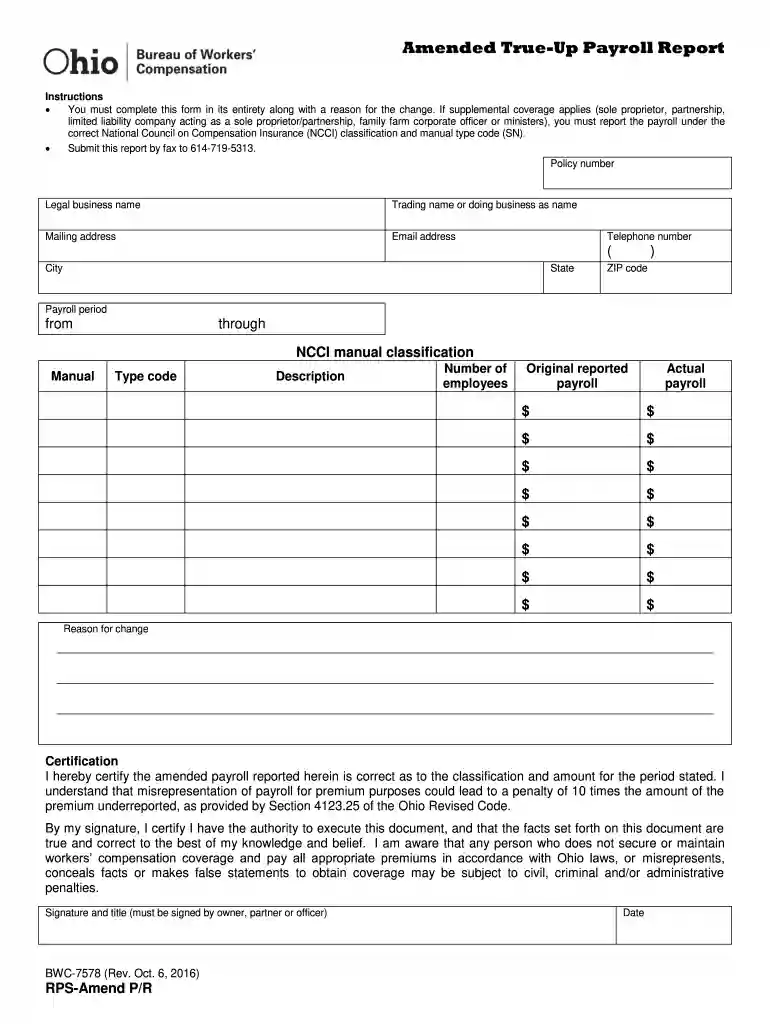
Form RPS-AMEND P R (BWC-7578) Download Printable PDF-2026

Get Form
Form RPS-AMEND P R (BWC-7578) Download Printable PDF Preview on Page 1

Here's how it works

01. Edit your form online
Type text, add images, blackout confidential details, add comments, highlights and more.

02. Sign it in a few clicks
Draw your signature, type it, upload its image, or use your mobile device as a signature pad.

03. Share your form with others
Send it via email, link, or fax. You can also download it, export it or print it out.

How to use or fill out Form RPS-AMEND P R (BWC-7578) Download Printable PDF with DocHub

Form edit decoration
9.5
Ease of Setup
DocHub User Ratings on G2
9.0
Ease of Use
DocHub User Ratings on G2
  1. Click ‘Get Form’ to open it in the editor.
  2. Begin by entering your policy number at the top of the form. This is essential for identifying your report.
  3. Fill in the legal business name and trading name or 'doing business as' name. Ensure these match your official records.
  4. Provide your mailing address, including city, state, and ZIP code. This information is crucial for correspondence.
  5. Enter your email address and telephone number for any follow-up communications regarding this report.
  6. Specify the payroll period by indicating the start and end dates clearly.
  7. Complete the NCCI manual classification section with the appropriate classification and type code, along with a brief description.
  8. Report the number of employees and both original reported payroll and actual payroll amounts in their respective fields.
  9. In the 'Reason for change' section, provide a detailed explanation for why you are amending this report.
  10. Finally, certify the document by signing it. Ensure that it is signed by an authorized individual such as an owner or officer, along with their title and date.

Start using our platform today to easily fill out and submit your Form RPS-AMEND P R (BWC-7578) for free!

See more Form RPS-AMEND P R (BWC-7578) Download Printable PDF versions

We've got more versions of the Form RPS-AMEND P R (BWC-7578) Download Printable PDF form. Select the right Form RPS-AMEND P R (BWC-7578) Download Printable PDF version from the list and start editing it straight away!
Versions Form popularity Fillable & printable
2022 4.6 Satisfied (40 Votes)
2016 4.3 Satisfied (52 Votes)
2011 4 Satisfied (22 Votes)
be ready to get more

Complete this form in 5 minutes or less

Get form

Got questions?

We have answers to the most popular questions from our customers. If you can't find an answer to your question, please contact us.
Contact us

Electronic signatures are a great replacement for traditional signing, as they save time, effort, and costs people spend on printing, scanning, and paper delivery. You can electronically sign your Form RPS-AMEND P R (BWC-7578) Download Printable PDF using a trustworthy and robust online document management services like DocHub. It complies with main eSignature standards (ESIGN and UETA), so all forms approved there are legally binding and have the same validity as manually signed ones.

You may get and edit your Form RPS-AMEND P R (BWC-7578) Download Printable PDF online with the help of DocHub. Its straightforward yet feature-rich design allows you to start effective work immediately after you register your account. Create your account and add your file, then our user interface will guide you through our stress-free form completion experience.

Although employers may contact BWC at (800) OHIO-BWC (800.644. 6292) and complete their true-up report over the phone, BWC anticipates high call volumes and long wait times. They strongly encourage employers to complete their true-up report online through their BWC e-account at .bwc.ohio.gov.
The Ohio Bureau of Workers Compensation bases the premiums that an employer pays each year on the companys estimated payroll. The payroll true-up report is the process that requires employers to report their actual payroll for the prior policy year and reconcile any over- or underpayments in premiums paid.
A claimant must file a notice of injury or death with BWC or the Ohio Industrial Commission (IC) within one year of the injury or death.

Security and compliance

At DocHub, your data security is our priority. We follow HIPAA, SOC2, GDPR, and other standards, so you can work on your documents with confidence.

Learn more
ccpa2
pci-dss
gdpr-compliance
hipaa
soc-compliance

People also ask

Temporary exposures: 90-Day Rule Ohios workers compensation laws now recognize the extraterritorial coverage of an out-of-state employer for 90 consecutive days. The 90-Day Rule is applicable to all industries, including the construction industry.
0:00 1:09 This helps us streamline the process. Then enter your actual payroll for each class code descriptionMoreThis helps us streamline the process. Then enter your actual payroll for each class code description. After the system completes its calculations youll see your true-up summary.
They strongly encourage employers to complete their true-up report online through their BWC e-account at .bwc.ohio.gov. If you do not have an e-account, select the Create E-Account Link to begin. You will need your BWC policy number and/or Federal Tax Identification Number.

Related links