




01. Edit your bwc 7578 online
Type text, add images, blackout confidential details, add comments, highlights and more.

Type text, add images, blackout confidential details, add comments, highlights and more.

Draw your signature, type it, upload its image, or use your mobile device as a signature pad.

Send it via email, link, or fax. You can also download it, export it or print it out.
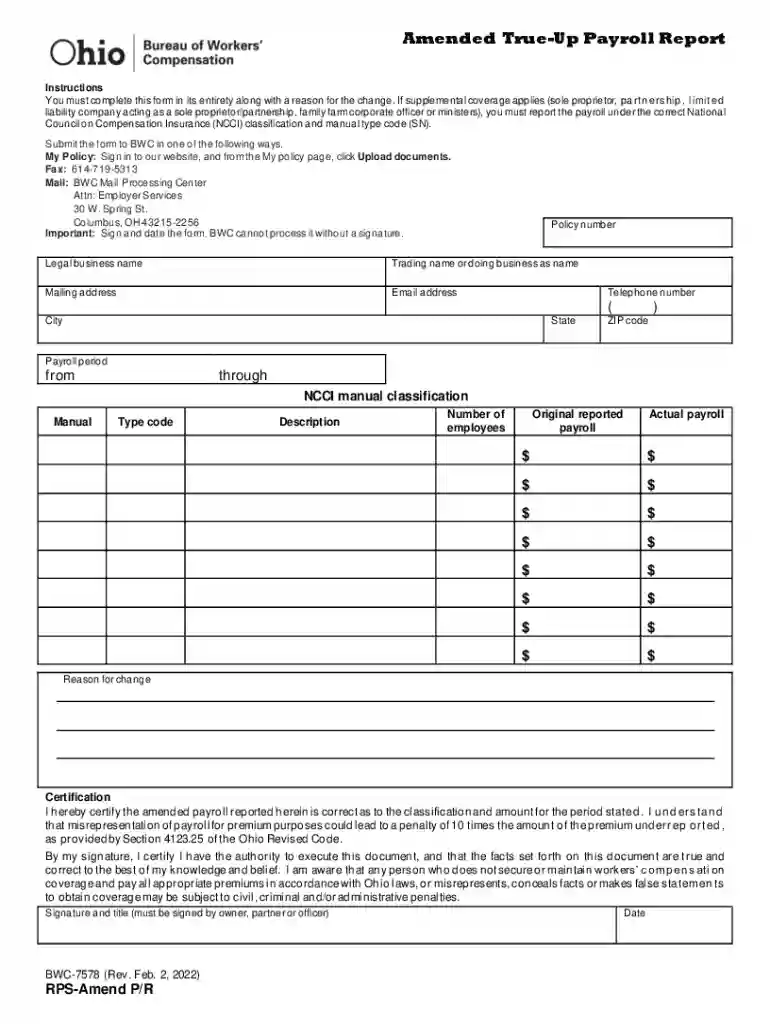
The "Amended True-Up Payroll Report," formally known as Form RPS-AMEND P R (BWC-7578), is designed for employers to report any changes or corrections to previously submitted payroll data. This document plays an essential role in ensuring that payroll adjustments align with the National Council on Compensation Insurance (NCCI) codes and are correctly classified under the Bureau of Workers' Compensation (BWC) guidelines. By completing this form, employers certify that all information is accurate, which is crucial for maintaining compliance and avoiding potential penalties for misrepresentation.
Employers can obtain the Amended True-Up Payroll Report form through multiple channels to streamline their workflow. It is typically accessible from the BWC's official website, where users can download the document in a digital format ready for editing and submission. Alternatively, it may also be available through commercial document management services like DocHub, which provides editing and sharing capabilities directly integrated with various cloud storage platforms. Acquiring the form electronically ensures you always have access to the latest version with all updated regulatory changes.
Gather Required Information: Before starting, collect all necessary payroll records, including previous reports and documentation of any changes.
Download and Open the Form: Access the form from the BWC's website or your document management solution, ensuring you have the most recent version.
Enter Employer Information: Fill out sections detailing your business name, address, and BWC identification number.
Detail Payroll Adjustments: Provide comprehensive information on adjustments being made, explaining the reasons and ensuring correct classification under NCCI codes.
Certify Accuracy: Sign and date the form to certify that all information is accurate and true, as any false representation can lead to penalties.
Submission: Submit the completed form via the designated method, whether online, by mail, or in-person, depending on your preference or requirement.
Employers have various submission options to ensure timely and efficient processing of payroll amendments:
Failing to accurately report payroll changes or misclassifying employees can result in significant penalties. Misrepresentation or errors may lead to fines, increased premiums, or audits from the BWC. Ensuring all filed information is accurate and complete is crucial for maintaining compliance and economic efficiency.
The form is predominantly used by employers who need to correct or update prior payroll submissions. This includes businesses of various sizes and industries that are subject to BWC guidelines, especially those frequently experiencing payroll shifts, such as seasonal companies or those with fluctuating employee numbers.


While the Amended True-Up Payroll Report is commonly used across states under the BWC's jurisdiction, specific submission rules or interpretation of NCCI codes may vary. Employers are advised to review state-specific regulations to ensure accurate compliance, factoring in any unique local legislative nuances that could affect reporting requirements.
We've got more versions of the bwc 7578 form. Select the right bwc 7578 version from the list and start editing it straight away!
You need to use only trustworthy software solutions with strong data protection compliance to sign your paperwork electronically. DocHub is just the type of service you need! It stores data on Amazon Web Servers and complies with all essential security standards and eSignature regulations, so it’s a trusted way to electronically sign your templateroller template1886851Form RPS-AMEND P R (BWC-7578) "Amended True-Up Payroll Report or other forms with this tool.
You can complete and eSign your templateroller template1886851Form RPS-AMEND P R (BWC-7578) "Amended True-Up Payroll Report on the internet, even on a tight deadline. All you need to access high quality editing instruments on any device is a DocHub account, which you can sign up in just a few moments. When you register, add your file or find what you are searching for in our catalog, complete it using the editing instruments you need, and put your electronic signature on it at the end.
At DocHub, your data security is our priority. We follow HIPAA, SOC2, GDPR, and other standards, so you can work on your documents with confidence.


