Type text, add images, blackout confidential details, add comments, highlights and more.
02. Sign it in a few clicks
Draw your signature, type it, upload its image, or use your mobile device as a signature pad.
03. Share your form with others
Send it via email, link, or fax. You can also download it, export it or print it out.
How to use or fill out cam antagonist with our platform
Ease of Setup
DocHub User Ratings on G2
Ease of Use
DocHub User Ratings on G2
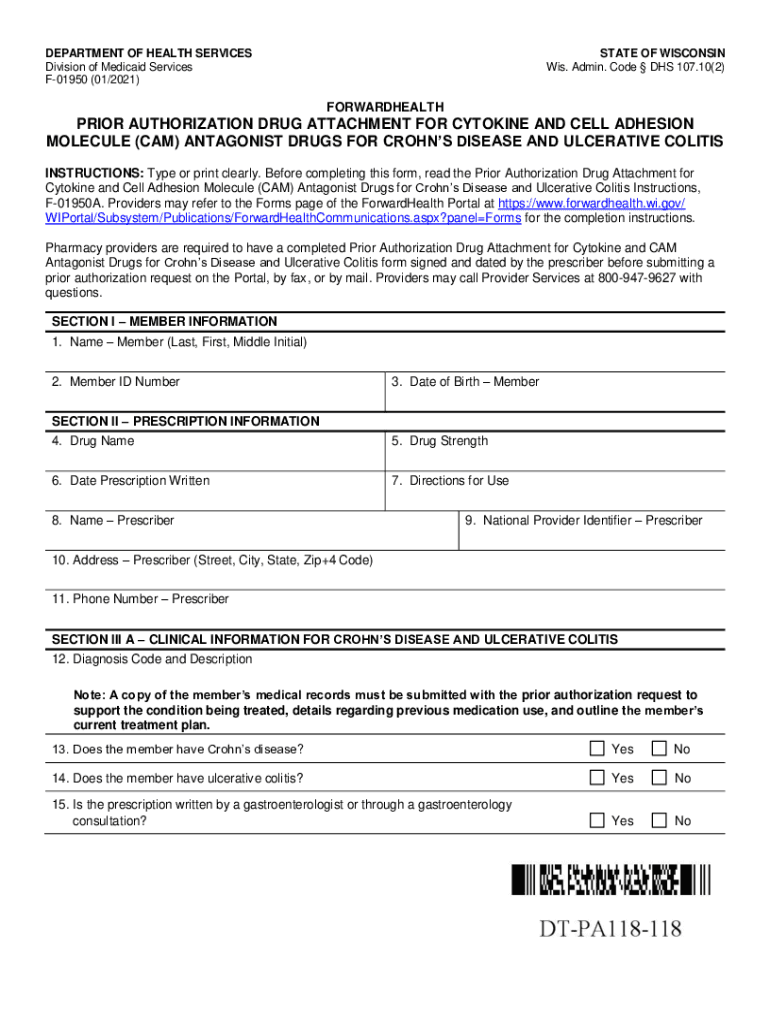
Click ‘Get Form’ to open the cam antagonist document in the editor.
Begin with SECTION I – MEMBER INFORMATION. Fill in the member's name, ID number, and date of birth clearly.
Proceed to SECTION II – PRESCRIPTION INFORMATION. Enter the drug name, strength, date prescription was written, directions for use, prescriber’s name, NPI, address, and phone number.
In SECTION III A – CLINICAL INFORMATION, provide the diagnosis code and description. Answer the questions regarding Crohn’s disease and ulcerative colitis accurately.
Document any previous medications attempted by filling in details about treatment responses in the provided spaces.
Complete SECTION IV by obtaining the prescriber’s signature and date signed.
If necessary, add any additional information in SECTION V before finalizing your form.
Start using our platform today to streamline your form completion process for free!
Feb 7, 2024 Background: Cytokines and cell-adhesion molecule (CAM) are chemical mediators involved in inflammatory processes throughout the body.Read more
Cookie consent notice
This site uses cookies to enhance site navigation and personalize your experience.
By using this site you agree to our use of cookies as described in our Privacy Notice.
You can modify your selections by visiting our Cookie and Advertising Notice.