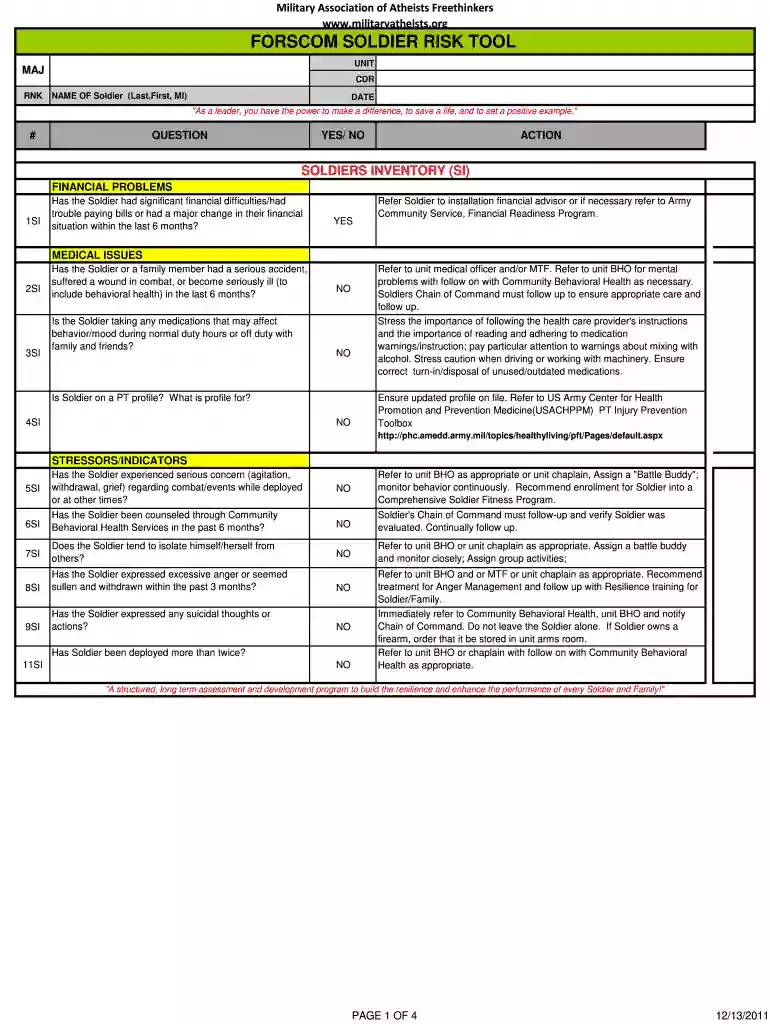
Forscom soldier risk assessment fillable 2011 form-2026

Get Form
pt risk assessment army example Preview on Page 1

Here's how it works

01. Edit your pt risk assessment army example online
Type text, add images, blackout confidential details, add comments, highlights and more.

02. Sign it in a few clicks
Draw your signature, type it, upload its image, or use your mobile device as a signature pad.

03. Share your form with others
Send army pt risk assessment example via email, link, or fax. You can also download it, export it or print it out.

How to use or fill out Forscom soldier risk assessment fillable 2011 form with our platform

Form edit decoration
9.5
Ease of Setup
DocHub User Ratings on G2
9.0
Ease of Use
DocHub User Ratings on G2
  1. Click ‘Get Form’ to open the Forscom soldier risk assessment fillable 2011 form in the editor.
  2. Begin by filling in the unit information, including MAJ, RNK, CDR, and the name of the Soldier (Last, First, MI) along with the date at the top of the form.
  3. Proceed to the Soldier Inventory (SI) section. For each question, select 'YES' or 'NO' based on the Soldier's circumstances. If 'YES', follow the recommended actions provided.
  4. Continue to the Soldiers' Social Network (SN) section. Again, answer each question truthfully and note any necessary referrals for support services as indicated.
  5. Move on to Soldiers' High Risk Activities (SA). Assess and document any high-risk behaviors or activities that may require further evaluation or training.
  6. Finally, review your entries for accuracy before signing and dating at the bottom of the form. Ensure all required fields are completed.

Start using our platform today to efficiently complete your Forscom soldier risk assessment form online for free!

See more Forscom soldier risk assessment fillable 2011 form versions

We've got more versions of the Forscom soldier risk assessment fillable 2011 form form. Select the right Forscom soldier risk assessment fillable 2011 form version from the list and start editing it straight away!
Versions Form popularity Fillable & printable
2012 4.8 Satisfied (37 Votes)
2011 4.3 Satisfied (126 Votes)
be ready to get more

Complete this form in 5 minutes or less

Get form

Got questions?

We have answers to the most popular questions from our customers. If you can't find an answer to your question, please contact us.
Contact us

You should use only trustworthy software solutions with strong security compliance to sign your documents electronically. DocHub is just the type of editor you need! It stores data on Amazon Web Servers and complies with all essential security requirements and eSignature laws, so it’s a trusted way to electronically sign your army risk assessment example or other documents using this tool.

You need only a web connection and a web browser to complete your forscom forms by using an iOS phone. Open the DocHub website and authenticate. Then, add your file or choose it from the list in your dashboard. Then use our editing tools to complete your form and save all your modifications. You may also send it to a specified recipient immediately.

The five steps of RMidentify the hazards, assess the hazards, develop controls and make risk decisions, implement controls, and supervise and evaluateare used across the Services to help them operate as a joint force. RM must be embedded in Army culture.
to this activity including: Step 1 - Stop, step back think. Step 2 - Identify the hazards. Step 3 - Assess the risk. Step 4 - Control the risk. Step 5 - Proceed safely.
The Health and Safety Executive (HSE) recommends following five actionable steps to conduct an effective risk assessment. Step 1: Identify Hazards. Step 2: Assess the Risks. Step 3: Control the Risks. Step 4: Record your Findings. Step 5: Review the Controls.

Security and compliance

At DocHub, your data security is our priority. We follow HIPAA, SOC2, GDPR, and other standards, so you can work on your documents with confidence.

Learn more
ccpa2
pci-dss
gdpr-compliance
hipaa
soc-compliance

People also ask

Army policy and implementation guidance for health risk assessment is found in Army Regulation 40-5 and DA Pamphlet 40-11.
Ground Risk Assessment Tool a mission planning tool developed to augment the military decision-making process. Consisting of five integral parts, it assists users in identifying potential hazards and controls for specified ground missions or activities, both on and off duty.
How to do a risk assessment? Identifying potential hazards. Identifying who might be harmed by those hazards. Evaluating risk (severity and likelihood) and establishing suitable precautions. Implementing controls and recording your findings. Reviewing your assessment and re-assessing if necessary.
Seven Steps for Risk Assessment Preparation of the risk assessment, Determination of the hazards, Assessment of the hazards, Determination of specific occupational safety and health measures, Performance of the measures, Review of the performance and efficiency of the measures, and. Updating of the risk assessment.
You can use a risk assessment template to help you keep a simple record of: who might be harmed and how. what youre already doing to control the risks. what further action you need to take to control the risks. who needs to carry out the action. when the action is needed by.

Related links