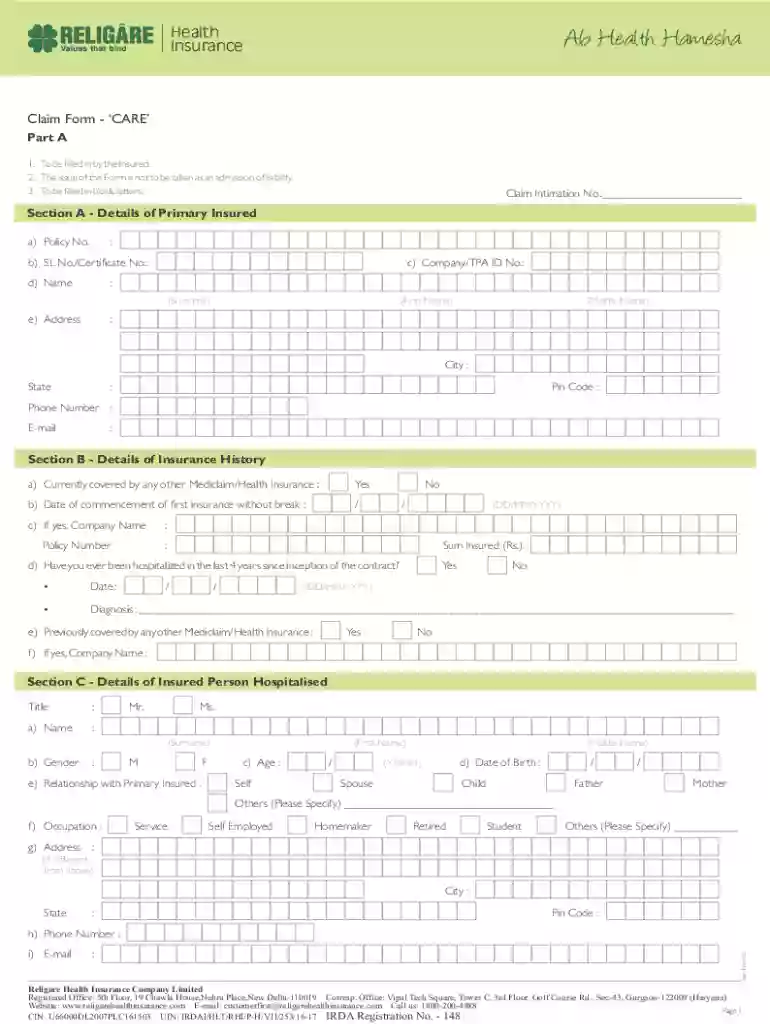
CARE V2 - CLAIM FORM cdr 2025

Get Form
CARE V2 - CLAIM FORM cdr Preview on Page 1

Here's how it works

01. Edit your form online
Type text, add images, blackout confidential details, add comments, highlights and more.

02. Sign it in a few clicks
Draw your signature, type it, upload its image, or use your mobile device as a signature pad.

03. Share your form with others
Send it via email, link, or fax. You can also download it, export it or print it out.

How to use or fill out CARE V2 - CLAIM FORM cdr with our platform

Form edit decoration
9.5
Ease of Setup
DocHub User Ratings on G2
9.0
Ease of Use
DocHub User Ratings on G2
  1. Click ‘Get Form’ to open the CARE V2 - CLAIM FORM in the editor.
  2. Begin by filling in your personal details in Section A. Enter your name, gender, age, and date of birth. Ensure all fields are completed accurately.
  3. In Section B, provide information about your insurance history. Indicate if you have any other health insurance and include relevant dates and company names.
  4. Proceed to Section C to detail the insured person hospitalized. Fill in their name, relationship to you, and contact information.
  5. In Section D, document hospitalization details such as the hospital name, admission dates, and reasons for hospitalization.
  6. Section E requires you to list treatment expenses claimed. Be thorough in detailing each cost associated with your claim.
  7. Finally, review all sections for accuracy before signing in Section H and submitting your form.

Start using our platform today for free to streamline your claims process!

See more CARE V2 - CLAIM FORM cdr versions

We've got more versions of the CARE V2 - CLAIM FORM cdr form. Select the right CARE V2 - CLAIM FORM cdr version from the list and start editing it straight away!
Versions Form popularity Fillable & printable
2023 4.1 Satisfied (45 Votes)
2023 4.3 Satisfied (27 Votes)
2023 4.1 Satisfied (45 Votes)
2022 4.8 Satisfied (52 Votes)
2021 4.2 Satisfied (40 Votes)
2021 4.8 Satisfied (61 Votes)
2021 4.7 Satisfied (124 Votes)
2021 4.8 Satisfied (145 Votes)
2021 4.8 Satisfied (89 Votes)
2021 4.8 Satisfied (49 Votes)
2021 4.5 Satisfied (36 Votes)
2021 4.8 Satisfied (31 Votes)
2020 4.8 Satisfied (51 Votes)
2020 4.5 Satisfied (50 Votes)
2020 4.8 Satisfied (39 Votes)
be ready to get more

Complete this form in 5 minutes or less

Get form

Got questions?

We have answers to the most popular questions from our customers. If you can't find an answer to your question, please contact us.
Contact us
Providers sending professional and supplier claims to Medicare on paper must use Form CMS-1500 in a valid version.
Types of claim forms include health insurance claim forms, auto insurance claim forms, and property insurance claim forms.
In order to purchase claim forms, you should contact the U.S. Government Printing Office at 1-866-512-1800, local printing companies in your area, and/or office supply stores. Each of the vendors above sells the CMS-1500 claim form in its various configurations (single part, multi-part, continuous feed, laser, etc).
Can CMS 1500 Forms be Handwritten? While it is technically possible to handwrite a CMS 1500 form, it is generally not recommended.
Amazon.com : NEW CMS 1500 Claim Forms - 500 Sheets (02/12 Version) for Laser or Inkjet Printers : Business Claim Forms : Office Products.

People also ask

List of documents to furnish Original hospital final bill. Original numbered receipts for payments made to the hospital. Complete breakup of the hospital bill. Original discharge summary. All original investigation reports along with prescriptions. All original medicine bills with relevant prescriptions.
Hard copy forms may be available from Intermediaries, Carriers, State Agencies, local Social Security Offices or End Stage Renal Disease Networks that service your State.

Related links