Federal firearms license atf 2026

Get Form
federal firearms license atf Preview on Page 1

Here's how it works

01. Edit your federal firearms license atf online
Type text, add images, blackout confidential details, add comments, highlights and more.

02. Sign it in a few clicks
Draw your signature, type it, upload its image, or use your mobile device as a signature pad.

03. Share your form with others
Send explosives federal license atf via email, link, or fax. You can also download it, export it or print it out.

How to use or fill out federal firearms license atf with our platform

Form edit decoration
9.5
Ease of Setup
DocHub User Ratings on G2
9.0
Ease of Use
DocHub User Ratings on G2
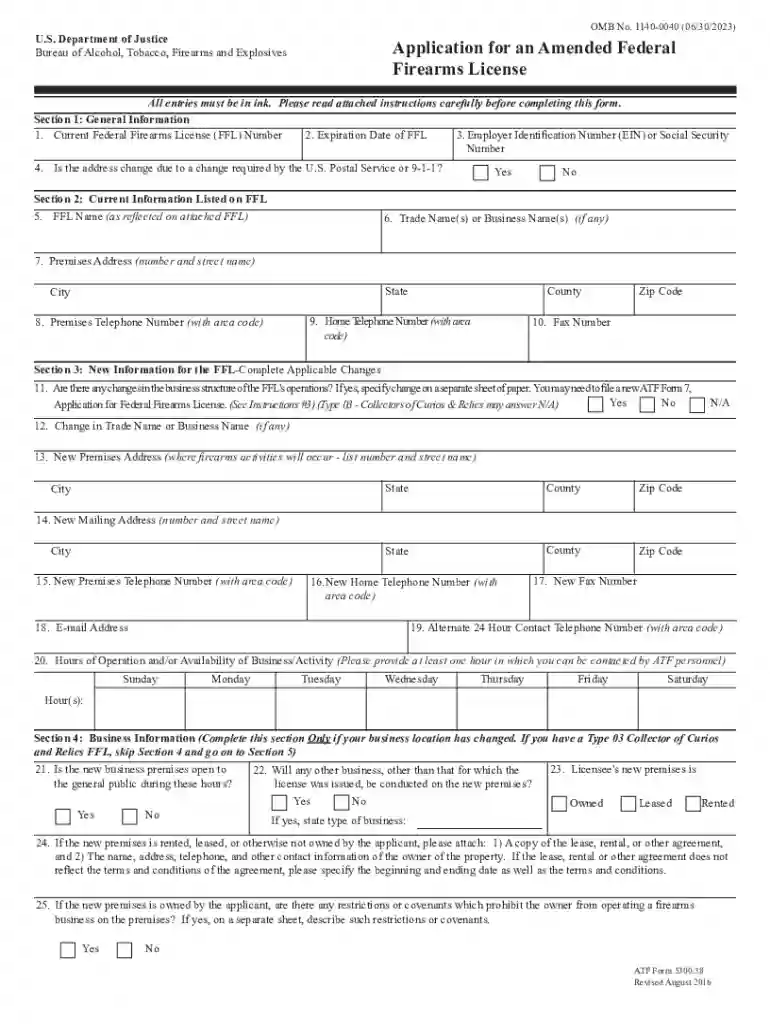
  1. Click ‘Get Form’ to open the federal firearms license ATF application in the editor.
  2. Begin with Section 1: General Information. Fill in your current Federal Firearms License (FFL) number, expiration date, and either your Employer Identification Number (EIN) or Social Security Number. Indicate if the address change is due to postal service requirements.
  3. Proceed to Section 2: Current Information Listed on FFL. Enter your FFL name, trade names, premises address, and contact numbers as required.
  4. In Section 3: New Information for the FFL, specify any changes in business structure and provide new addresses and contact information as applicable.
  5. Complete Section 4 only if your business location has changed. Answer questions regarding public access and zoning ordinances.
  6. Finally, review Section 5 for certification of compliance with state and local laws. Ensure all information is accurate before signing.

Start using our platform today to streamline your federal firearms license application process for free!

See more federal firearms license atf versions

We've got more versions of the federal firearms license atf form. Select the right federal firearms license atf version from the list and start editing it straight away!
Versions Form popularity Fillable & printable
2016 4.8 Satisfied (154 Votes)
2012 4 Satisfied (43 Votes)
2004 4 Satisfied (55 Votes)
be ready to get more

Complete this form in 5 minutes or less

Get form

Got questions?

We have answers to the most popular questions from our customers. If you can't find an answer to your question, please contact us.
Contact us

If you regularly deal with documents kept in your Google Drive, DocHub is an excellent option for you to easily and quickly fill out, edit, and sign them. This editor integrates well with Google services, so you can export your federal firearms license atf from your Google Drive to the editor without the need of downloading and re-uploading it. Right-click on your file, select Open With → DocHub PDF Sign and Edit. In our editor, add and assign Signature Fields for all parties involved, then click on the Menu option above → Send → choose how you want to share your form.

With DocHub, you have several convenient methods to edit your federal firearms license atf online. You can drag and drop the form and edit it directly at the DocHub website or use our browser extension to fill out your form right away. On top of that, you can edit your PDF on your smartphone, as DocHub works with all the accessible mobile platforms.

In fact, they are so common, most FFL dealers in the country are home based FFLs. This means that the ATF approves MORE FFLs every year for home-based applicants than they do for retail locations for a gun shop.
A Type 03 FFL is the easiest to get, its a collector of curios and relics.
A federal firearms license (FFL) is a license in the United States that enables an individual or a company to engage in a business pertaining to the manufacture or importation of firearms and ammunition, or the interstate and intrastate sale of firearms.

Security and compliance

At DocHub, your data security is our priority. We follow HIPAA, SOC2, GDPR, and other standards, so you can work on your documents with confidence.

Learn more
ccpa2
pci-dss
gdpr-compliance
hipaa
soc-compliance

People also ask

An FFL, or Federal Firearms License, is a license that allows a person or business to engage in the business of firearms. In other words, having an FFL allows you to import, make, or sell firearms as a business.
5 Most Common ATF Violations | Best Practices for FFLs to Stay Transferring a firearm to a prohibited person. Failing to conduct the required background check. Falsification of records. Failing to respond to an ATF trace request. Refusing ATFs right of entry to conduct an inspection.
The FFL cost in California is the same as in all other US states. In other words, the ATF has a uniform FFL cost regardless of which state. However that fee starts at $30 and can quickly rise to $3000 depending on the type of FFL you are getting.
In order to get any type of FFL, you must have a business intent! You can get a personal firearm for yourself with your license, but youll need to at least have some business intent in order to get your FFL application approved.
Thats right, not only can you get an FFL and sell guns from your home as a part time business opportunity, but you can use your FFL for personal use as well.

Related links