01. Edit your security clearance certificate form online
Type text, add images, blackout confidential details, add comments, highlights and more.
02. Sign it in a few clicks
Draw your signature, type it, upload its image, or use your mobile device as a signature pad.
03. Share your form with others
Send nato security clearance certificate via email, link, or fax. You can also download it, export it or print it out.
How to use or fill out the NATO Security Clearance Certificate online
Ease of Setup
DocHub User Ratings on G2
Ease of Use
DocHub User Ratings on G2
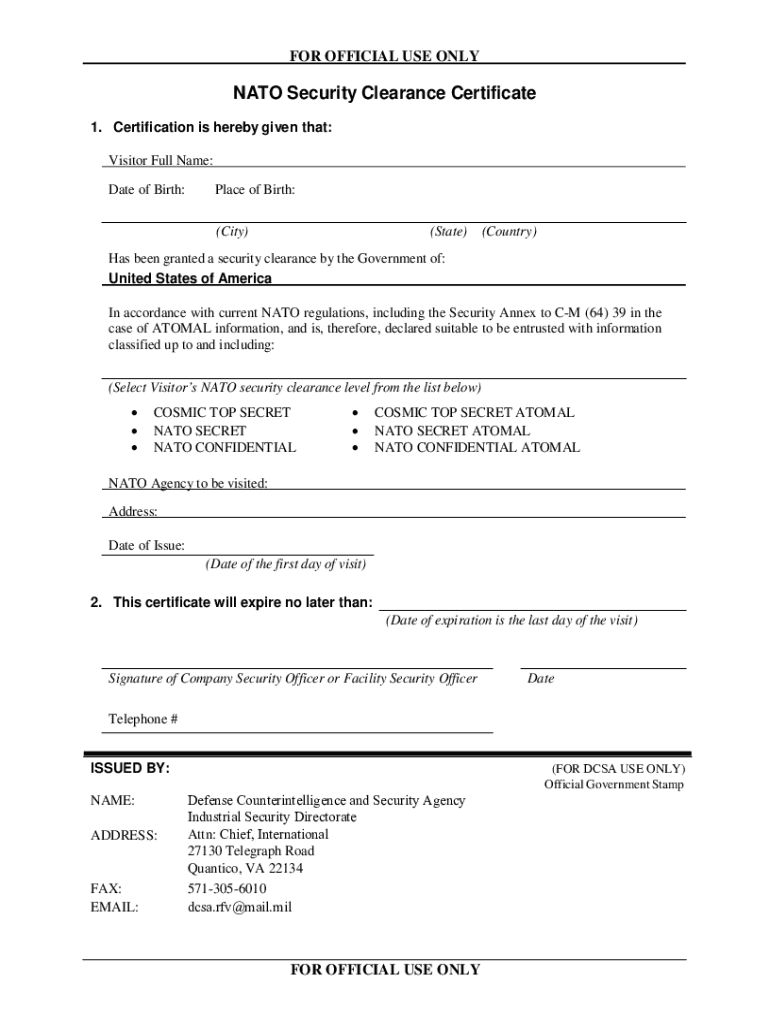
Click ‘Get Form’ to open the NATO Security Clearance Certificate in our editor.
In Section 1, enter the Visitor's Full Name, Date of Birth, Place of Birth (City, State, Country), and select the appropriate NATO security clearance level from the provided options.
Fill in the NATO Agency to be visited and its address. Ensure that the Date of Issue matches the first day of the visit as cited on the RFV form.
In Section 2, specify the certificate expiration date, which should align with the last day of the subject’s visit as noted on the RFV form.
Obtain a signature from the Company Security Officer or Facility Security Officer. Don’t forget to include their date of signature and phone number in the designated fields.
Once completed, fax your certificate along with the Request For Visit form to DCSA International at (571) 305-6010.
Start filling out your NATO Security Clearance Certificate for free today!
Fill out NATO Security Clearance Certificate online It's free
See more NATO Security Clearance Certificate versions
We've got more versions of the NATO Security Clearance Certificate form. Select the right NATO Security Clearance Certificate version from the list and start editing it straight away!
99 -- Security Clearances for Construction of New NATO
security clearance and must be briefed on NATO procedures. A NATO Personnel Security Clearance Certificate must be issued prior to award of the subcontract.
Cookie consent notice
This site uses cookies to enhance site navigation and personalize your experience.
By using this site you agree to our use of cookies as described in our Privacy Notice.
You can modify your selections by visiting our Cookie and Advertising Notice.