Fillable Online neduet edu Application for the issuance of 2026

Get Form
Fillable Online neduet edu Application for the issuance of Preview on Page 1

Here's how it works

01. Edit your form online
Type text, add images, blackout confidential details, add comments, highlights and more.
02. Sign it in a few clicks
Draw your signature, type it, upload its image, or use your mobile device as a signature pad.
03. Share your form with others
Send it via email, link, or fax. You can also download it, export it or print it out.

How to use or fill out Fillable Online neduet edu Application for the issuance of

Form edit decoration
9.5
Ease of Setup
DocHub User Ratings on G2
9.0
Ease of Use
DocHub User Ratings on G2
  1. Click ‘Get Form’ to open it in the editor.
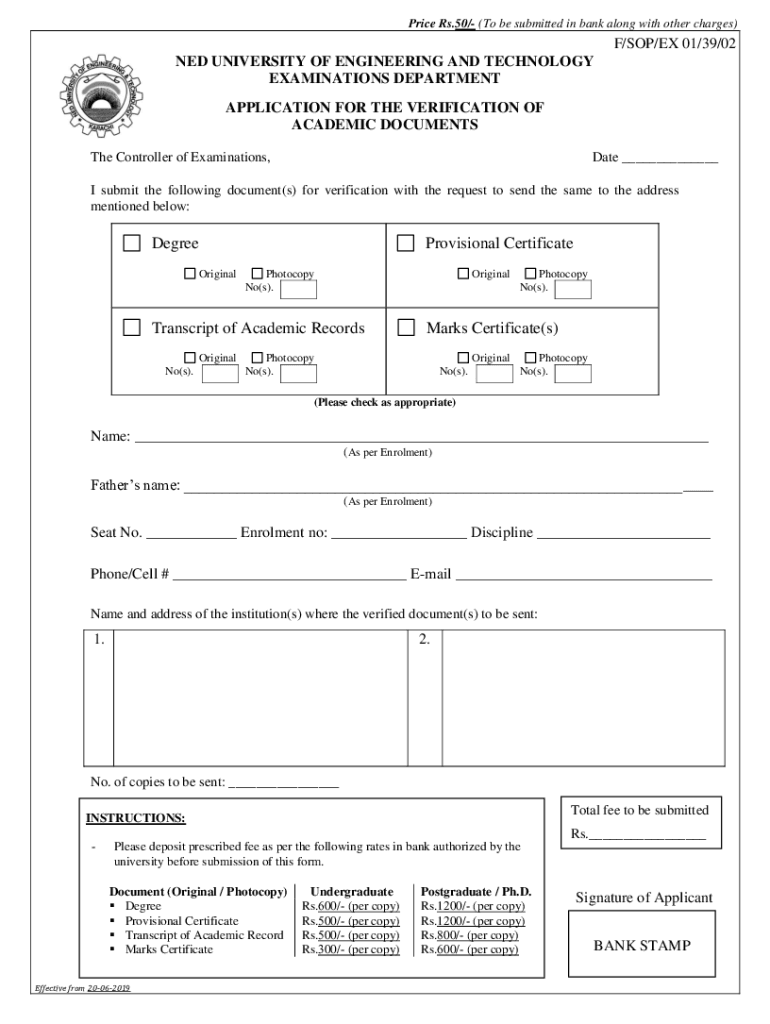
  2. Begin by entering the date at the top of the form. This is essential for processing your application.
  3. Fill in your name and father's name as per your enrollment records. Ensure accuracy to avoid any verification issues.
  4. Provide your seat number, enrollment number, and discipline in the designated fields.
  5. Enter your contact information, including phone/cell number and email address, for any follow-up communication.
  6. Indicate the documents you are submitting for verification by checking the appropriate boxes next to each document type.
  7. Specify the name and address of the institution(s) where you want the verified documents sent.
  8. Complete the section regarding the number of copies to be sent and calculate the total fee based on the provided rates.
  9. Finally, sign at the bottom of the form to validate your application before submission.

Start using our platform today to streamline your application process for free!

See more Fillable Online neduet edu Application for the issuance of versions

We've got more versions of the Fillable Online neduet edu Application for the issuance of form. Select the right Fillable Online neduet edu Application for the issuance of version from the list and start editing it straight away!
Versions Form popularity Fillable & printable
2023 4.3 Satisfied (29 Votes)
2019 4.5 Satisfied (60 Votes)
2012 4.5 Satisfied (47 Votes)
be ready to get more

Complete this form in 5 minutes or less

Get form

Got questions?

We have answers to the most popular questions from our customers. If you can't find an answer to your question, please contact us.
Contact us
Medium of instruction in all subjects is English.
The National University of Computer and Emerging Sciences (NUCES) (Urdu: قومی جامعہِ کمپیوٹر و ابھرتی ہوئی سائنس), commonly known as Foundation for Advancement of Science and Technology (FAST), is a private research university with multiple campuses in different cities of Pakistan.
Nadirshaw Edulji Dinshaw, the new college buildings and laboratories were constructed on separate land. The new college was originally the Prince of Wales Engineering College but later renamed in memory of Nadirshaw Edulji Dinshaw.
Home | Johns Hopkins University.
After the creation of Pakistan in 1947, it was taken over by the Government of Sindh, renamed as NED Government Engineering College, and affiliated to the University of Sindh.

Security and compliance

At DocHub, your data security is our priority. We follow HIPAA, SOC2, GDPR, and other standards, so you can work on your documents with confidence.

Learn more
ccpa2
pci-dss
gdpr-compliance
hipaa
soc-compliance
be ready to get more

Complete this form in 5 minutes or less

Get form

People also ask

The NED University of Engineering Technology, was established in March 1977 under an act of the Provincial Assembly of Sindh after upgrading of the former NED Government Engineering College, which was set up in 1921.

Related links