




Here's how it works



How to use or fill out Maine Bureau of Motor Vehicles 3Q 21 IFTA-100 (page 1) Motor Carrier Services with DocHub

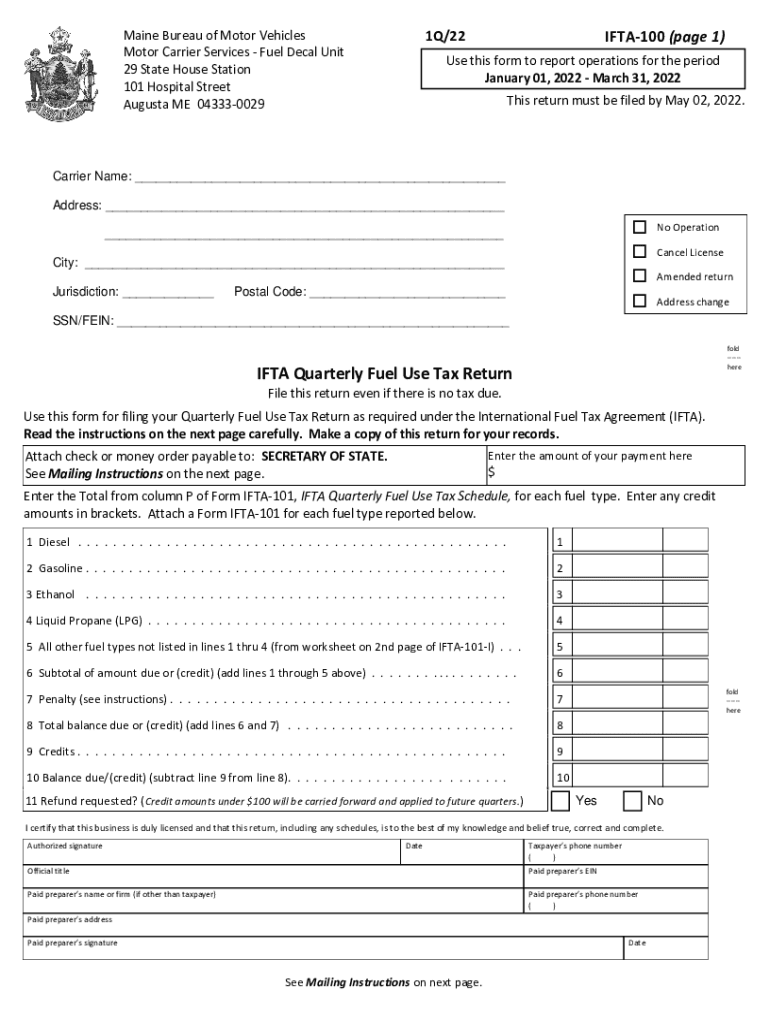
- Click ‘Get Form’ to open the Maine Bureau of Motor Vehicles IFTA-100 form in our platform.
- Begin by entering your Carrier Name and Address in the designated fields. Ensure all information is accurate for proper processing.
- Indicate your Jurisdiction and Postal Code. If applicable, check the appropriate boxes for No Operation, Cancel License, Amended Return, or Address Change.
- Input your SSN/FEIN in the specified field. This is crucial for identification purposes.
- Complete the fuel type sections by entering amounts from Form IFTA-101 for Diesel, Gasoline, Ethanol, Liquid Propane (LPG), and any other fuel types as required.
- Calculate totals as instructed on the form. Make sure to include any penalties if applicable.
- Sign and date the form at the bottom. If a paid preparer assisted you, ensure they also sign and provide their details.
Start filling out your IFTA-100 form online for free using our editor today!
It's free
See more Maine Bureau of Motor Vehicles 3Q 21 IFTA-100 (page 1) Motor Carrier Services versions
Got questions?
How can I sign my Maine Bureau of Motor Vehicles 3Q 21 IFTA-100 (page 1) Motor Carrier Services online?
Log in to your DocHub account and import your Maine Bureau of Motor Vehicles 3Q 21 IFTA-100 (page 1) Motor Carrier Services to our editor using one of its upload options - from your device, cloud storage, secure URL, or your DocHub folders if you have already managed your document before. Open our editor, click the Sign button in the upper toolbar, and decide on your signing method. You can upload a picture of your handwritten signature, draw it, enter your name, or utilize a QR code as an alternative.
What browser do I need to edit Maine Bureau of Motor Vehicles 3Q 21 IFTA-100 (page 1) Motor Carrier Services online?
If you need to edit your Maine Bureau of Motor Vehicles 3Q 21 IFTA-100 (page 1) Motor Carrier Services on the internet swiftly, it does not matter what browser you use. DocHub’s straightforward editing tools are accessible using any internet browser. Just open the appropriate tab in the editor, add your file, and fill it out without stress.
Security and compliance
At DocHub, your data security is our priority. We follow HIPAA, SOC2, GDPR, and other standards, so you can work on your documents with confidence.
Learn more




