Forced choice reinforcement survey google forms 2026

Get Form
forced choice Preview on Page 1

Here's how it works

01. Edit your forced choice online
Type text, add images, blackout confidential details, add comments, highlights and more.

02. Sign it in a few clicks
Draw your signature, type it, upload its image, or use your mobile device as a signature pad.

03. Share your form with others
Send forced choice reinforcement menu via email, link, or fax. You can also download it, export it or print it out.

How to use or fill out forced choice reinforcement survey google forms with our platform

Form edit decoration
9.5
Ease of Setup
DocHub User Ratings on G2
9.0
Ease of Use
DocHub User Ratings on G2
  1. Click ‘Get Form’ to open it in the editor.
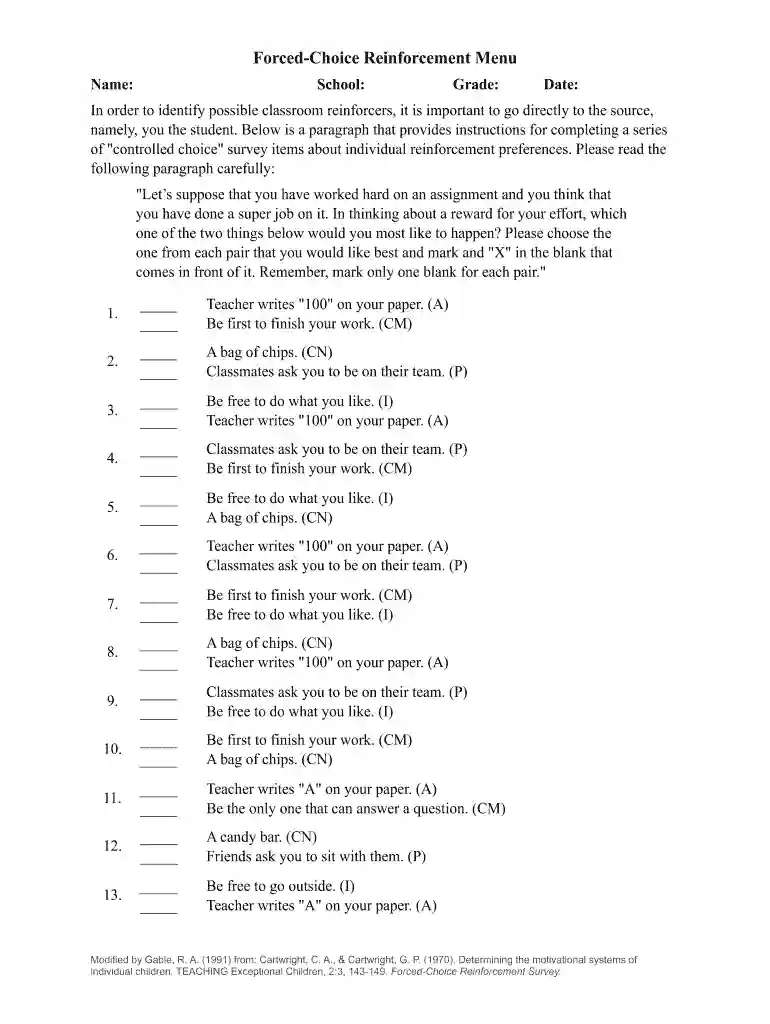
  2. Begin by entering your Name, School, Grade, and Date at the top of the form. This information helps personalize your responses.
  3. Read the introductory paragraph carefully. It provides essential instructions on how to select your preferred options from each pair.
  4. For each question, you will see two options. Mark an 'X' in front of the option you prefer. Ensure you only select one option per pair.
  5. Continue through all pairs until you have completed all questions. Take your time to reflect on each choice for accurate results.
  6. Once finished, review your selections for any changes before submitting the form.

Start using our platform today to easily complete your forced choice reinforcement survey online for free!

See more forced choice reinforcement survey google forms versions

We've got more versions of the forced choice reinforcement survey google forms form. Select the right forced choice reinforcement survey google forms version from the list and start editing it straight away!
Versions Form popularity Fillable & printable
2019 4 Satisfied (44 Votes)
2006 4.1 Satisfied (28 Votes)
be ready to get more

Complete this form in 5 minutes or less

Get form

Got questions?

We have answers to the most popular questions from our customers. If you can't find an answer to your question, please contact us.
Contact us
Add the question by clicking on this add question icon. Write the question and from the dropdown on the right side, opt for the Multiple choice option. If want to add a dropdown or checkboxes option, opt for the same option from the dropdown. Then add the answer options for the question.
0:03 1:00 Before you send your form dont forget to adjust the settings to allow outside email addresses andMoreBefore you send your form dont forget to adjust the settings to allow outside email addresses and response limits. Need to use your form again for another conference. Day just reset your choices.
Created by. Secondary Special Ed. A survey to give to students that can be completed independently or with assistance to determine potential reinforcers. This survey can help determine what students will want to earn, in order to increase the appropriate behaviors.
A Forced Choice Reinforcement Survey is a survey filled out by a student in which they select which rewards and incentives will motivate them most. These incentives fall in five categories: Adult Approval​ (verbal praise, stickers on assignments)
An example of a forced-choice question is: Which flavor do you prefer: chocolate or vanilla? Respondents must choose one of the two options, leaving no room for additional responses or open-ended answers.

Security and compliance

At DocHub, your data security is our priority. We follow HIPAA, SOC2, GDPR, and other standards, so you can work on your documents with confidence.

Learn more
ccpa2
pci-dss
gdpr-compliance
hipaa
soc-compliance

People also ask

In a forced choice format, respondents are not given a specific option to reflect a nonresponse type choice, such as no opinion, dont know, not sure, or not applicable. Respondents must select a response choice that provides a specific answer to the survey item.
your budgetchoose Google Forms. It serves the basic purpose of creating forms, surveys, and quizzes, with the fundamental question types and design options available. You wont have to pay a cent or create a separate accountGoogle workspace is enough. Your responses wont be limited, the questions you can add either.
A forced-choice question is a survey question with no option for a neutral response. Responses like Undecided, No opinion, Cant say, Dont know, Maybe, and Not applicable are eliminated from the available responses. A forced-choice question ensures that the respondent gives an actionable answer.

survey choice forced