




01. Edit your form online
Type text, add images, blackout confidential details, add comments, highlights and more.

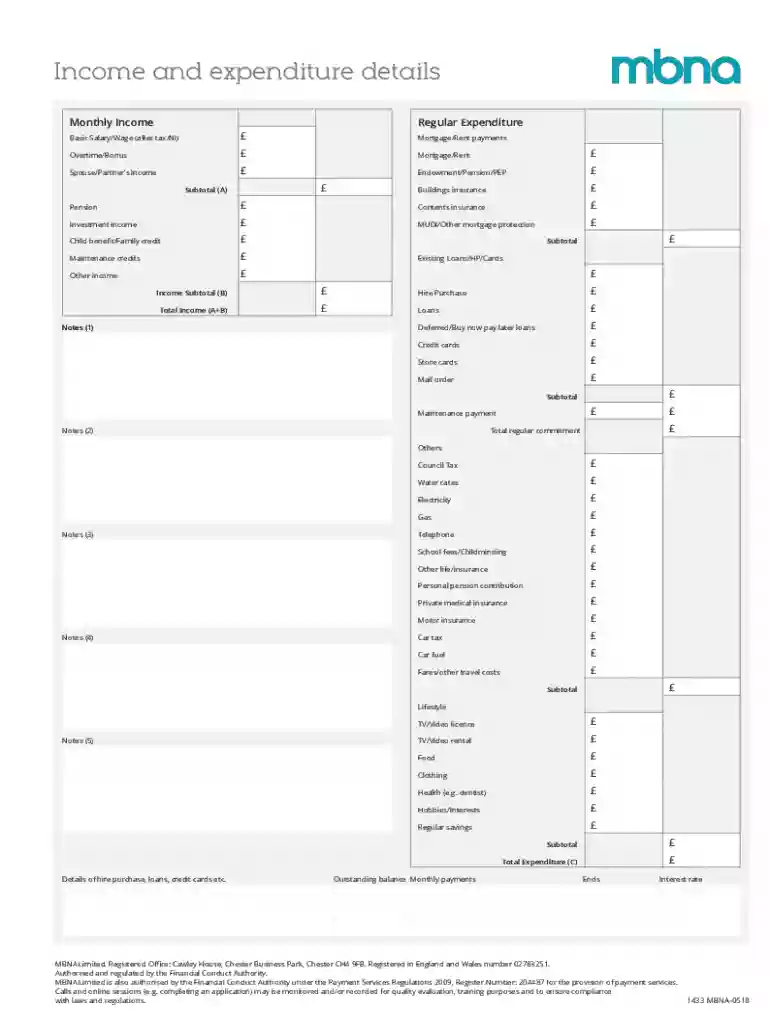
Type text, add images, blackout confidential details, add comments, highlights and more.

Draw your signature, type it, upload its image, or use your mobile device as a signature pad.

Send it via email, link, or fax. You can also download it, export it or print it out.
Online forms are electronic documents that facilitate the collection of data via the internet. These forms are commonly used to gather information for various purposes, including registration, applications, surveys, and feedback. They replace traditional paper forms by allowing users to input information directly into designated fields on a webpage, which can then be submitted with a single click. This digital approach streamlines the process of data collection, making it faster and more efficient for both the form creator and the respondent.
Online forms can vary widely in complexity, ranging from simple contact forms to detailed applications that require multiple inputs and document uploads. Moreover, many platforms allow the creation of fillable forms that can guide users through specific fields, ensuring all necessary information is captured accurately. This not only enhances user experience but also reduces data entry errors, making online forms a valuable tool for a wide range of digital interactions.
Using an online form involves several straightforward steps that ensure the timely and accurate submission of required information. An effective online form is easily navigable, meaning users can effortlessly find and complete the necessary sections. Here is a general guide on how to interact with online forms:
Access the Form: Locate the online form via a direct link or through a website. Ensure you are using a supported web browser to optimize form functionality.
Read Instructions Carefully: Before starting, read any introductory notes or guidelines. These often highlight important instructions or common pitfalls to avoid.
Fill in the Fields: Enter the required information into the designated fields. Online forms may include text boxes, checkboxes, radio buttons, and dropdowns, each designed to capture specific types of input.
Review Your Entries: Before submission, review all entered data for accuracy. Correcting mistakes at this stage helps avoid processing delays or the need for resubmission.
Submit the Form: Once satisfied with your entries, click the submit button. Some forms might provide an option to save a copy of your submission for your records.
By following these steps, users can effectively complete online forms, ensuring their information is both accurate and timely.
Completing an online form involves several key steps that are essential for accuracy and thoroughness. The process typically includes:
Preparation: Gather all related documents and information beforehand. This might include personal identification, contact details, or specific data required by the form.
Navigation: Familiarize yourself with the layout of the form. Identify mandatory and optional sections and any parts that require additional verification or uploads.
Input Data: Begin entering the necessary information into each field. Use concise and clear responses, and ensure all entries match required formats (e.g., dates, phone numbers).
Form Validation: Use any available form validation tools, which may highlight errors or omissions. Correct any issues identified by these tools before proceeding.
Confirmation: After submission, be sure to receive and review any confirmation messages or emails to verify that the form has been submitted successfully.
By meticulously following these steps, participants can avoid common errors and ensure their submissions are complete and compliant with the intended form's requirements.
The architecture of online forms typically consists of several core components designed to capture specific data types efficiently. These elements include:
Each element within an online form is carefully designed to facilitate smooth data entry and minimize the potential for user errors, thereby enhancing the overall efficiency and quality of the information collected.
The legal use of online forms is governed by various regulations to ensure the security and privacy of the data collected. For instance, online forms that gather personal information must comply with privacy laws such as the General Data Protection Regulation (GDPR) in the European Union or the California Consumer Privacy Act (CCPA) in the United States.
When using online forms, it's crucial to ensure that the platform provides proper data encryption to protect information during transmission. Moreover, consent must be explicitly obtained from users before collecting their data, often necessitating a check on a consent box within the form itself. Keeping these legal aspects in mind helps organizations maintain compliance and build trust with their users.
Online forms should be compatible with various software solutions to ensure broad accessibility and ease of use. Many are designed to work seamlessly across different devices and browsers, including:
Ensuring compatibility with these platforms not only enhances user satisfaction but also maximizes the reach and effectiveness of the forms.
Online forms are utilized by a diverse group of people and organizations due to their versatile nature. Common users include:
This wide range of applications highlights the inherent adaptability of online forms to meet various data collection needs across different sectors.
State-specific rules may affect how online forms are designed and utilized, particularly in contexts like tax filings or regulatory compliance. Certain states may demand:
Understanding these localized requirements is vital for creating forms that not only meet legal standards but also facilitate smooth and successful data processing, tailored to state-specific guidelines.
Online forms are instrumental in various real-world scenarios, offering efficiency and convenience. For example:
These examples underscore the versatility and utility of online forms across different fields, demonstrating their effectiveness in simplifying data collection and processing.
We've got more versions of the Income and Expenditure Details Form form. Select the right Income and Expenditure Details Form version from the list and start editing it straight away!
At DocHub, your data security is our priority. We follow HIPAA, SOC2, GDPR, and other standards, so you can work on your documents with confidence.
Income and Expense Information. I,. , hereby declare that the following information is complete, true, and accurate. I further declare that I am unable toRead more
Please FULLY complete this form explaining how you were able to provide housing, food utilities, clothing, etc. for your household in 2024.


