
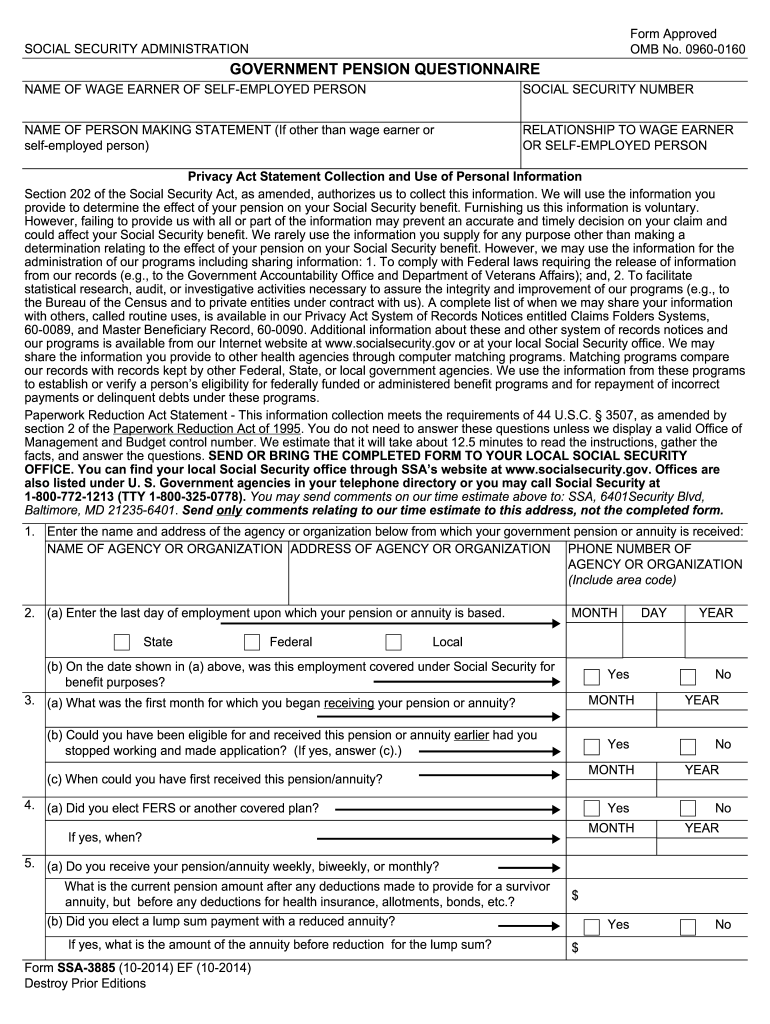





Form ssa 3885-2026

Get Form
ssa 3885 Preview on Page 1

Here's how it works

01. Edit your ssa 3885 online
Type text, add images, blackout confidential details, add comments, highlights and more.
02. Sign it in a few clicks
Draw your signature, type it, upload its image, or use your mobile device as a signature pad.
03. Share your form with others
Send it via email, link, or fax. You can also download it, export it or print it out.

How to use or fill out form SSA 3885 with our platform

Form edit decoration
9.5
Ease of Setup
DocHub User Ratings on G2
9.0
Ease of Use
DocHub User Ratings on G2
  1. Click ‘Get Form’ to open the SSA 3885 in the editor.
  2. Begin by entering the name and address of the agency or organization from which your government pension is received. Ensure you include the phone number for easy reference.
  3. Next, provide details about your last day of employment related to the pension. Specify if this employment was covered under Social Security for benefit purposes.
  4. Indicate when you began receiving your pension or annuity and whether you could have received it earlier had you applied sooner.
  5. Complete sections regarding your election of FERS or other plans, and specify how often you receive your pension (weekly, biweekly, monthly).
  6. Finally, review all information for accuracy before signing. Make sure to report any changes in your pension amount as required.

Start filling out your SSA 3885 form online for free today!

See more form ssa 3885 versions

We've got more versions of the form ssa 3885 form. Select the right form ssa 3885 version from the list and start editing it straight away!
Versions Form popularity Fillable & printable
2018 4.8 Satisfied (132 Votes)
2014 4.4 Satisfied (337 Votes)
2011 4 Satisfied (23 Votes)
be ready to get more

Complete this form in 5 minutes or less

Get form

Got questions?

We have answers to the most popular questions from our customers. If you can't find an answer to your question, please contact us.
Contact us

You should use only reliable software solutions with strong data protection compliance to sign your documents electronically. DocHub is just the type of editor you need! It stores data on Amazon Web Servers and complies with all necessary security standards and eSignature laws, so it’s a trustworthy way to eSign your form ssa 3885 or other forms with this tool.

It is a no-brainer on a computer or via a mobile device to complete a form ssa 3885 with DocHub. All you need to do is open any installed browser on your smartphone and go to the DocHub website. Once authenticated, add your file and open it in editing mode. Use our toolbar to make your edits and save changes. Optionally, keep your file in your files or send it to a recipient immediately.

In most cases, you can take or mail this signed application with your documents to any Social Security office. Any documents you mail to us will be returned to you.
In all other instances, use the Inquiry Response Benefit Verification screen or the paper Form SSA-2458 (Report of Confidential Social Security Benefit Information) to manually generate a BEVE letter or respond to benefit and payment questions.
SSA-8510. Authorization for the Social Security Administration to Obtain Personal Information.

Security and compliance

At DocHub, your data security is our priority. We follow HIPAA, SOC2, GDPR, and other standards, so you can work on your documents with confidence.

Learn more
ccpa2
pci-dss
gdpr-compliance
hipaa
soc-compliance

People also ask

NOTE: There are now two options to submit evidence. You can upload documents by using the Send Response for Individual Case link on the Electronic Records Express Home page. The upload function is also available while accessing a claimant's electronic folder through the Access Claimant's Electronic Folder link.
SSA and its affiliated State disability determination services use Form SSA-827, "Authorization to Disclose Information to the Social Security Administration (SSA)" to obtain medical and other information needed to determine whether or not a claimant is disabled.
Form SSA-7028 Instructions Form SSA-7028 is filed for the employees or students who have not been issued a social security card. This form is also necessary to validate the SSN of an individual if their current SSN is incorrect or missing.
Apply Online To start your application, go to our Apply for Benefits page, read and agree to the Terms of Service. ... On that page, review the \u201cGetting Ready\u201d section to make sure you have the information you need to apply. Select \u201cStart A New Application.\u201d
You can apply: Online; or. By calling our national toll-free service at 1-800-772-1213 (TTY 1-800-325-0778) or visiting your local Social Security office.

Related links

