




01. Edit your free church tithe and offering spreadsheet excel online
Type text, add images, blackout confidential details, add comments, highlights and more.

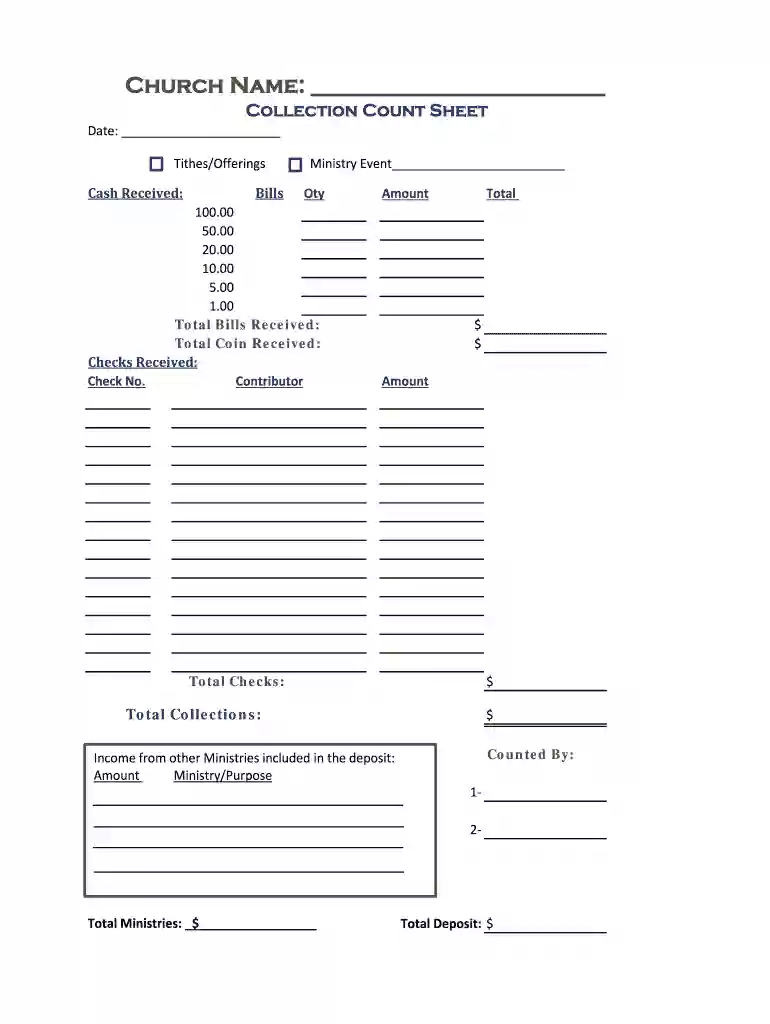
Type text, add images, blackout confidential details, add comments, highlights and more.

Draw your signature, type it, upload its image, or use your mobile device as a signature pad.

Send how to record tithes and offering in excel via email, link, or fax. You can also download it, export it or print it out.
The church tithe and offering spreadsheet in Excel format serves as a crucial tool for tracking and managing contributions made by congregants. This spreadsheet allows churches to maintain accurate records of their financial inflow, including tithes, offerings, and special donations. Utilizing such a tool simplifies the financial oversight process and ensures accountability within the church community.
Categories for Tracking: The spreadsheet typically includes sections for distinguishing between various types of contributions, such as cash, checks, and electronic transfers. Each category provides a transparent view of the church's income streams.
Data Collection Features: Users can easily enter data on a regular basis, providing a reliable record of contributions over time. This functionality supports accurate reporting and facilitates financial planning.
Summary Totals: At the end of each period, totals can be quickly calculated, helping finance teams assess the church's financial health and set future budgetary goals.
An Excel template for church accounting offers several advantages for both church administrators and congregants. The ease of use and customizable features make it an attractive choice for managing financial records.
Accessibility: Excel templates are widely used, making them accessible to staff members with varying levels of technical skills.
Customization: Churches can modify the spreadsheet to fit their specific needs, such as adding or removing columns for additional data fields like designated funds.
Cost-Effective Solution: Many free church tithe and offering spreadsheet options are available, reducing the financial burden associated with professional accounting software.
Recording tithes and offerings in Excel involves several steps that ensure the accuracy and efficiency of the data entry process.
Open the Template: Begin by downloading or opening your selected church donation spreadsheet template. Ensure it is formatted to include all necessary fields.
Input Contribution Data: For each contribution, enter relevant information such as:
Categorize Contributions: Assign each entry to the appropriate category to streamline reporting and analysis. This can be done using dropdown menus within the template.
Calculate Totals Automatically: Utilize Excel formulas to automatically generate totals for each category and an overall total. This reduces the risk of manual errors and saves time.
Review and Save: After entering data, review the entries for accuracy, then save the spreadsheet for future reference.
A well-designed tithe and offering spreadsheet will typically include several important features that enhance its functionality.
Fillable Fields: Users can quickly fill in fields dedicated to different categories, ensuring clarity and consistency in data entry.
Summary Sections: These sections aggregate data and provide an overview of total contributions, making it easy for church leaders to monitor financial health.
Visual Aids: Some templates may incorporate graphs or charts to illustrate contributions over time, aiding in visual comprehension of giving trends.
Implementing an Excel spreadsheet for church finances can lead to streamlined processes and better financial insights. Here are some scenarios that illustrate practical applications:
Weekly Contribution Tracking: Each week, the church administrator inputs donation data into the spreadsheet, categorizing it by type. This allows for quick analysis during weekly meetings to make informed decisions about resource allocation.
Annual Reporting: At the end of the fiscal year, the aggregated data from the spreadsheet can be used to generate reports for church leaders and members, incorporating totals and providing insights into overall giving patterns.
Budget Planning: By analyzing historical data, church leaders can forecast future financial trends and develop informed budgets that align with the needs of the ministry.
To further assist churches in their financial management, there are various resources available, including:
Free Printable Church Tithe Forms: These forms help congregants document their contributions for personal record-keeping.
Templates for Special Donations: Specific templates designed for events or campaigns can be utilized to track one-time or special donations effectively.
Training for Church Staff: Workshops or online tutorials that focus on Excel skills can enhance the ability of church staff to manage financial records efficiently.
By utilizing an Excel-based church tithe and offering spreadsheet, churches can ensure they maintain a transparent and organized record of contributions, ultimately leading to better financial stewardship and enhanced trust within the congregation.
At DocHub, your data security is our priority. We follow HIPAA, SOC2, GDPR, and other standards, so you can work on your documents with confidence.



Aoor, winclows, and cloors of the church in which this inst.allation was made. The cubic volume of the main audito- rium is 48,000 cubic feet. Used in this.Read more
Also, petition of citizens of Adzona in regard to a sixteenth amendment of the Constitution-tp the Committee on the Ju- diciary.Read more


