







Definition and Purpose of Forms & Documents - Vacaville Unified School District
The Forms & Documents - Vacaville Unified School District serve as essential tools for managing various administrative needs within the school district. These documents cater to a range of purposes, including employee resignations, student registrations, and policy acknowledgments. Understanding the specific intent of each form is crucial for proper usage and compliance with district procedures.
Types of Forms Available
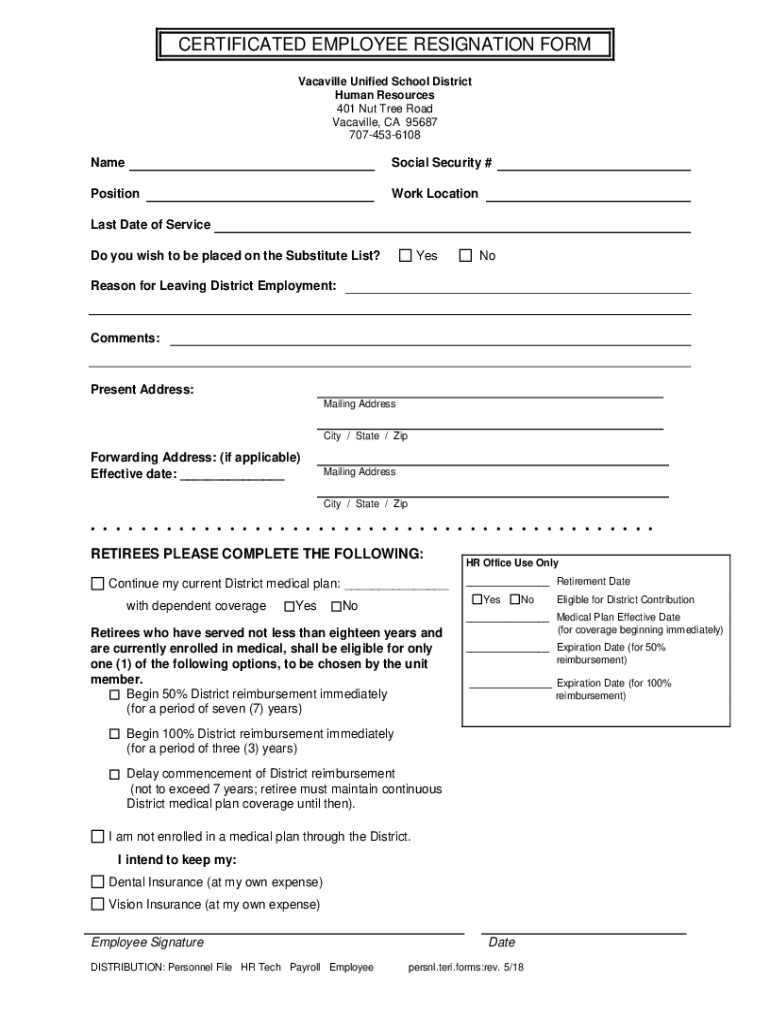
- Certificated Employee Resignation Form: Used by district employees to officially submit their resignation.
- Student Enrollment/Registration Forms: Required for enrolling students in the district schools.
- Policy Acknowledgment Forms: Used for confirming the understanding of district policies by staff or students.
These forms are structured to capture precise information, ensuring all necessary data is collected for efficient processing within the district's administrative framework.
Obtaining the Forms & Documents
To acquire the forms from the Vacaville Unified School District, individuals can access them through several channels designed to ensure accessibility and convenience.
Methods for Access
- Online Access: Most forms are available for download from the district’s official website. This ensures easy access and allows users to print and fill out forms at their convenience.
- In-Person Collection: Physical copies can be obtained directly from school offices or the district's administrative center.
- Mailed Copies: Some forms can be requested and mailed directly to individuals by contacting the district office.
Whether opting for digital or physical copies, it is essential to ensure the forms are current to prevent processing delays.
Steps to Complete the Forms
Completing the Forms & Documents - Vacaville Unified School District involves a systematic approach to ensure accuracy and compliance. Each form has its specific structure tailored to its function.
Step-by-Step Process
- Read Instructions Carefully: Begin by thoroughly reviewing any instructional guidelines provided with the form.
- Complete Personal Information: Fill out all personal data fields, such as name, contact details, and identification numbers, where applicable.
- Provide Specific Details: For forms like the resignation form, include specifics like the reason for leaving and preferred communication method for follow-up.
- Signature Section: Ensure all required signatures are provided, as unsigned forms may be considered invalid.
- Review and Submit: Double-check all entered information for completeness and accuracy before submission.
Completing each step carefully helps in minimizing errors and facilitating efficient processing by the district's administrative staff.
Key Elements of the Forms
Every form used within the Vacaville Unified School District includes several critical components designed to capture pertinent information and guide users through the completion process.
Common Sections and Features
- Applicant Information: Basic details such as name, address, and role within the district.
- Purpose of Form: A section clearly stating why the form is being filled out.
- Instructions for Completion: Guidance on how to correctly fill out the form.
- Signature and Date Fields: Mandatory fields for validation of the form.
These elements are essential for ensuring that the form serves its intended purpose and meets all administrative requirements of the district.
Important Terms and Definitions
Understanding the terminology used in the Forms & Documents - Vacaville Unified School District is crucial for accurate completion and submission.
Glossary of Key Terms
- Certificated Employee: A district worker holding professional certification required for certain educational roles.
- Resignation: The voluntary act of leaving one's position within the district.
- Enrollment: The process of officially registering a student to attend schools within the district.
Familiarity with these terms can help clarify form requirements and facilitate smoother interactions with the district's administrative personnel.
Legal Considerations and Compliance
The use of Forms & Documents - Vacaville Unified School District must adhere to various legal standards to ensure compliance with district policies and state regulations.
Compliance Requirements
- Confidentiality: All personal data provided in the forms are subject to privacy regulations to protect sensitive information.
- Accuracy: Misrepresenting information on official forms can lead to administrative actions or delays in processing.
- Signature Verification: Forms must be signed by the appropriate parties to be considered valid by district authorities.
Adhering to these legal standards is essential for achieving the desired administrative outcomes and avoiding potential penalties.
Submission Methods and Timelines
Once the forms have been completed, submitting them in a timely and correct manner is key for efficient processing by the district administration.
Options for Submission
- Online Submission: Electronic submission through designated district portals where applicable.
- Mail-In Submission: Sending completed forms through postal services to the district office.
- In-Person Delivery: Direct handover of completed forms at relevant school or district offices.
Important Dates
Observing submission deadlines ensures forms are processed without delay, especially for time-sensitive processes like student enrollment at the beginning of an academic year.
Examples and Practical Scenarios
To illustrate the application of the Forms & Documents - Vacaville Unified School District, consider a few real-world use cases where they are employed.
Scenario 1: Employee Resignation
An educator decides to resign from their position. They access the Certificated Employee Resignation Form from the district’s website, fill out the necessary details including their intent to resign and the effective date, then submit the form to their supervisor for further processing.
Scenario 2: New Student Enrollment
Parents new to Vacaville enroll their child in the district schools. They complete the registration form, ensuring all fields including emergency contact information and previous education records are accurately provided, and submit it to the school’s administrative office before the deadline.
Through these scenarios, it becomes evident how critical these forms are in managing and streamlining school district operations effectively.




