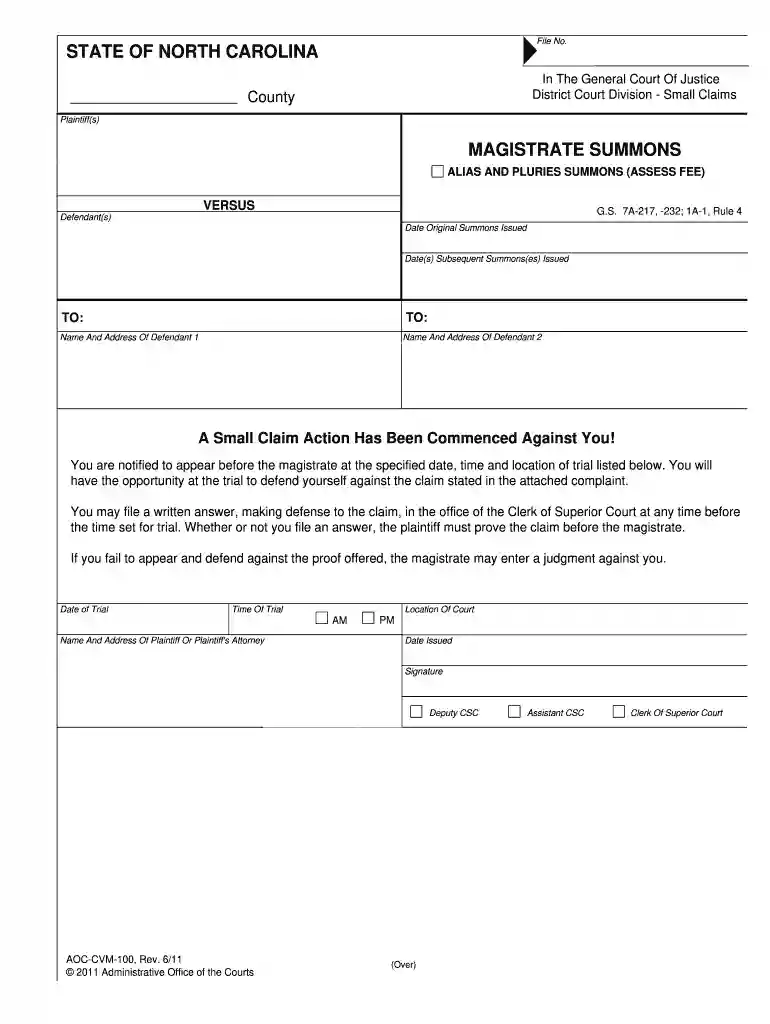
nccourts gov forms Preview on Page 1

Clerk of court forms 2026

Here's how it works

  • 01. Edit your nccourts gov forms online

    Type text, add images, blackout confidential details, add comments, highlights and more.

  • 02. Sign it in a few clicks

    Draw your signature, type it, upload its image, or use your mobile device as a signature pad.

  • 03. Share your form with others

    Send nc summons form via email, link, or fax. You can also download it, export it or print it out.

How to use or fill out clerk of court forms with our platform

Form edit decoration
9.5
Ease of Setup
DocHub User Ratings on G2
9.0
Ease of Use
DocHub User Ratings on G2
  1. Click ‘Get Form’ to open the magistrate summons in the editor.
  2. Begin by entering the 'File No.' at the top of the form. This number is essential for tracking your case.
  3. Fill in the 'County' where the action is taking place, ensuring accuracy to avoid delays.
  4. In the 'Plaintiff(s)' section, input the name and address of each plaintiff involved in the case.
  5. Next, provide details for each defendant under 'Defendant(s)', including their names and addresses.
  6. Specify the 'Date Original Summons Issued' and any subsequent dates for summonses issued.
  7. Complete the trial details by filling in the 'Date of Trial', 'Time Of Trial', and 'Location Of Court'.
  8. Finally, sign and date the form as required, ensuring all information is accurate before submission.

Start using our platform today to easily fill out your clerk of court forms online for free!

See more nccourts gov forms versions

We've got more versions of the nccourts gov forms form. Select the right nccourts gov forms version from the list and start editing it straight away!

VersionsForm popularityFillable & printable
20234.9 Satisfied (29 Votes)
20194.6 Satisfied (58 Votes)
20114.9 Satisfied (44 Votes)

be ready to get more

Complete this form in 5 minutes or less

Got questions?

We have answers to the most popular questions from our customers. If you can't find an answer to your question, please contact us.

0:30 2:00 You need to file you must include the case caption information on the top of the motion. Indicating.MoreYou need to file you must include the case caption information on the top of the motion. Indicating. The court and docket number for the case. Next.
1:07 2:20 Or other relevant announcements. So when you receive a letter from the clerk of courts. ItsMoreOr other relevant announcements. So when you receive a letter from the clerk of courts. Its essential to read it carefully. And take any necessary.
0:06 2:18 Process four payments the clerk of courts may call to remind you of outstanding fees or finesMoreProcess four payments the clerk of courts may call to remind you of outstanding fees or fines associated with your case.
The Court Clerk keeps summaries of court actions in an appearance docket; maintains case files; collects court fees, fines, costs, assessments, and forfeitures; and distributes or expends collected monies.
If you want to file a motion, the process is generally something like this: You write your motion. You file your motion with the court clerk. The court clerk inserts the date and time your motion will be heard by the judge. You serve (mail) your motion to the other side.

Security and compliance

At DocHub, your data security is our priority. We follow HIPAA, SOC2, GDPR, and other standards, so you can work on your documents with confidence.

People also ask

0:09 1:49 Important details about the case. The first set of letters often represents the court where the caseMoreImportant details about the case. The first set of letters often represents the court where the case was filed. For example SC might stand for Supreme Court.
0:18 2:55 This could be due to a citation. Or a complaint and summon which includes details of the offense.MoreThis could be due to a citation. Or a complaint and summon which includes details of the offense. And the date. And time you need to appear in court.

civil court summons form

Court Forms Evaluation Design Guide

This page presents guides to evaluating your existing court forms from a users POV, and designing new paper or digital forms that are more accessible andRead more

Learn more
Superior Court Forms | Cobb County Georgia

Access various forms and orders for the Cobb County, GA Superior Court, including standing orders, court appearances, general forms, and specific petitions

Learn more
FL-390 - California Courts

I deposited a copy of the Notice of Motion and Motion for Simplified Modification of Order for Child, Spousal, or Family Support (form FL-390) and allRead more

Learn more
If you believe that this page should be taken down, please follow our DMCA take down process here