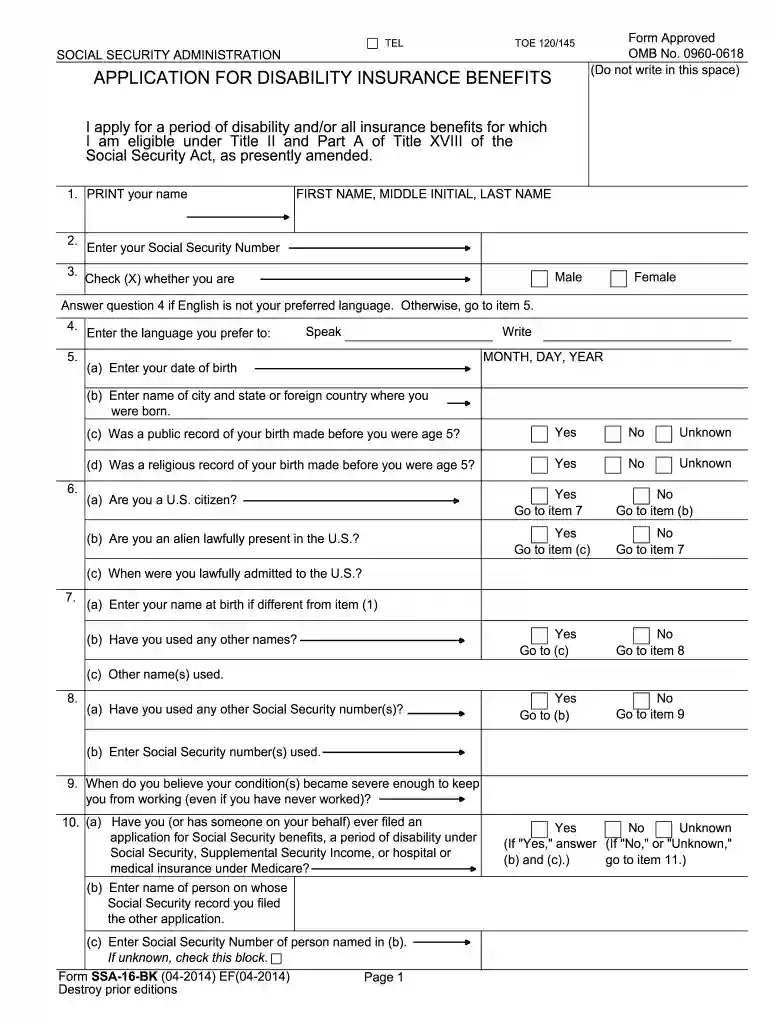
ssa 16 bk Preview on Page 1

2014 ssa 16 bk form-2026

Here's how it works

  • 01. Edit your ssa 16 bk online

    Type text, add images, blackout confidential details, add comments, highlights and more.

  • 02. Sign it in a few clicks

    Draw your signature, type it, upload its image, or use your mobile device as a signature pad.

  • 03. Share your form with others

    Send ssa 16 printable form via email, link, or fax. You can also download it, export it or print it out.

How to use or fill out 2014 SSA 16 BK form with our platform

Form edit decoration
9.5
Ease of Setup
DocHub User Ratings on G2
9.0
Ease of Use
DocHub User Ratings on G2
  1. Click ‘Get Form’ to open the 2014 SSA 16 BK form in the editor.
  2. Begin by entering your full name in the designated fields. Ensure accuracy as this will be used for identification.
  3. Provide your Social Security Number and select your gender by checking the appropriate box.
  4. If English is not your preferred language, specify it in question 4; otherwise, proceed to item 5.
  5. Fill in your date of birth and place of birth. Be sure to answer questions regarding public or religious records of your birth.
  6. Indicate your citizenship status and provide any additional names you have used if applicable.
  7. Answer questions about previous applications for benefits and military service, ensuring all relevant details are included.
  8. Complete sections regarding employment history, earnings, and any other disability benefits you may be applying for.
  9. Review all entries for accuracy before signing the form electronically within the editor.

Start filling out your 2014 SSA 16 BK form today using our platform for a seamless experience!

See more ssa 16 bk versions

We've got more versions of the ssa 16 bk form. Select the right ssa 16 bk version from the list and start editing it straight away!

VersionsForm popularityFillable & printable
20224.4 Satisfied (27 Votes)
20184.8 Satisfied (107 Votes)
20174.5 Satisfied (32 Votes)
20154.4 Satisfied (538 Votes)
20144.4 Satisfied (400 Votes)
20104.3 Satisfied (35 Votes)
20064 Satisfied (40 Votes)

be ready to get more

Complete this form in 5 minutes or less

Got questions?

We have answers to the most popular questions from our customers. If you can't find an answer to your question, please contact us.

Most eSignature solutions require users to have a paid subscription. With DocHub, there are two ways for you to add an electronic signature to your disability application form pdf at no cost:

  • You can do it during a 7-day trial period;
  • You can sign up for a free plan.

The second option, though, has restrictions on the number of signatures, sign requests, emails, and documents for adjusting available per month. You can check for full information here.

You can easily edit fill out your ssa 16 on any iOS gadget. Open an internet browser of your liking, go to the DocHub site, authorize or create a new account, upload your file for editing, and make your desired adjustments. Our service is mobile-friendly, so utilizing its features on your phone will be a no-brainer, even on the first try.

Security and compliance

At DocHub, your data security is our priority. We follow HIPAA, SOC2, GDPR, and other standards, so you can work on your documents with confidence.

Related links

The social insurance system in the US: Policies to protect ...

Jun 23, 2021 — This paper examines the U.S. social insurance system, which we define broadly to include both programs supported by dedicated taxes and ...

Learn more
2014 in American television - Wikipedia

The following is a list of events affecting American television in 2014. Events listed include television show debuts, finales, and cancellations; ...

Learn more
inFormCustomReport (2) - Social Security

431, SSA-16-BK-SP, Application For Disability Insurance Benefits - Spanish. 432. 433. 434, SSA-16-INST, Reporting Responsibilities For Disability Insurance ...

Learn more
If you believe that this page should be taken down, please follow our DMCA take down process here