





Social security form no0960 0623 2006-2026

Get Form
social security form no0960 0623 2006 Preview on Page 1

Here's how it works

01. Edit your form online
Type text, add images, blackout confidential details, add comments, highlights and more.
02. Sign it in a few clicks
Draw your signature, type it, upload its image, or use your mobile device as a signature pad.
03. Share your form with others
Send it via email, link, or fax. You can also download it, export it or print it out.

How to use or fill out social security form no0960 0623 2006 with our platform

Form edit decoration
9.5
Ease of Setup
DocHub User Ratings on G2
9.0
Ease of Use
DocHub User Ratings on G2
  1. Click ‘Get Form’ to open it in the editor.
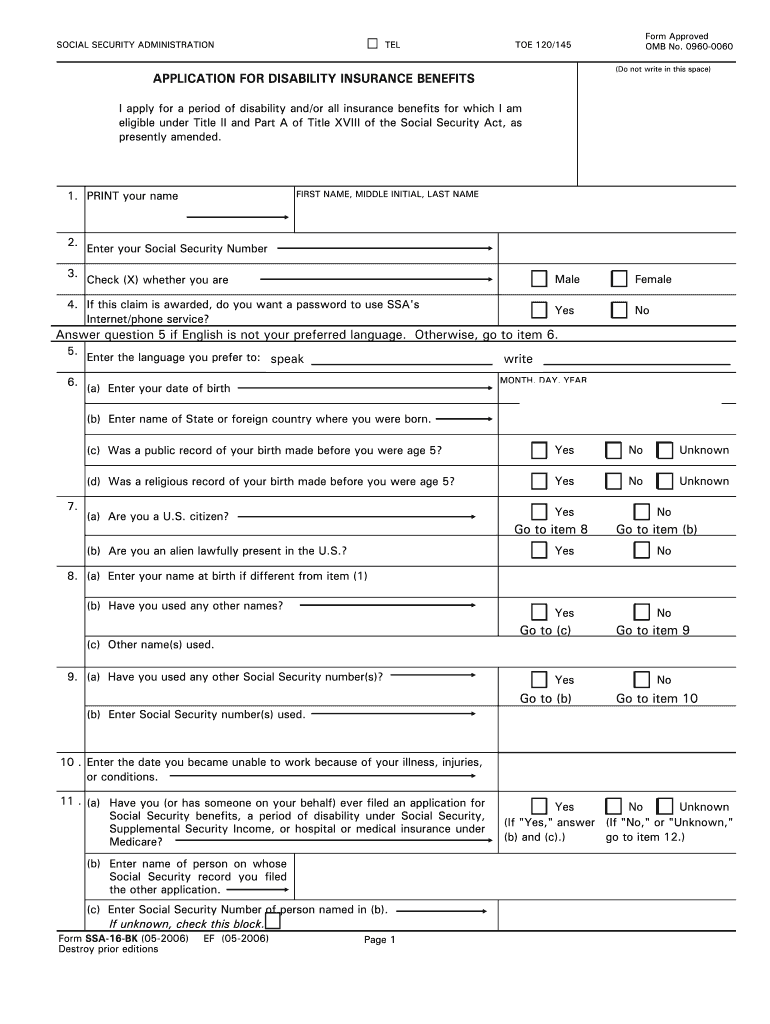
  2. Begin by entering your first name, middle initial, and last name in the designated fields. Ensure accuracy as this information is crucial for identification.
  3. Input your Social Security Number in the provided space. This number is essential for processing your application.
  4. Indicate your gender by checking the appropriate box. If you wish to use SSA's Internet/phone service upon approval, select 'Yes' or 'No' as applicable.
  5. Fill in your date of birth and place of birth. Be sure to answer questions regarding public or religious records of your birth if applicable.
  6. Complete sections about citizenship status and any previous names used. This includes providing Social Security numbers from past applications if necessary.
  7. Detail your work history, including employers and dates of employment, ensuring all information is accurate and complete.
  8. Finally, review all entries for correctness before signing the form electronically using our platform’s signature feature.

Start filling out your social security form no0960 0623 2006 today for free on our platform!

See more social security form no0960 0623 2006 versions

We've got more versions of the social security form no0960 0623 2006 form. Select the right social security form no0960 0623 2006 version from the list and start editing it straight away!
Versions Form popularity Fillable & printable
2018 4.8 Satisfied (107 Votes)
2015 4.4 Satisfied (538 Votes)
2014 4.4 Satisfied (400 Votes)
2010 4.3 Satisfied (35 Votes)
2006 4 Satisfied (40 Votes)
be ready to get more

Complete this form in 5 minutes or less

Get form

Got questions?

We have answers to the most popular questions from our customers. If you can't find an answer to your question, please contact us.
Contact us

Approving documents on a mobile device is fast, easy, and doesn’t require software installation when you have an account with DocHub. Log in from any browser, complete your blank fields with your data, and click on Sign → Create your signature. You can draw your eSignature just as you usually do on paper, add its picture to your social security form no0960 0623 2006, or type in your name and stylize its look. Whatever option you choose, your document will be valid.

If you edit your social security form no0960 0623 2006 with DocHub, you only require a stable web connection and virtually any web browser installed on your device. No need to install any third-party software or study tutorials. Just open a tab with DocHub, drag and drop your file, and modify it immediately.

You can apply: Online; or. By calling our national toll-free service at 1-800-772-1213 (TTY 1-800-325-0778) or visiting your local Social Security office.
Sign the English SSA-827 in the space provided if two signatures are required by State law. WITNESS: In this section of the English SSA-827, one who knows the person signing the form should sign as a witness and provide his or her phone number or address. There is space for a second witness if needed.
§ 1306. If you are seeking SSA program records about a living individual, you must have the individual complete the Form SSA-3288 available at https://www.ssa.gov/forms/ssa-3288.pdf or complete a consent that complies with our regulation at 20 C.F.R. § 401.100 to request the individual's records.

Security and compliance

At DocHub, your data security is our priority. We follow HIPAA, SOC2, GDPR, and other standards, so you can work on your documents with confidence.

Learn more
ccpa2
pci-dss
gdpr-compliance
hipaa
soc-compliance
be ready to get more

Complete this form in 5 minutes or less

Get form

People also ask

0:48 6:49 How to Fill Out the Social Security Work History Report Form (SSA ... YouTube Start of suggested clip End of suggested clip So what you do is you list the job titles that you've had in the last. 15 years before the onsetMoreSo what you do is you list the job titles that you've had in the last. 15 years before the onset date of disability. And keep it simple don't use fancy terms like managers. And supervisors.
You can apply: Online; or. By calling our national toll-free service at 1-800-772-1213 (TTY 1-800-325-0778) or visiting your local Social Security office. ... If you do not live in the U.S. or one of its territories, you can also contact your nearest U.S. Social Security office, U.S. Embassy or consulate.
Many businesses ask for your SSN because it is a convenient way to identify you in their system. As a result, your social security number can now reveal all kinds of information about you, including places you've lived, your credit history, and maybe even medical conditions.
Your Social Security Statement shows how much you have paid in Social Security and Medicare taxes. It explains about how much you would get in Social Security benefits when you reach full retirement age. If you become disabled and unable to work, you may be eligible for disability benefits.
You can: Verify up to 10 names and SSNs (per screen) online and receive immediate results. This option is ideal to verify new hires. Upload overnight files of up to 250,000 names and SSNs and usually receive results the next government business day.

Related links

