ARMY NATIONAL GUARD SPC/CPL PROMOTION APPRAISAL 2026

Get Form
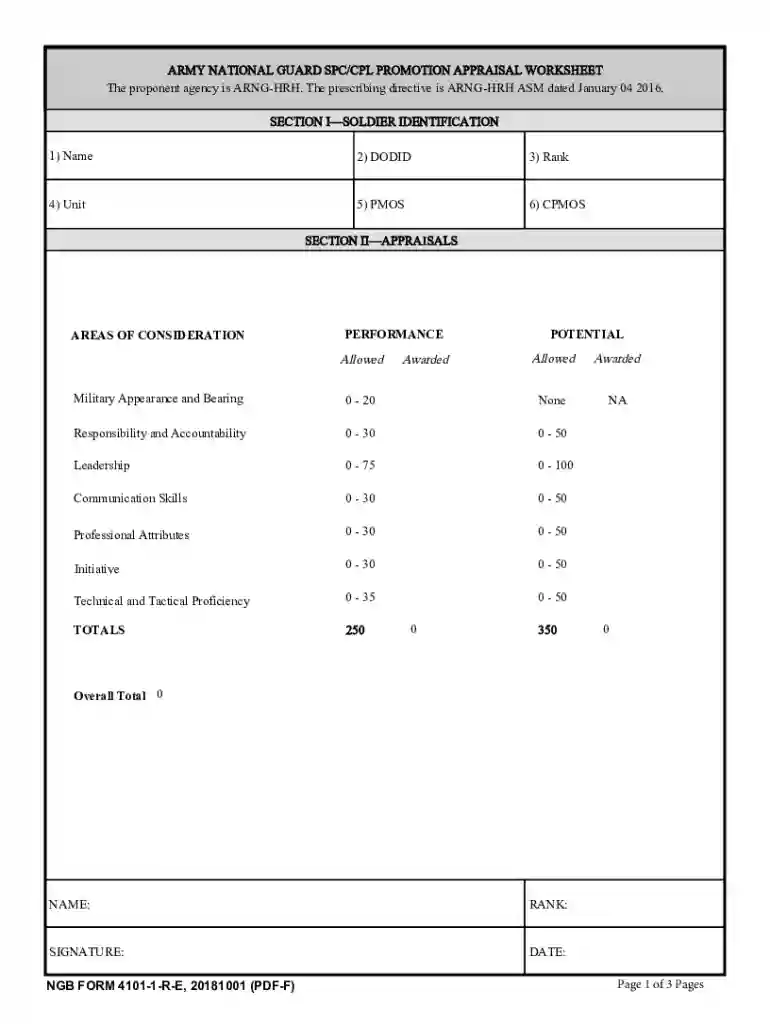
ARMY NATIONAL GUARD SPC/CPL PROMOTION APPRAISAL Preview on Page 1

Here's how it works

01. Edit your form online
Type text, add images, blackout confidential details, add comments, highlights and more.

02. Sign it in a few clicks
Draw your signature, type it, upload its image, or use your mobile device as a signature pad.

03. Share your form with others
Send it via email, link, or fax. You can also download it, export it or print it out.

How to use or fill out ARMY NATIONAL GUARD SPC/CPL PROMOTION APPRAISAL

Form edit decoration
9.5
Ease of Setup
DocHub User Ratings on G2
9.0
Ease of Use
DocHub User Ratings on G2
  1. Click ‘Get Form’ to open the ARMY NATIONAL GUARD SPC/CPL PROMOTION APPRAISAL in our editor.
  2. Begin with SECTION I—SOLDIER IDENTIFICATION. Fill in your Name, DODID, Rank, Unit, PMOS, and CPMOS accurately to ensure proper identification.
  3. Proceed to SECTION II—APPRAISALS. Here, evaluate your performance in various areas such as Military Appearance and Bearing, Responsibility and Accountability, Leadership, Communication Skills, Professional Attributes, Initiative, and Technical and Tactical Proficiency.
  4. For each area of consideration, enter the allowed and awarded points based on your assessment. Ensure that you total these scores correctly for an accurate overall evaluation.
  5. Finally, sign and date the form at the bottom to validate your appraisal before submitting it.

Start using our platform today for free to streamline your document editing and completion process!

See more ARMY NATIONAL GUARD SPC/CPL PROMOTION APPRAISAL versions

We've got more versions of the ARMY NATIONAL GUARD SPC/CPL PROMOTION APPRAISAL form. Select the right ARMY NATIONAL GUARD SPC/CPL PROMOTION APPRAISAL version from the list and start editing it straight away!
Versions Form popularity Fillable & printable
2018 4.1 Satisfied (36 Votes)
2010 4.9 Satisfied (40 Votes)
be ready to get more

Complete this form in 5 minutes or less

Get form

Got questions?

We have answers to the most popular questions from our customers. If you can't find an answer to your question, please contact us.
Contact us
This functionality can be docHubed through the NavBar. The NavPath is: NavBar Menu Self-Service OML/Promotion Points. The My Retirement Points Tile is a review of the Members allotted retirement points made visible in the following tabs by Period, Points, Service, and Show All.
Unlike the active duty force, Guard unit vacancy promotions require officers to perform the duties of the higher rank from the time of state promotion. This allows Guard officers to claim that time in grade at the higher rank, improving future promotion opportunities, and making them eligible for back-pay.
Soldiers can check their Retirement Accounting Statement by logging into the Integrated Personnel and Pay System - Army (IPPS-A Landing Page (army.mil)), select HR Professional, then select View Retirement Points.
The Army has silently integrated your Promotion Point Worksheet (PPW) into IPPS-A. If you log in to IPPS-A and do not see a tile for Promotion Points on your dashboard, simply use the global search feature to search for Promotion Points.

Security and compliance

At DocHub, your data security is our priority. We follow HIPAA, SOC2, GDPR, and other standards, so you can work on your documents with confidence.

Learn more
ccpa2
pci-dss
gdpr-compliance
hipaa
soc-compliance
be ready to get more

Complete this form in 5 minutes or less

Get form