




Here's how it works

01. Edit your canada border services agency online
Type text, add images, blackout confidential details, add comments, highlights and more.

02. Sign it in a few clicks
Draw your signature, type it, upload its image, or use your mobile device as a signature pad.

03. Share your form with others
Send canada free trade agreement via email, link, or fax. You can also download it, export it or print it out.
How to use or fill out Canada Trade Agreement with Our Platform

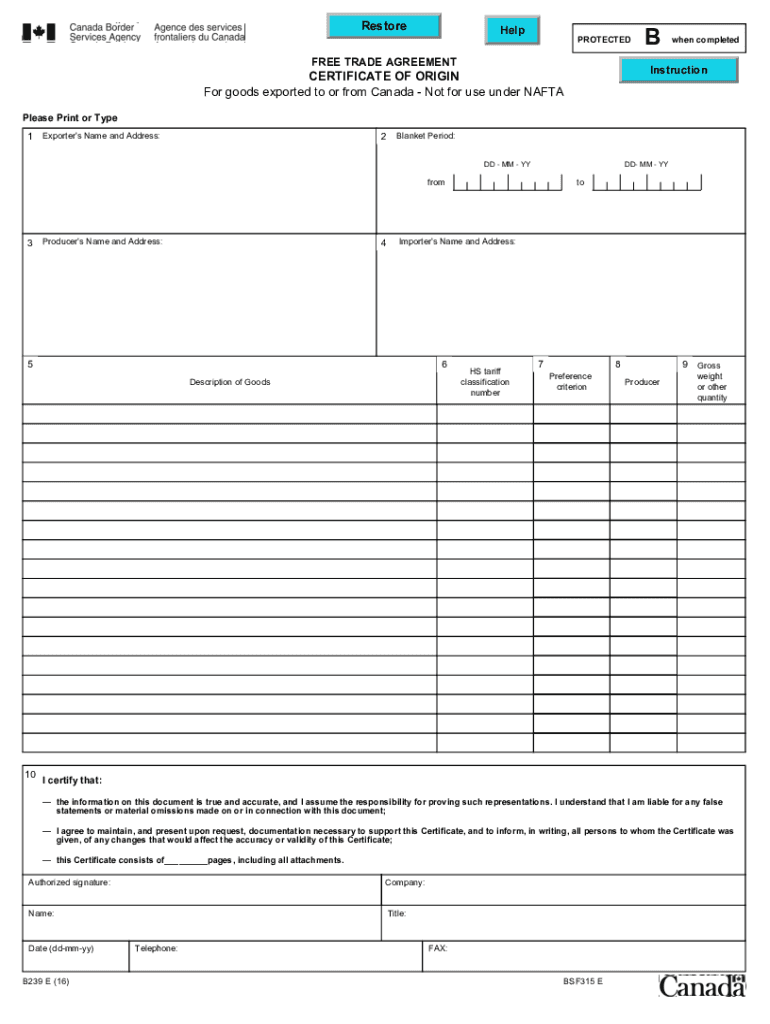
- Click ‘Get Form’ to open the Canada Trade Agreement in the editor.
- Begin by filling out Field 1 with the full legal name and address of the exporter. Ensure accuracy for smooth processing.
- In Field 2, specify the blanket period if applicable, indicating the start and end dates for multiple shipments.
- Complete Field 3 with the producer's name and address. If there are multiple producers, attach a list as needed.
- Fill in Field 4 with the importer's name and address. If unknown, indicate 'Unknown' or 'Various' for multiple importers.
- Provide a detailed description of goods in Field 5, ensuring it aligns with invoice descriptions.
- Identify the HS tariff classification number in Field 6 for each good listed.
- State the applicable preference criterion in Field 7 based on your goods' origin status.
- Indicate your production status in Field 8 by marking 'Yes' or 'No' as appropriate.
- For non-blanket certificates, provide gross weight or quantity in Field 9 before signing and dating in Field 10.
Start using our platform today to streamline your Canada Trade Agreement completion!
Fill out canada trade agreement online
It's free
It's free
See more canada trade agreement versions
We've got more versions of the canada trade agreement form. Select the right canada trade agreement version from the list and start editing it straight away!
Security and compliance
At DocHub, your data security is our priority. We follow HIPAA, SOC2, GDPR, and other standards, so you can work on your documents with confidence.
Learn more


