




Here's how it works



How to use or fill out surrender parental rights form with our platform

- Click ‘Get Form’ to open the surrender parental rights form in the editor.
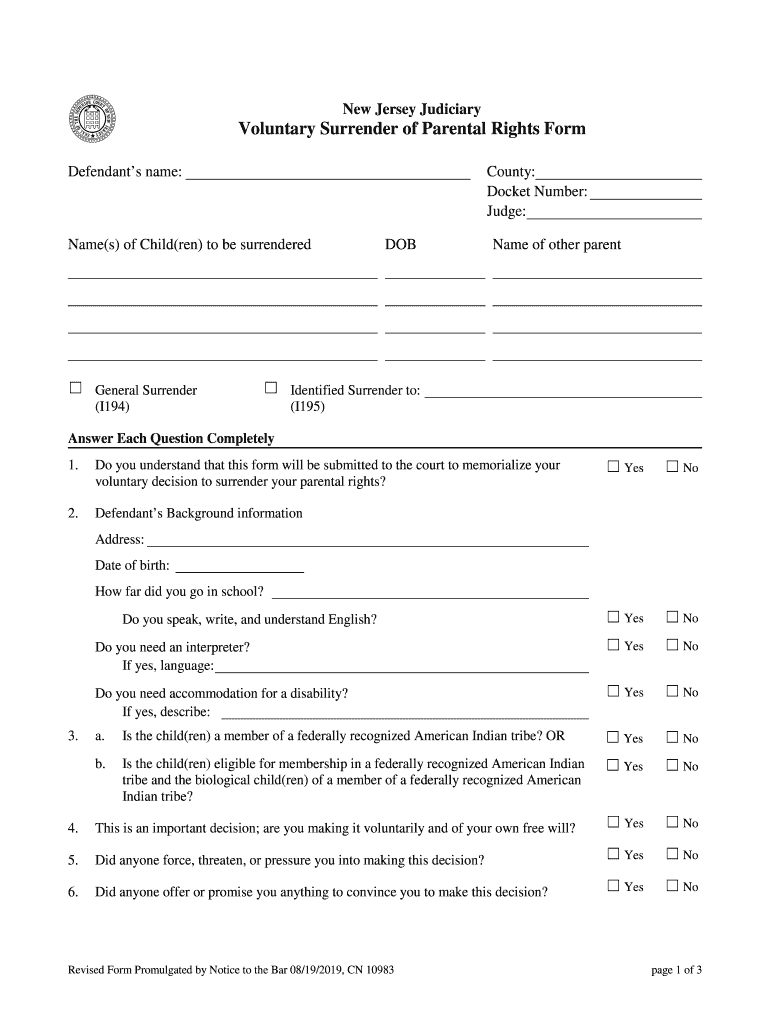
- Begin by filling in your personal details, including your name, county, docket number, and the judge's name. This information is crucial for identifying your case.
- Specify the name(s) of the child(ren) you are surrendering and select whether it is a general or identified surrender. Include their date of birth and the name of the other parent if applicable.
- Answer each question completely, indicating if you need an interpreter or accommodations for a disability. This ensures that all necessary support is provided during this process.
- Provide background information such as your address, date of birth, education level, and language proficiency. This section helps establish your context.
- Carefully consider questions regarding your understanding of the implications of surrendering your parental rights. Answer truthfully to ensure clarity in your decision-making.
- Finally, review all responses for accuracy before submitting. Once satisfied, save and submit the form directly through our platform for free.
Start using our platform today to complete your surrender parental rights form with ease!
It's free
See more surrender parental rights form versions
Got questions?
How do I sign my printable voluntary termination of parental rights form free of charge?
Most eSignature solutions require users to have a paid subscription. With DocHub, there are two options for you to add an electronic signature to your printable voluntary termination of parental rights form at no cost:
- You can do it during a 7-day trial period;
- You can subscribe to a free plan.
The second option, however, has restrictions on the number of signatures, sign requests, emails, and documents for editing available per month. You can check for full details here.
Can I edit voluntary surrender of parental rights form ga on my phone?
As a comprehensive document editing service, DocHub is accessible on mobile phones. Open DocHub in your choice of mobile internet browser and employ our intelligent mobile-friendly toolset to complete your voluntary surrender of parental rights form ga.
Security and compliance
At DocHub, your data security is our priority. We follow HIPAA, SOC2, GDPR, and other standards, so you can work on your documents with confidence.
Learn more


