Type text, add images, blackout confidential details, add comments, highlights and more.
02. Sign it in a few clicks
Draw your signature, type it, upload its image, or use your mobile device as a signature pad.
03. Share your form with others
Send verified statement via email, link, or fax. You can also download it, export it or print it out.
How to use or fill out foc 23 with our platform
Ease of Setup
DocHub User Ratings on G2
Ease of Use
DocHub User Ratings on G2
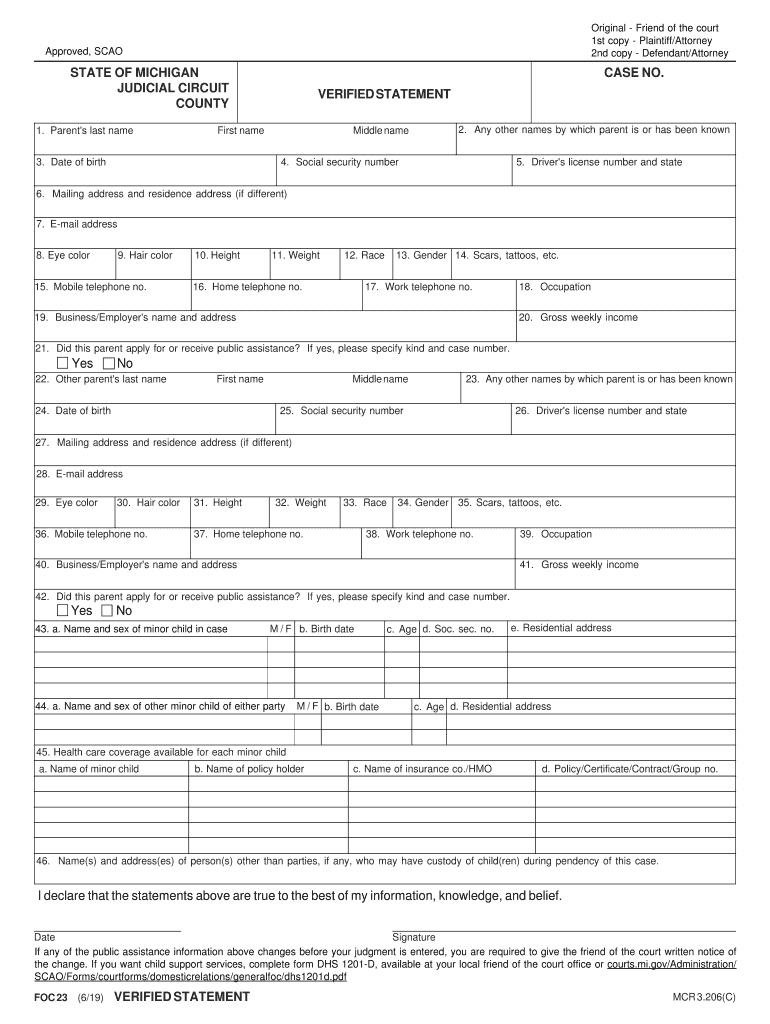
Click ‘Get Form’ to open the foc 23 document in the editor.
Begin by entering the parent's last name, first name, and middle name in the designated fields. Ensure accuracy as this information is crucial for identification.
Fill in any other names by which the parent is known, followed by their date of birth and social security number. This helps establish a clear identity.
Provide the driver's license number and state, along with mailing and residence addresses. If they differ, make sure to specify both.
Complete personal details such as email address, eye color, hair color, height, weight, race, gender, and any distinguishing features like scars or tattoos.
Input contact numbers including mobile and home telephone numbers. Additionally, include work telephone number if applicable.
For income details, enter gross weekly income and indicate if public assistance was received. If yes, specify the type and case number.
Repeat similar steps for the other parent’s information as required in the form.
Finally, declare that all statements are true by signing and dating at the bottom of the form before submission.
Start filling out your foc 23 form today using our platform for free!
This screen enables the user to handle transactions where goods or services are provided without charging the customer. These orders are typically used forRead more
Any other country(ies) of citizenship: 23. Foreign/international identifying number(s) and source(s) (drivers license, passport, social/tax no., etc.).Read more
Cookie consent notice
This site uses cookies to enhance site navigation and personalize your experience.
By using this site you agree to our use of cookies as described in our Privacy Notice.
You can modify your selections by visiting our Cookie and Advertising Notice.