Hpcsa cpd form 2026

Get Form
hpcsa cpd points check online Preview on Page 1

Here's how it works

01. Edit your hpcsa cpd points check online online
Type text, add images, blackout confidential details, add comments, highlights and more.
02. Sign it in a few clicks
Draw your signature, type it, upload its image, or use your mobile device as a signature pad.
03. Share your form with others
Send free cpd points hpcsa via email, link, or fax. You can also download it, export it or print it out.

How to use or fill out hpcsa cpd form with our platform

Form edit decoration
9.5
Ease of Setup
DocHub User Ratings on G2
9.0
Ease of Use
DocHub User Ratings on G2
  1. Click ‘Get Form’ to open the hpcsa cpd form in the editor.
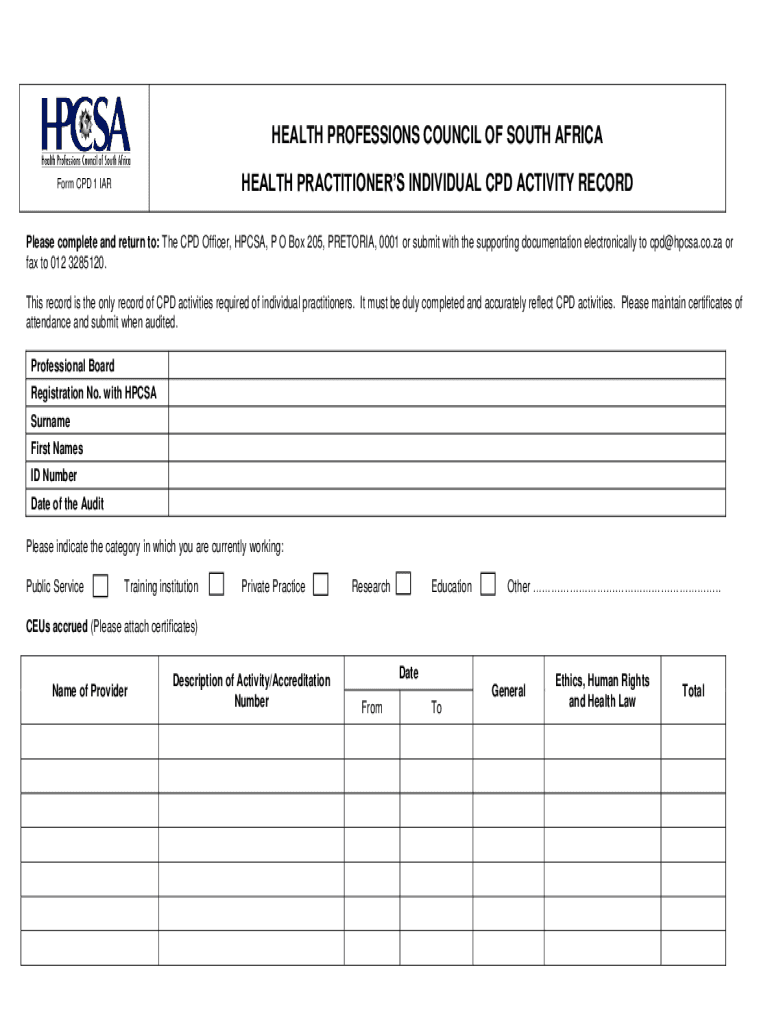
  2. Begin by entering your Professional Board Registration Number with HPCSA, followed by your surname and first names in the designated fields.
  3. Input your ID Number and the Date of the Audit. This information is crucial for accurate record-keeping.
  4. Select your current working category from options such as Public Service, Private Practice, or Education. Use the dropdown menu for easy selection.
  5. Accumulate CEUs accrued by attaching certificates of attendance. Fill in the Name of Provider, Description of Activity/Accreditation Number, and relevant dates for each activity.
  6. Ensure you complete both sections for General and Ethics, Human Rights and Health Law activities, providing totals where required.
  7. Finally, certify the information by signing and dating at the bottom of the form before submission.

Start using our platform today to effortlessly complete your hpcsa cpd form online for free!

See more hpcsa cpd form versions

We've got more versions of the hpcsa cpd form form. Select the right hpcsa cpd form version from the list and start editing it straight away!
Versions Form popularity Fillable & printable
2016 4.8 Satisfied (52 Votes)
2009 4.2 Satisfied (73 Votes)
be ready to get more

Complete this form in 5 minutes or less

Get form

Got questions?

We have answers to the most popular questions from our customers. If you can't find an answer to your question, please contact us.
Contact us

Electronic document approval demands a software solution that works in compliance with data protection and eSignature laws. DocHub is a great tool for that, because it fulfills all the aforementioned requirements. Whatever method you prefer to sign your hpcsa individual activity record in DocHub, your eSignature will be legally binding and court-admissible.

In case your go-to email service is Gmail, it is simple to incorporate your DocHub editor in your work. Modify your hpcsa cpd points check with DocHub instruments and attach it to your drafts in Gmail. See how straightforward it is to exchange documents and collaborate with a swift PDF editing solution at hand.

After clicking on account overview click on My CPDs tab as shown below- Page 7 7 11. After clicking My CPDs, a screen showing a summary of CPD activity will be shown. If registration is CPD compliant the option to download compliance letter will be enabled.
Your CPD record should include the following information: A detailed description of your role and responsibilities. A detailed description of your development needs. A list of all CPD activities you have undertaken and how long they have taken. Outline the impact of those actions.
To earn more CPD points, you can choose to undertake any of the CPD activities provided by the various providers. b. Click on CPD Activities and Select the activity of your choice. Click on the My Portfolio tab at the top of the page.

Security and compliance

At DocHub, your data security is our priority. We follow HIPAA, SOC2, GDPR, and other standards, so you can work on your documents with confidence.

Learn more
ccpa2
pci-dss
gdpr-compliance
hipaa
soc-compliance

People also ask

Required documentation: The completed CPD 2A Form (the application form) see document portal. Programme of the CPD activity specifying the exact time slots for each presentation / topic. The planned advert for the CPD activity. Presenter(s) short CV / biography.
For example, being involved in a professional body or giving a presentation at a conference. Formal education. For example, going on formal courses or carrying out research. Self-directed learning.
You could write a statement on how you have updated your knowledge and skills over the last two years, and what learning needs you have met. You may find it helpful to identify four to six points that have contributed to the quality of your work.
Your documentation of the identified learning need, a learning plan, your participation in the learning activity, and the outcome achieved will form the evidence of CPD you may need to provide. References to the articles that you have read are needed for self-directed activities.

cpd 1