Dr 907 2026

Get Form
dr 907 Preview on Page 1

Here's how it works

01. Edit your form online
Type text, add images, blackout confidential details, add comments, highlights and more.

02. Sign it in a few clicks
Draw your signature, type it, upload its image, or use your mobile device as a signature pad.

03. Share your form with others
Send it via email, link, or fax. You can also download it, export it or print it out.

How to use or fill out dr 907 with our platform

Form edit decoration
9.5
Ease of Setup
DocHub User Ratings on G2
9.0
Ease of Use
DocHub User Ratings on G2
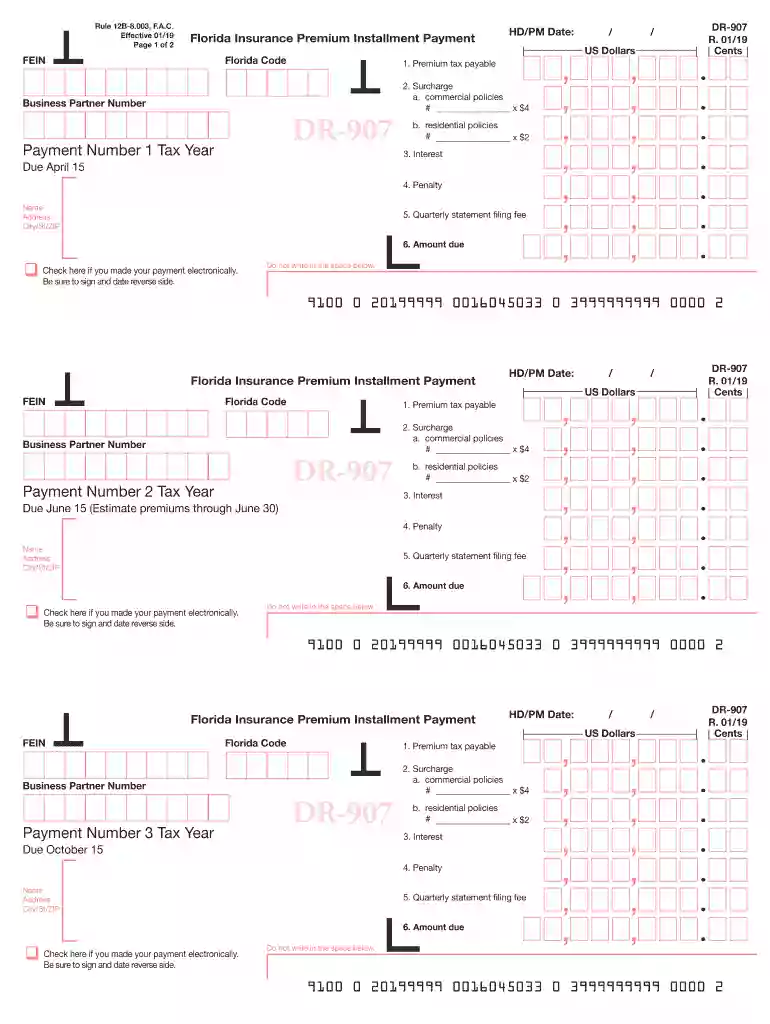
  1. Click ‘Get Form’ to open the DR-907 in the editor.
  2. Begin by entering your FEIN and Florida Code at the top of the form. If using a blank form, ensure to print or type your name and address under the payment due date.
  3. For Line 1, input the amount of premium tax payable as per your calculations. Refer to the instructions for guidance on determining this amount.
  4. In Line 2, specify the number of commercial policies on Line 2a and multiply by $4. For residential policies on Line 2b, enter the number and multiply by $2.
  5. Calculate any interest due for this installment payment in Line 3 based on the floating rate provided in the guidelines.
  6. For Line 4, compute any penalties applicable for late payments or underpayment.
  7. Enter your quarterly statement filing fee of $250 in Line 5.
  8. Finally, sum up Lines 1 through 5 for your total amount due in Line 6. Don’t forget to check if you made an electronic payment and sign and date where indicated.

Start filling out your DR-907 today using our platform for free!

See more dr 907 versions

We've got more versions of the dr 907 form. Select the right dr 907 version from the list and start editing it straight away!
Versions Form popularity Fillable & printable
2019 4.8 Satisfied (201 Votes)
2018 4.3 Satisfied (162 Votes)
2016 3.7 Satisfied (29 Votes)
2015 4.4 Satisfied (501 Votes)
be ready to get more

Complete this form in 5 minutes or less

Get form

Got questions?

We have answers to the most popular questions from our customers. If you can't find an answer to your question, please contact us.
Contact us

Sure, a typed name is recognized as a valid electronic signature when you add it to your document using a compliant solution like DocHub. Simply upload your dr 907 to our editor, click Sign in the top tool pane → Create your signature → Type your name in the appropriate tab, and choose how it will look on your document.

If you edit your dr 907 with DocHub, you only need a steady web connection and virtually any browser installed on your device. No need to install any third-party software or research tutorials. Just open a tab with DocHub, drag and drop your file, and edit it on the spot.

Security and compliance

At DocHub, your data security is our priority. We follow HIPAA, SOC2, GDPR, and other standards, so you can work on your documents with confidence.

Learn more
ccpa2
pci-dss
gdpr-compliance
hipaa
soc-compliance