



Here's how it works



How to use or fill out DR-907. Insurance Premium Installment Payment and Instructions R.01/15 with our platform

- Click ‘Get Form’ to open the DR-907 in the editor.
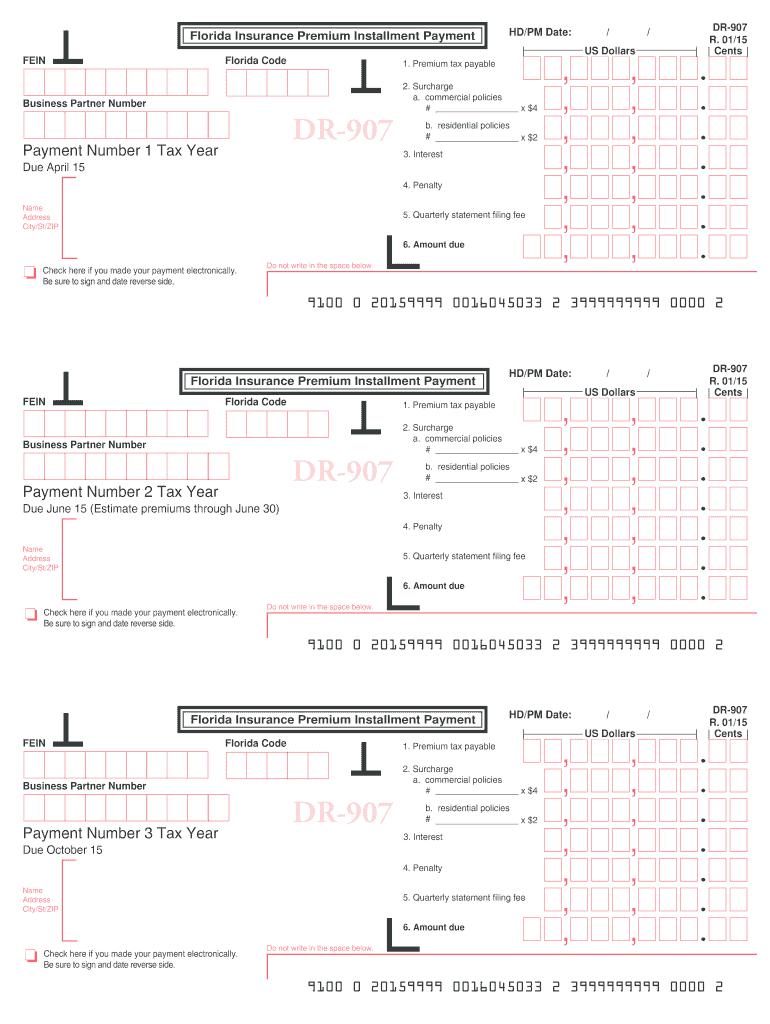
- Begin by entering your FEIN and Florida Code at the top of the form. Ensure all personalized information is accurate.
- In Line 1, input the amount of premium tax payable based on your calculations.
- For Line 2, specify the number of commercial policies on Line 2a and multiply by $4, then do the same for residential policies on Line 2b using $2.
- Calculate any interest due for Line 3 based on current rates and enter it accordingly.
- Complete Line 4 by calculating any penalties that may apply.
- Enter your quarterly statement filing fee of $250 in Line 5.
- Sum Lines 1 through 5 to determine the total amount due in Line 6.
- Finally, sign and date the form in the designated spaces provided before submitting it electronically or via mail.
Start filling out your DR-907 form online for free today!
It's free
See more DR-907. Insurance Premium Installment Payment and Instructions R.01/15 versions
Got questions?
Can I use DocHub to generate legal eSignatures on my DR-907. Insurance Premium Installment Payment and Instructions R.01/15?
Yes, you can utilize DocHub for signing any business and personal paperwork, including your DR-907. Insurance Premium Installment Payment and Instructions R.01/15. All electronic signatures you generate with our service are legally binding and court-admissible, as DocHub complies with criteria required by ESIGN and UETA. Save your accomplished paperwork with a detailed Audit Trail if necessary.
How do you edit DR-907. Insurance Premium Installment Payment and Instructions R.01/15 on Android?
Document editing with DocHub is equally convenient on desktop and mobile devices. You just need an internet browser to revise your DR-907. Insurance Premium Installment Payment and Instructions R.01/15 on Android. Open our site and sign in to access the instruments you require. Add your file and introduce your intended modifications. Next, you can keep your form in your file storage or send it out instantly.
Security and compliance
At DocHub, your data security is our priority. We follow HIPAA, SOC2, GDPR, and other standards, so you can work on your documents with confidence.
Learn more