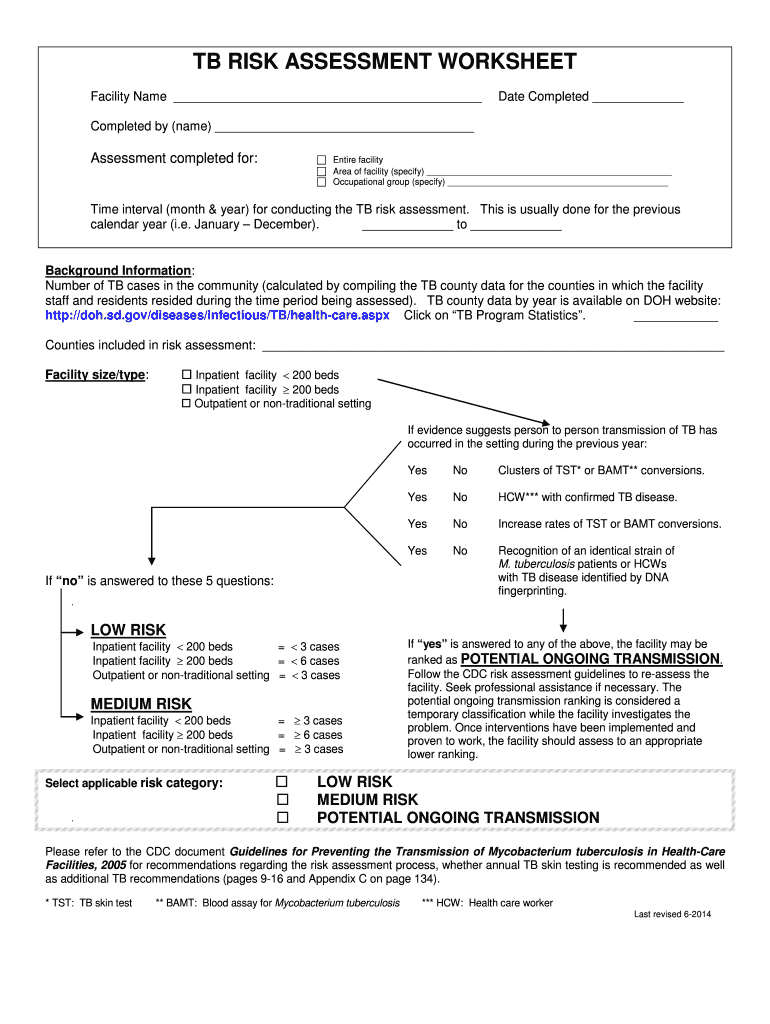
Completed by (name) - doh sd 2026

Get Form
Completed by (name) - doh sd Preview on Page 1

Here's how it works

01. Edit your form online
Type text, add images, blackout confidential details, add comments, highlights and more.
02. Sign it in a few clicks
Draw your signature, type it, upload its image, or use your mobile device as a signature pad.
03. Share your form with others
Send it via email, link, or fax. You can also download it, export it or print it out.

How to use or fill out Completed by (name) - doh sd with our platform

Form edit decoration
9.5
Ease of Setup
DocHub User Ratings on G2
9.0
Ease of Use
DocHub User Ratings on G2
  1. Click ‘Get Form’ to open it in the editor.
  2. Begin by entering the Facility Name and Date Completed in the designated fields at the top of the form.
  3. In the 'Completed by (name)' section, input your name to indicate who completed the assessment.
  4. Select whether the assessment was for the entire facility, a specific area, or an occupational group by checking the appropriate box and providing any necessary specifications.
  5. Fill in the time interval for conducting the TB risk assessment, typically for the previous calendar year.
  6. Gather background information on TB cases in your community and enter this data along with counties included in your risk assessment.
  7. Answer all relevant questions regarding potential TB transmission risks and select an applicable risk category based on your responses.

Start using our platform today to streamline your document editing and form completion process for free!

See more Completed by (name) - doh sd versions

We've got more versions of the Completed by (name) - doh sd form. Select the right Completed by (name) - doh sd version from the list and start editing it straight away!
Versions Form popularity Fillable & printable
2021 4.8 Satisfied (204 Votes)
2014 4.4 Satisfied (158 Votes)
2008 4.3 Satisfied (27 Votes)
be ready to get more

Complete this form in 5 minutes or less

Get form

Got questions?

We have answers to the most popular questions from our customers. If you can't find an answer to your question, please contact us.
Contact us

Microsoft Word doesn’t have signing tools to generate legitimate eSignatures and enforceable forms. Luckily, DocHub is an online eSignature-compliant editor that supports various document formats, including .doc files. Sign in to your account and import the Word version of your Completed by (name) - doh sd from your device and cloud, or URL - our editor will automatically turn it into an editable PDF. Make all essential adjustments in your form and click Sign to generate your own legally-binding eSignature. There are four signing options from which to choose.

Apart from a comprehensive toolset for editing PDFs on mobile devices, DocHub allows you to sign your Completed by (name) - doh sd along the way. Open our editor in your internet browser, make changes using DocHub’s toolset, and finish your editing by eSigning the completed form.

Order Online or By Phone VitalChek is the only third-party vendor authorized by the South Dakota Department of Health to accept orders for South Dakota vital records. Place your order by visiting .vitalchek.com or by calling 605-773-4961.
The South Dakota Board of Nursing website is considered primary source verification. The licensure information on the website is real time with the Board of Nursing licensure database. Please contact the South Dakota Board of Nursing office with any questions (605) 362-2760.
The average time for obtaining a South Dakota medical license is 12-16 weeks. However, it can take longer.

Security and compliance

At DocHub, your data security is our priority. We follow HIPAA, SOC2, GDPR, and other standards, so you can work on your documents with confidence.

Learn more
be ready to get more

Complete this form in 5 minutes or less

Get form

People also ask

Certified copies of birth and death certificates are available through the San Diego County Assessor/Recorder/Clerks office. Marriage licenses are also available. For specific information visit their website or call 619.237. 0502.
South Dakota birth, death, marriage, and divorce records may be requested in person, through the mail, online, or over the phone. A $15 search fee is applicable for all certificates requested. Online orders and those over the phone include additional expedite fees.
Contact your birth state or territorys vital records office to find out: How to order a certified copy of your birth certificate online, by mail, or in person.
You can order a copy of a PSA birth certificate online at PSAHelpline.ph, an official and authorized partner of the Philippine Statistics Authority (PSA) in delivering PSA birth certificates through an online platform that helps facilitate the application procedure.

Related links