Group msp british columbia 2025

Get Form
group msp british columbia Preview on Page 1

Here's how it works

01. Edit your form online
Type text, add images, blackout confidential details, add comments, highlights and more.

02. Sign it in a few clicks
Draw your signature, type it, upload its image, or use your mobile device as a signature pad.

03. Share your form with others
Send it via email, link, or fax. You can also download it, export it or print it out.

How to use or fill out group msp british columbia with our platform

Form edit decoration
9.5
Ease of Setup
DocHub User Ratings on G2
9.0
Ease of Use
DocHub User Ratings on G2
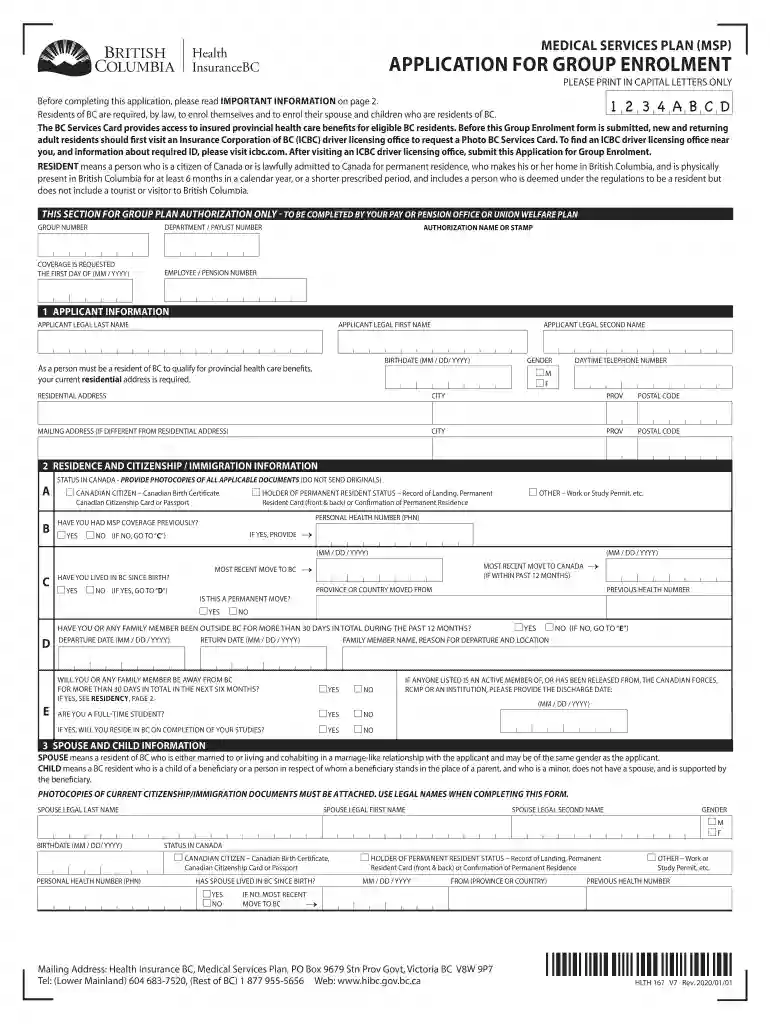
  1. Click ‘Get Form’ to open the group MSP British Columbia application in the editor.
  2. Begin by filling out the Applicant Information section. Enter your legal last name, first name, and second name in capital letters. Provide your birthdate, gender, and daytime telephone number.
  3. Next, input your residential address along with the city, province, and postal code. If your mailing address differs from your residential address, complete that section as well.
  4. Proceed to the Residence and Citizenship/Immigration Information section. Indicate your status in Canada and attach photocopies of relevant documents supporting your citizenship or immigration status.
  5. In the Spouse and Child Information section, provide details for each family member applying. Ensure you include their legal names, birthdates, gender, and status in Canada.
  6. Finally, review all information for accuracy before signing the authorization at the end of the form. Ensure both you and your spouse (if applicable) sign and date it.

Start using our platform today to easily complete your group MSP British Columbia application online for free!

See more group msp british columbia versions

We've got more versions of the group msp british columbia form. Select the right group msp british columbia version from the list and start editing it straight away!
Versions Form popularity Fillable & printable
2021 4.8 Satisfied (33 Votes)
2020 4.2 Satisfied (61 Votes)
2017 4.2 Satisfied (47 Votes)
2014 4.8 Satisfied (202 Votes)
2013 4.3 Satisfied (65 Votes)
be ready to get more

Complete this form in 5 minutes or less

Get form

Got questions?

We have answers to the most popular questions from our customers. If you can't find an answer to your question, please contact us.
Contact us
MSP premiums were discontinued as of January 1, 2020. Learn about payment options for premium debts owing prior to January 1, 2020.
MSP will help pay for unexpected insured services you receive anywhere outside Canada and for any insured services you receive elsewhere in Canada, provided the services are medically required and performed by a qualified medical doctor.
Medical Services Plan (MSP) Premiums were eliminated as of January 1, 2020. For more information about Retroactive Premium Assistance, go to Retroactive Premium Assistance. MSP supplementary benefits provide partial payment for certain medical services obtained in British Columbia.
Using Your BC Services Card to Obtain Health Care Services As long as you are a resident of B.C. and are enrolled in MSP, you can use your card to obtain insured medical and health care services. Your card can be used as of the date your MSP coverage begins.
The Medical Services Plan (MSP) is the BC provincial governments medical insurance plan and is administered by Health Insurance BC.
be ready to get more

Complete this form in 5 minutes or less

Get form

People also ask

MSP premiums were discontinued as of January 1, 2020.
Each B.C. resident enrolled with the Medical Services Plan (MSP) is eligible for a BC Services Card with a unique lifetime identifier for health care called a Personal Health Number. This number remains the same, regardless of any changes to personal status.
Accessing Health Care in B.C. B.C. offers free health care coverage to all residents. To access health care services, you need to enroll in the Government of British Columbias health plan known as the Medical Services Plan (MSP). It pays for basic, medically required health services.

Related links