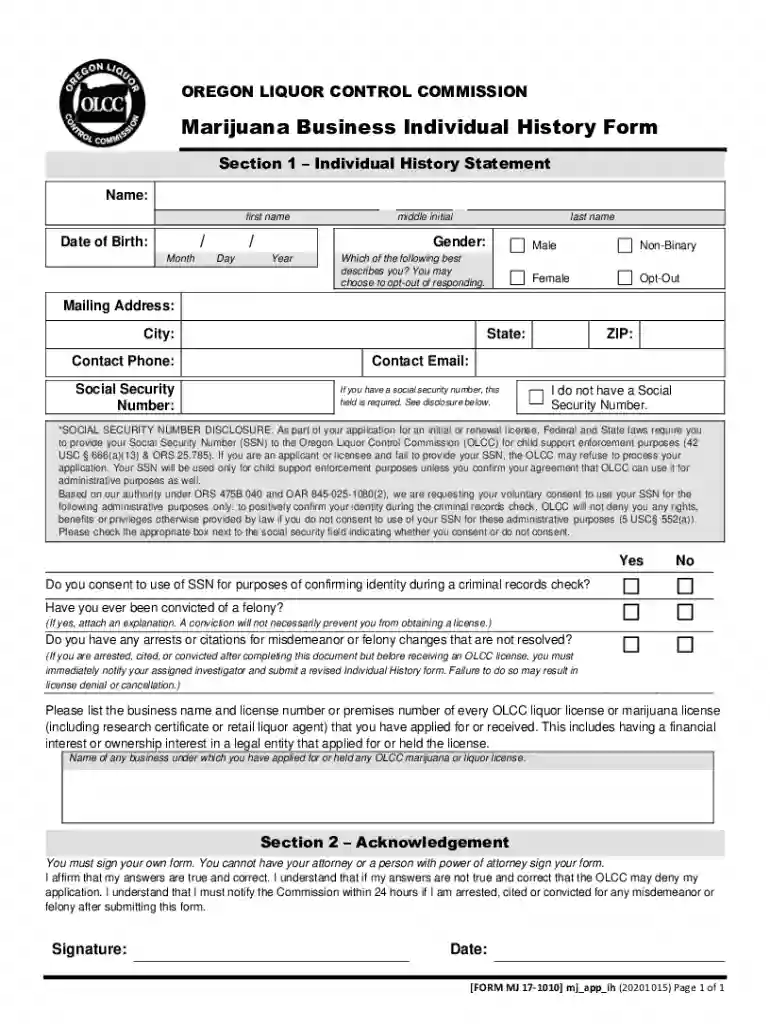
Marijuana Business Individual History Form 2026

Get Form
Marijuana Business Individual History Form Preview on Page 1

Here's how it works

01. Edit your form online
Type text, add images, blackout confidential details, add comments, highlights and more.

02. Sign it in a few clicks
Draw your signature, type it, upload its image, or use your mobile device as a signature pad.

03. Share your form with others
Send it via email, link, or fax. You can also download it, export it or print it out.

How to use or fill out Marijuana Business Individual History Form with DocHub

Form edit decoration
9.5
Ease of Setup
DocHub User Ratings on G2
9.0
Ease of Use
DocHub User Ratings on G2
  1. Click ‘Get Form’ to open the Marijuana Business Individual History Form in our editor.
  2. Begin with Section 1, where you will provide your personal information. Fill in your name, date of birth, gender, and mailing address. Ensure accuracy as this information is crucial for your application.
  3. Next, enter your contact phone number and email address. If you have a Social Security Number (SSN), include it in the designated field. Remember to check the box indicating whether you consent to its use for identity confirmation.
  4. Proceed to answer questions regarding any felony convictions or unresolved arrests. If applicable, attach an explanation for any felony conviction.
  5. List any OLCC liquor or marijuana licenses you have applied for or held previously. This includes any financial interests in related businesses.
  6. In Section 2, sign and date the form affirming that all provided information is true and correct. Remember, only you can sign this form; no one else can do it on your behalf.

Start filling out your Marijuana Business Individual History Form today using our platform for free!

See more Marijuana Business Individual History Form versions

We've got more versions of the Marijuana Business Individual History Form form. Select the right Marijuana Business Individual History Form version from the list and start editing it straight away!
Versions Form popularity Fillable & printable
2022 4.1 Satisfied (47 Votes)
2021 4.9 Satisfied (23 Votes)
2020 4.4 Satisfied (242 Votes)
2017 4.4 Satisfied (45 Votes)
be ready to get more

Complete this form in 5 minutes or less

Get form

Got questions?

We have answers to the most popular questions from our customers. If you can't find an answer to your question, please contact us.
Contact us

Yes, and it’s really straightforward! DocHub is an online PDF editor with advanced document processing functions that allow you quickly modify your documents, complete blank fields and drop new ones for other people to fill out, and create electronic signatures in several ways. Add your Marijuana Business Individual History Form, give information as requested, and choose how you want to eSign your document - by typing your name, drawing your signature, uploading its picture, or utilizing a QR code.

With DocHub, there are several convenient ways to edit your Marijuana Business Individual History Form online. You can drag and drop the form and modify it directly at the DocHub website or use our browser extension to fill out your form immediately. Additionally, you can modify your PDF on your smartphone, as DocHub is compatible with all the accessible mobile platforms.

Cannabis Cafes Are Now Legal in CA: What You Need to Know. Last fall, California Governor Gavin Newsom signed Assembly Bill 1775 (AB 1775) into law, and it officially took effect on January 1, 2025.
The base cost to start a cannabis dispensary in California includes $1,000 in application fees and anywhere between $2,500 to $96,000 in license fees depending on your projected revenue.
A legal cannabis business must obtain a license from BOTH the State and local jurisdiction, such as a city or county. Currently, all commercial cannabis business activity is prohibited in unincorporated LA County.

Security and compliance

At DocHub, your data security is our priority. We follow HIPAA, SOC2, GDPR, and other standards, so you can work on your documents with confidence.

Learn more
ccpa2
pci-dss
gdpr-compliance
hipaa
soc-compliance