




Here's how it works



How to use or fill out boston celtics donation request with DocHub

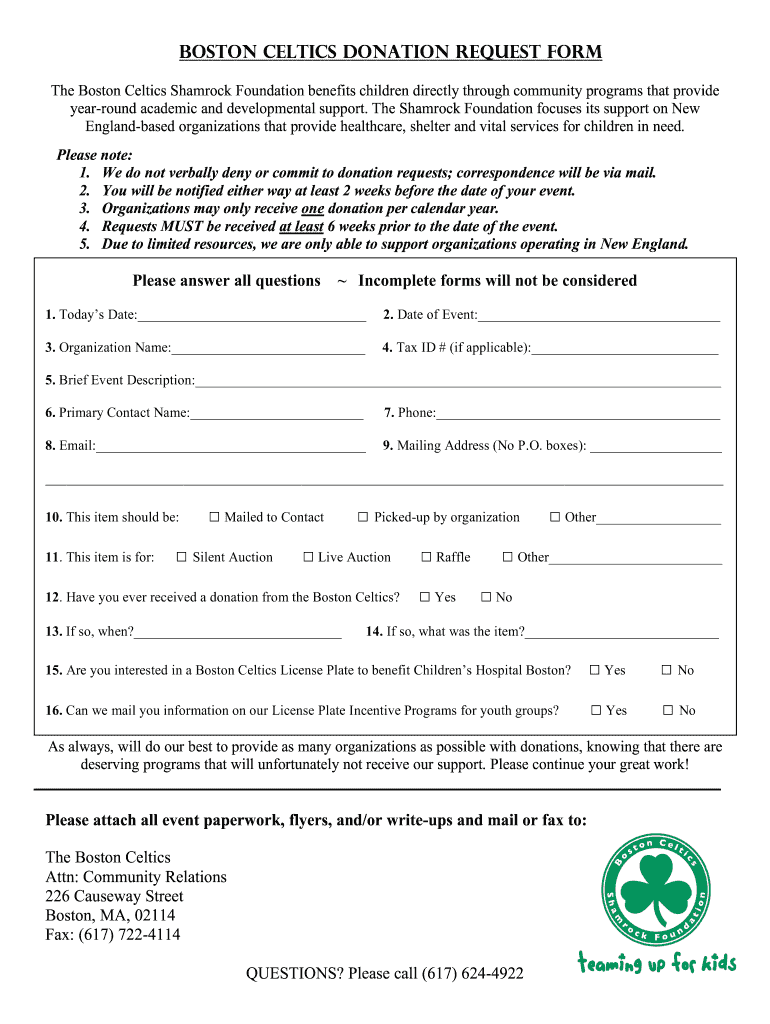
- Click ‘Get Form’ to open the Boston Celtics Donation Request in our editor.
- Begin by entering today’s date in the designated field. This helps track your request timeline.
- Next, fill in the date of your event. Ensure this is at least six weeks away to meet submission requirements.
- Provide your organization name and Tax ID number if applicable. This information verifies your eligibility.
- In the brief event description section, clearly outline the purpose of your event to convey its importance.
- Complete the primary contact details including name, phone number, and email for follow-up communication.
- Fill in your mailing address, ensuring it is not a P.O. box, as physical correspondence will be sent here.
- Indicate how you would like the item delivered by selecting one of the options provided in the form.
- Answer questions regarding previous donations and interest in additional programs to provide context for your request.
- Finally, attach any relevant event paperwork and submit via mail or fax as instructed at the bottom of the form.
Start using our platform today to streamline your Boston Celtics donation request process for free!
It's free
Got questions?
How do I sign my boston celtics donation request form for free?
Most eSignature solutions require users to have a paid subscription. With DocHub, there are two options for you to add an electronic signature to your boston celtics donation request form at no cost:
- You can do it during a 7-day trial period;
- You can subscribe to a free plan.
The second option, however, has restrictions on the number of signatures, sign requests, emails, and forms for adjusting available per month. You can check for full details here.
How do you edit celtics donation request form in Chrome?
If you are using Chrome, there are two easy methods to modify your celtics donation request form online. First, visit the DocHub site, add your file, and modify it using our toolbar. You can also install our Chrome extension and modify any document by dragging and dropping it in your browser window.
Security and compliance
At DocHub, your data security is our priority. We follow HIPAA, SOC2, GDPR, and other standards, so you can work on your documents with confidence.
Learn more




