




Here's how it works

01. Edit your motion to quash garnishment iowa online
Type text, add images, blackout confidential details, add comments, highlights and more.

02. Sign it in a few clicks
Draw your signature, type it, upload its image, or use your mobile device as a signature pad.

03. Share your form with others
Send motion to quash iowa via email, link, or fax. You can also download it, export it or print it out.
How to use or fill out motion to quash garnishment iowa with our platform

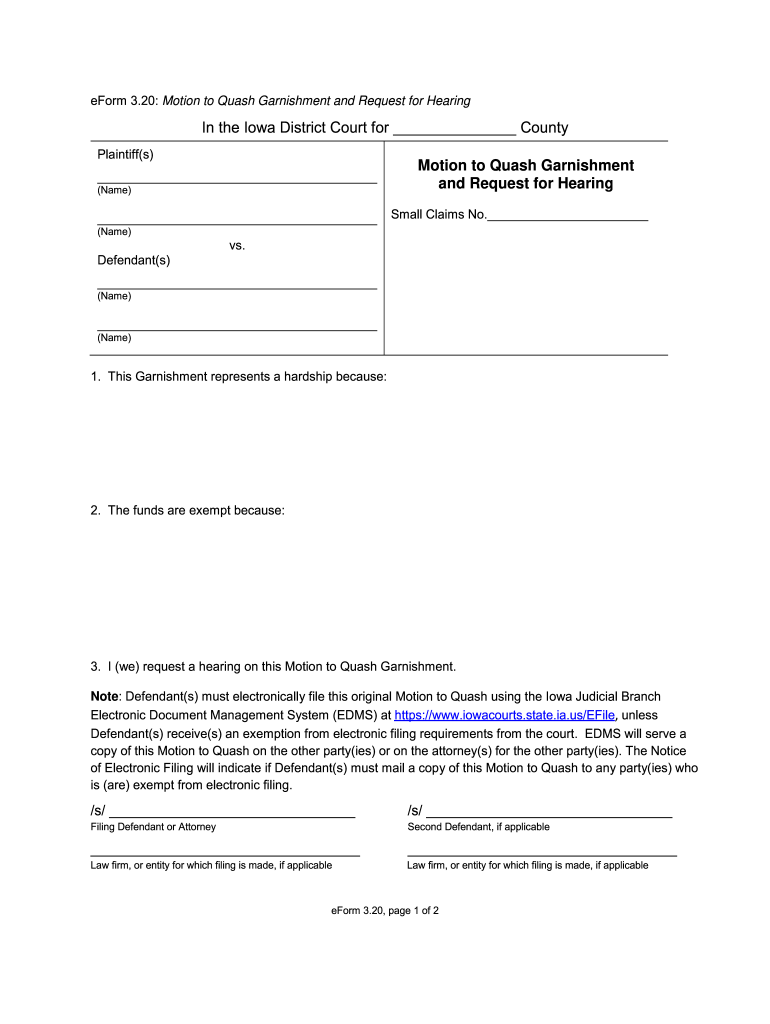
- Click ‘Get Form’ to open the Motion to Quash Garnishment in the editor.
- Begin by filling in the court name and county at the top of the form. This identifies where your motion is being filed.
- Next, enter the names of the plaintiff(s) and defendant(s) in the designated fields. Ensure accuracy as this information is crucial for your case.
- In section one, clearly state why this garnishment represents a hardship for you. Be specific about your financial situation.
- For section two, explain why you believe the funds are exempt from garnishment. This could include citing relevant laws or personal circumstances.
- In section three, indicate your request for a hearing on this motion by checking or marking as required.
- Finally, complete the signature fields at the bottom of the form, including any additional defendants if applicable. Make sure to provide contact information accurately.
Start using our platform today to fill out your Motion to Quash Garnishment easily and for free!
Fill out motion to quash garnishment iowa online
It's free
It's free
Security and compliance
At DocHub, your data security is our priority. We follow HIPAA, SOC2, GDPR, and other standards, so you can work on your documents with confidence.
Learn more


Related forms

LECTURES ON OPEN BOOK DECOMPOSITIONS AND
The document presents a comprehensive survey on open book decompositions and contact structures, primarily focusing on G ...

Christina M BourgeoisSchool of Electrical and - Georgia Tech ECE
The document is a Laboratory Workbook for the Digital Hardware Design course (ECE 2031) at Georgia Institute of Technolo ...

Department of Family and Consumer Sciences - Georgia Southern - sacs georgiasouthern
The document outlines the Level III Unit Level Implementation Plan for the Department of Family and Consumer Sciences at ...

Combat Exposure and Migraine Headache - Andrew Young School - aysps gsu
The paper examines the relationship between combat exposure and migraine headaches among U.S. servicemen, particularly t ...

Face Forward - faces - Georgia Institute of Technology - faces gatech
The Spring 2009 issue of the FACES newsletter highlights significant achievements and events related to diversity in aca ...

INDIVIDUAL CONFLICT OF COMMITMENT AND CONFLICT OF INTEREST
The Georgia State University Policy on Individual Conflict of Commitment and Conflict of Interest outlines procedures fo ...

Navigation Efficiency of Two Dimensional Auditory Menus
The document presents a study on the navigation efficiency of two-dimensional auditory menus using spearcon enhancements ...

You Say You Want a Revolution:
The document titled 'You Say You Want a Revolution: Music & Technology - Evolution or Destruction?' by Rebekah O'Hara ex ...


