Agreement between 2026

Get Form
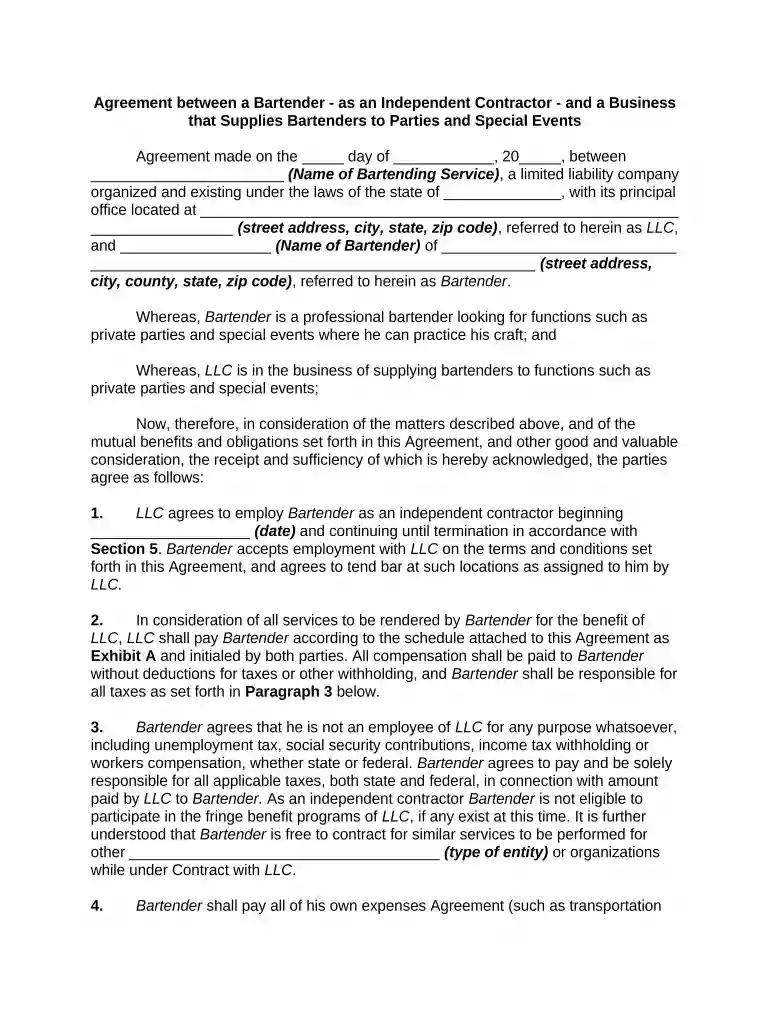
agreement between Preview on Page 1

Here's how it works

01. Edit your form online
Type text, add images, blackout confidential details, add comments, highlights and more.

02. Sign it in a few clicks
Draw your signature, type it, upload its image, or use your mobile device as a signature pad.

03. Share your form with others
Send it via email, link, or fax. You can also download it, export it or print it out.

How to use or fill out agreement between with our platform

Form edit decoration
9.5
Ease of Setup
DocHub User Ratings on G2
9.0
Ease of Use
DocHub User Ratings on G2
  1. Click ‘Get Form’ to open the agreement in the editor.
  2. Begin by filling in the date at the top of the document where indicated. This sets the official start of your agreement.
  3. Enter the name of the Bartending Service and its address in the designated fields. Ensure accuracy as this identifies your LLC.
  4. Next, input the Bartender's name and address. This personalizes the contract and confirms their role.
  5. Proceed to Section 1, where you will specify the start date of employment. This is crucial for defining contract duration.
  6. In Section 2, review and initial Exhibit A, which outlines compensation details. Make sure both parties agree on payment terms.
  7. Complete Sections 3 through 13 by carefully reading each clause and filling in any required information, such as state laws or termination notice periods.
  8. Finally, ensure all parties sign at the bottom of the document to validate the agreement before saving or sharing it.

Start using our platform today to streamline your document editing and signing process for free!

be ready to get more

Complete this form in 5 minutes or less

Get form

Got questions?

We have answers to the most popular questions from our customers. If you can't find an answer to your question, please contact us.
Contact us
An agreement is any mutual understanding or arrangement between two or more parties. It can be written, verbal, or even implied through actions. When youre shaking hands on a business deal, exchanging emails about a freelance project, or agreeing to keep something confidential, youre entering into an agreement.
The following are some real-world examples: One person agreeing to drive while another agrees to pay for gas. One business agreeing to pay another business a certain amount of money in exchange for each referral they receive from them.
Pact is a word that is used to refer to a formal agreement between two countries or two people to do something.
A partnership is an agreement where parties agree to cooperate to advance their mutual interests. The partners in a partnership may be individuals, businesses, interest-based organizations, schools, governments or combinations.
How to write an agreement letter Title your document. Provide your personal information and the date. Include the recipients information. Address the recipient and write your introductory paragraph. Write a detailed body. Conclude your letter with a paragraph, closing remarks, and a signature. Sign your letter.

Security and compliance

At DocHub, your data security is our priority. We follow HIPAA, SOC2, GDPR, and other standards, so you can work on your documents with confidence.
Learn more
ccpa2
pci-dss
gdpr-compliance
hipaa
soc-compliance

People also ask

Write the contract in six steps Start with a contract template. Open with the basic information. Describe in detail what you have agreed to. Describe how the contract will end. Say which laws apply and how disputes will be resolved. Include space for signatures.

Related links