Type text, add images, blackout confidential details, add comments, highlights and more.
02. Sign it in a few clicks
Draw your signature, type it, upload its image, or use your mobile device as a signature pad.
03. Share your form with others
Send it via email, link, or fax. You can also download it, export it or print it out.
How to use or fill out summons probate with our platform
Ease of Setup
DocHub User Ratings on G2
Ease of Use
DocHub User Ratings on G2
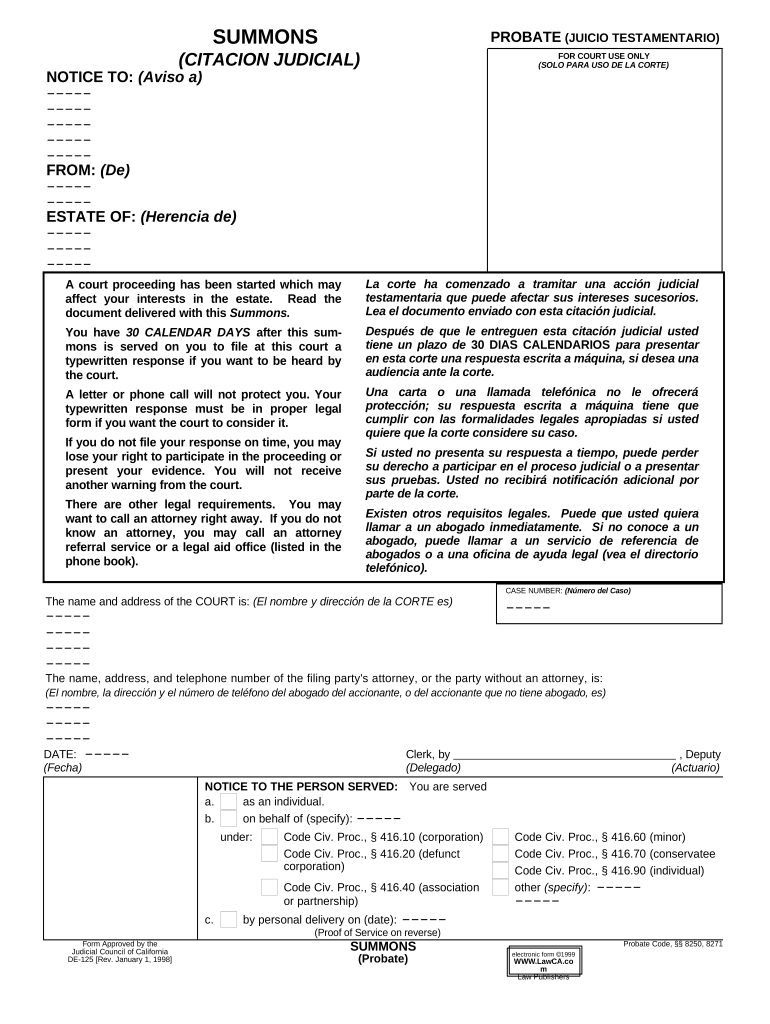
Click ‘Get Form’ to open the summons probate document in the editor.
Begin by filling in the 'NOTICE TO' section with the names and addresses of all parties involved. This ensures that everyone is properly notified about the court proceedings.
In the 'FROM' section, enter your name and address as the filing party. This identifies who is initiating the probate process.
Complete the 'ESTATE OF' field with the name of the deceased individual whose estate is being probated.
Fill in the 'CASE NUMBER' provided by the court, which helps track your case throughout its progression.
Ensure you include your attorney's information if applicable, or indicate if you are representing yourself.
Review all entries for accuracy before saving and exporting your completed form for submission.
Start using our platform today to streamline your summons probate process for free!
Proof of service Probate CaliforniaCitation probateWill and probateProbate objection formsProbate citation formOrder of probateProbate letters of testamentaryLetters of probate
Security and compliance
At DocHub, your data security is our priority. We follow HIPAA, SOC2, GDPR, and other standards, so you can work on your documents with confidence.
Mar 27, 2026 Probate Court Forms. Note that recent changes in probate law make some forms obsolete. Check with your county court for updated forms. ProbateRead more
Summons (Probate) (DE-125). Tells parties other than the petitioner that a probate case has started and what can happen if a response is not filed in 30 days.Read more
Cookie consent notice
This site uses cookies to enhance site navigation and personalize your experience.
By using this site you agree to our use of cookies as described in our Privacy Notice.
You can modify your selections by visiting our Cookie and Advertising Notice.