Type text, add images, blackout confidential details, add comments, highlights and more.
02. Sign it in a few clicks
Draw your signature, type it, upload its image, or use your mobile device as a signature pad.
03. Share your form with others
Send it via email, link, or fax. You can also download it, export it or print it out.
How to use or fill out adult adoption with our platform
Ease of Setup
DocHub User Ratings on G2
Ease of Use
DocHub User Ratings on G2
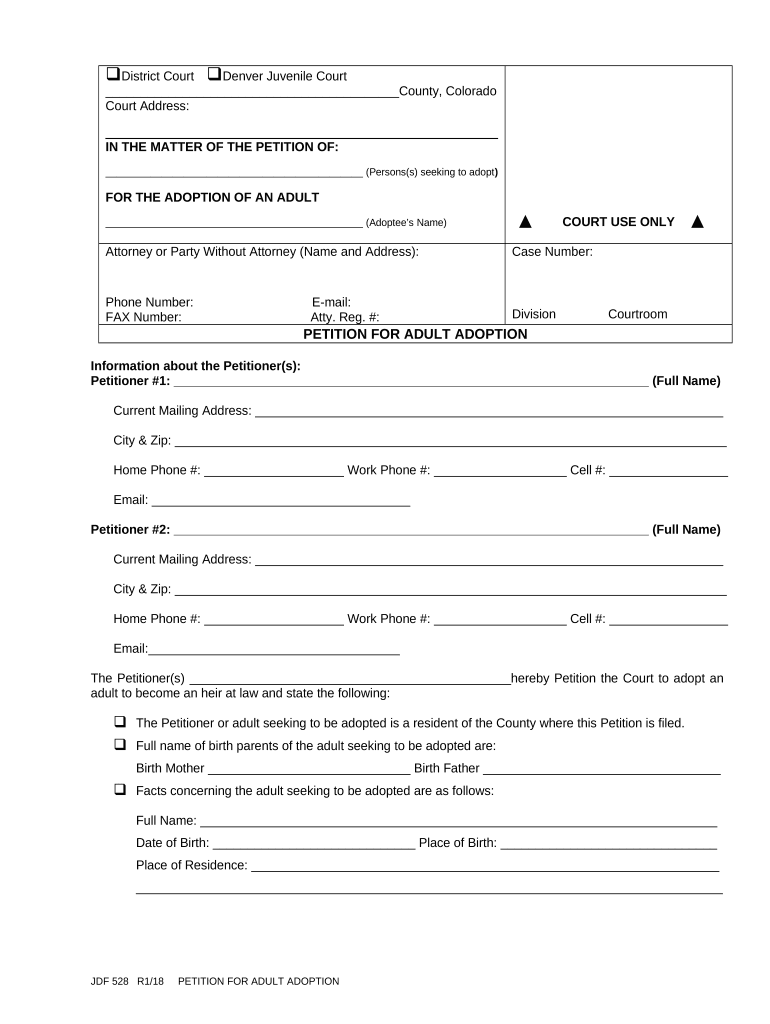
Click ‘Get Form’ to open the adult adoption petition in the editor.
Begin by entering the names of the petitioners in the designated fields. Ensure that you provide accurate current mailing addresses, phone numbers, and email addresses for both Petitioner #1 and Petitioner #2.
Fill in the details of the adult seeking adoption, including their full name, date of birth, place of birth, and current residence. This information is crucial for processing your petition.
Indicate whether the name of the adoptee will remain unchanged or if it will be changed by filling in the appropriate section.
Complete the verification section by signing and dating where indicated. Both petitioners must sign to validate the document.
Start your adult adoption process today using our platform for free!
Adult adoption near meAdult adoption californiaAdult adoption formsAdult adoption redditAdult adoption for adultsAdult adoption websiteAdult adoption San DiegoAdult adoption process
Security and compliance
At DocHub, your data security is our priority. We follow HIPAA, SOC2, GDPR, and other standards, so you can work on your documents with confidence.
May 13, 2022 Though not equivalent to annulment, adult adoption nevertheless demonstrates that adoptees are trusted as adults with their own decisions overRead more
Cookie consent notice
This site uses cookies to enhance site navigation and personalize your experience.
By using this site you agree to our use of cookies as described in our Privacy Notice.
You can modify your selections by visiting our Cookie and Advertising Notice.