Type text, add images, blackout confidential details, add comments, highlights and more.
02. Sign it in a few clicks
Draw your signature, type it, upload its image, or use your mobile device as a signature pad.
03. Share your form with others
Send it via email, link, or fax. You can also download it, export it or print it out.
How to use or fill out wi writ replevin with our platform
Ease of Setup
DocHub User Ratings on G2
Ease of Use
DocHub User Ratings on G2
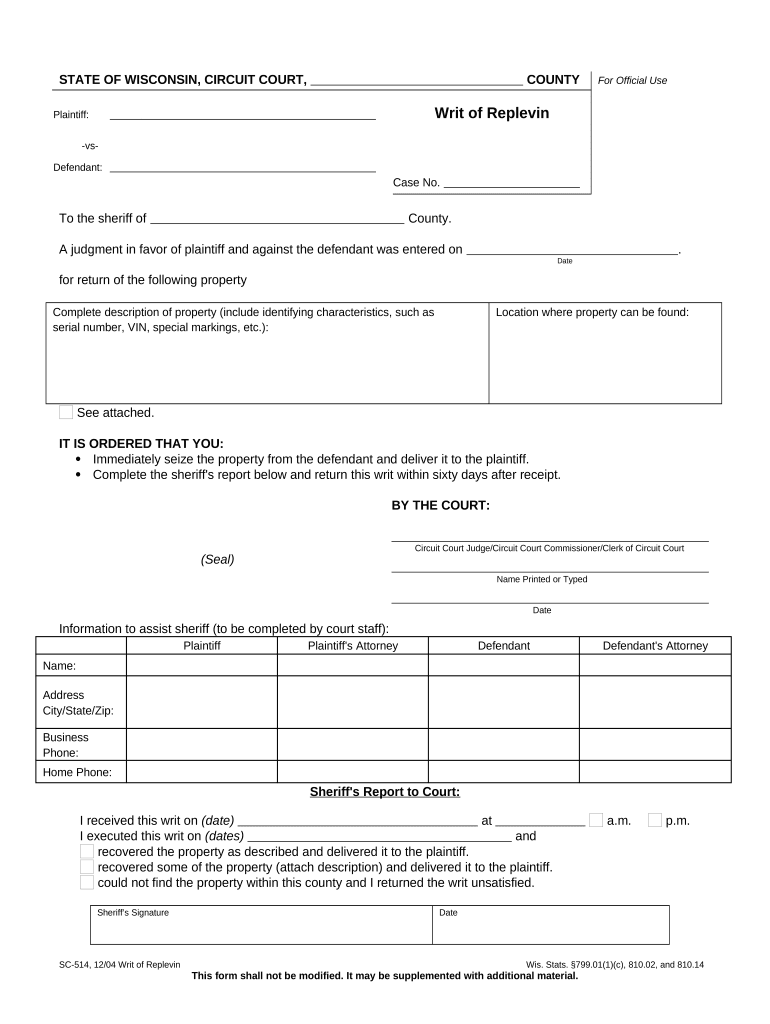
Click ‘Get Form’ to open the wi writ replevin in the editor.
Begin by entering the plaintiff's name and the defendant's name in the designated fields. Ensure accuracy as this information is crucial for legal proceedings.
Fill in the case number, which helps identify your specific legal matter. This should be provided by the court.
Specify the county where the sheriff will execute the writ. This is important for jurisdictional purposes.
In the property description section, provide a detailed account of the property to be seized, including any identifying characteristics like serial numbers or VINs.
Indicate where the property can be found. This assists law enforcement in locating it efficiently.
Complete any additional sections as required, such as information for court staff and sheriff’s report details.
Start using our platform today to fill out your wi writ replevin easily and for free!
Constitutional Law - Due Process - Replevin - Fuentes v. Shevin
The only difference will be that the writ of replevin will be executed a few days after the creditor files his application for a writ, rather than the same.Read more
IT IS ORDERED THAT YOU: Immediately seize the property from the defendant and deliver it to the plaintiff. Complete the sheriffs report and return the writRead more
Cookie consent notice
This site uses cookies to enhance site navigation and personalize your experience.
By using this site you agree to our use of cookies as described in our Privacy Notice.
You can modify your selections by visiting our Cookie and Advertising Notice.