




Here's how it works

01. Edit your columbia county georgia divorce online
Type text, add images, blackout confidential details, add comments, highlights and more.

02. Sign it in a few clicks
Draw your signature, type it, upload its image, or use your mobile device as a signature pad.

03. Share your form with others
Send annulment in ga via email, link, or fax. You can also download it, export it or print it out.
How to use or fill out annulment for Columbia County GA with our platform

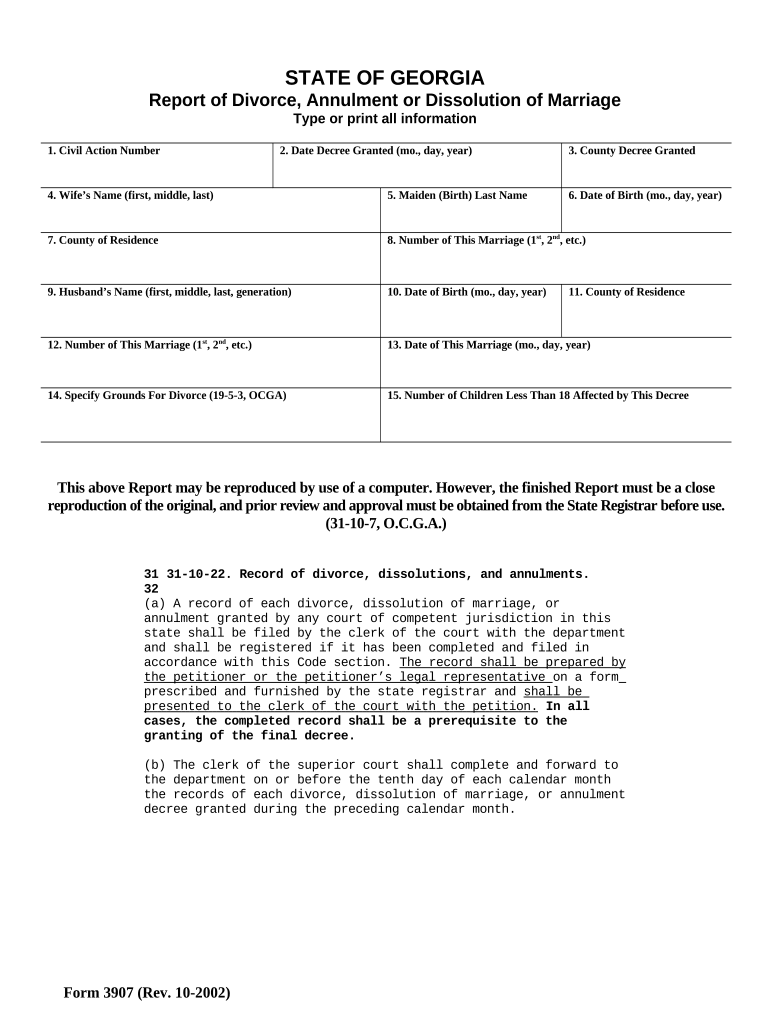
- Click ‘Get Form’ to open the annulment form in the editor.
- Begin by entering the Civil Action Number at the top of the form. This number is essential for tracking your case.
- Next, input the Date Decree Granted using the format (mo., day, year). This indicates when your annulment was officially recognized.
- Fill in the County Decree Granted, specifying where the annulment was processed.
- Provide your Wife’s Name and Maiden (Birth) Last Name. Ensure accuracy as this information is crucial for legal records.
- Enter both parties' Dates of Birth and their respective Counties of Residence. This helps establish identity and jurisdiction.
- Indicate the Number of This Marriage for both parties (1st, 2nd, etc.) to clarify marital history.
- Specify Grounds For Divorce according to OCGA 19-5-3. Be clear and concise in your explanation.
- Lastly, indicate the Number of Children Less Than 18 affected by this decree, if applicable.
Start filling out your annulment form today for free using our platform!
Fill out annulment for columbia county ga online
It's free
It's free
Security and compliance
At DocHub, your data security is our priority. We follow HIPAA, SOC2, GDPR, and other standards, so you can work on your documents with confidence.
Learn more




