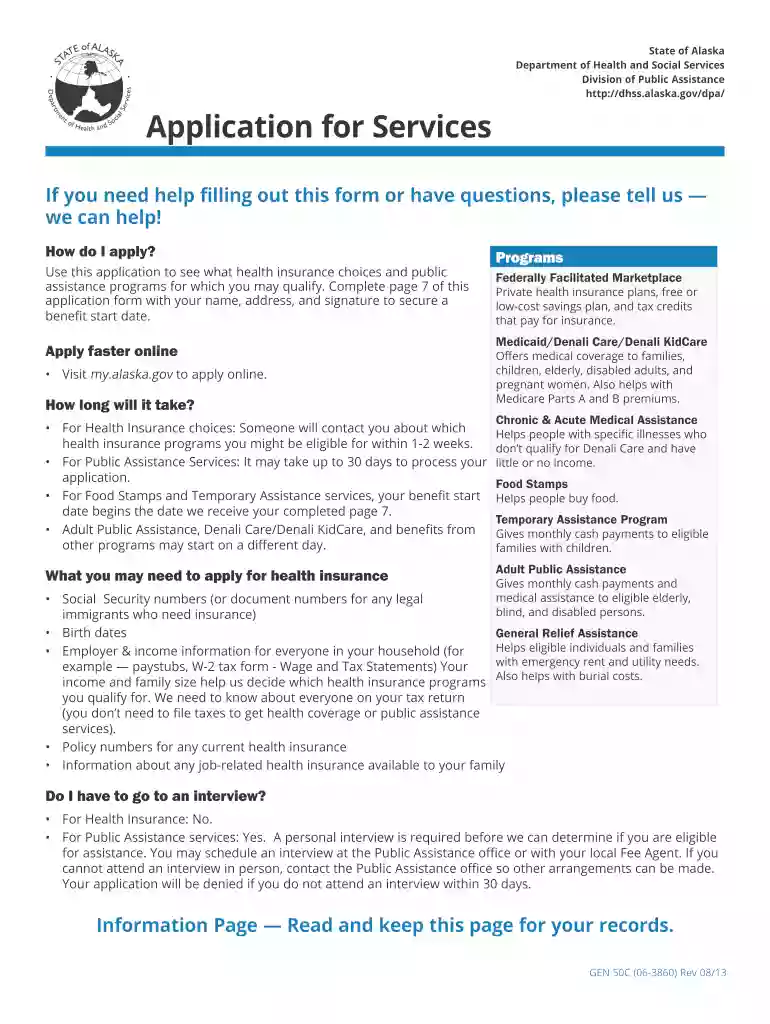
Alaska assistance gen50 c form 2026

Get Form
alaska public assistance application Preview on Page 1

Here's how it works

01. Edit your alaska public assistance application online
Type text, add images, blackout confidential details, add comments, highlights and more.

02. Sign it in a few clicks
Draw your signature, type it, upload its image, or use your mobile device as a signature pad.

03. Share your form with others
Send alaska snap application via email, link, or fax. You can also download it, export it or print it out.

How to use or fill out the Alaska Assistance GEN50 C form with our platform

Form edit decoration
9.5
Ease of Setup
DocHub User Ratings on G2
9.0
Ease of Use
DocHub User Ratings on G2
  1. Click ‘Get Form’ to open the Alaska Assistance GEN50 C form in the editor.
  2. Begin by filling out your personal information on page 7, including your name, address, and signature. This is crucial for securing a benefit start date.
  3. Proceed to list all household members in Step 2. Provide their names, relationships, Social Security numbers, and dates of birth. Ensure accuracy as this affects eligibility.
  4. In Step 3, detail your household income. Include all sources of income and specify how often you receive payments. This information is vital for determining assistance eligibility.
  5. Complete Steps 4 through 10 as applicable, providing details about assets, expenses, and any relevant documentation required for your application.

Utilize our platform to streamline your application process for free and ensure all necessary information is accurately captured!

See more alaska assistance gen50 c form versions

We've got more versions of the alaska assistance gen50 c form form. Select the right alaska assistance gen50 c form version from the list and start editing it straight away!
Versions Form popularity Fillable & printable
2022 4.8 Satisfied (170 Votes)
2021 4.9 Satisfied (49 Votes)
2021 4.3 Satisfied (46 Votes)
2020 4.7 Satisfied (60 Votes)
2014 4.7 Satisfied (28 Votes)
2013 4 Satisfied (25 Votes)
be ready to get more

Complete this form in 5 minutes or less

Get form

Got questions?

We have answers to the most popular questions from our customers. If you can't find an answer to your question, please contact us.
Contact us
1. Residency and Citizenship Applicants must be Alaska residents and U.S. citizens or have proper immigration status in 2025. 2. Age/Disability Applicants must be aged 65 or older, blind, or disabled.
You can file online or by submitting a paper application. You will be required to submit an original birth certificate, passport or naturalization certificate, and other required information as requested from the PFD Division after we receive your application.

Security and compliance

At DocHub, your data security is our priority. We follow HIPAA, SOC2, GDPR, and other standards, so you can work on your documents with confidence.

Learn more