Improve your efficiency with Financial explained Balance Sheet Templates

Papers administration takes up to half of your business hours. With DocHub, you can reclaim your office time and boost your team's productivity. Access Financial explained Balance Sheet Templates online library and discover all form templates relevant to your everyday workflows.

Effortlessly use Financial explained Balance Sheet Templates:

  1. Open Financial explained Balance Sheet Templates and employ Preview to find the suitable form.
  2. Click Get Form to start working on it.
  3. Wait for your form to upload in the online editor and begin modifying it.
  4. Add new fillable fields, symbols, and pictures, modify pages order, and many more.
  5. Fill out your file or prepare it for other contributors.
  6. Download or deliver the form by link, email attachment, or invite.

Improve your everyday document administration with our Financial explained Balance Sheet Templates. Get your free DocHub profile right now to discover all forms.


Video Guide on Financial explained Balance Sheet Templates management

video background

Commonly Asked Questions about Financial explained Balance Sheet Templates

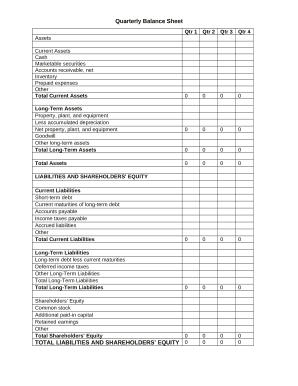
Preparing a balance sheet involves several steps: Gather Financial Information: Gather all your financial data, including assets, liabilities, and equity. Organize Assets: Here is the list of all assets, including current assets (cash, inventory) and non-current assets (property, equipment).
The Balance Sheet Template for Excel is a pre-designed spreadsheet that allows users to enter their companys financial information, including assets, liabilities, and equity. This template is useful for businesses of all sizes, as it can be customized to fit each companys specific needs.
A: Yes. Excel has a range of financial templates, including income statements, cash flow statements, and balance sheets.
How to make a balance sheet Invest in accounting software. Create a heading. Use the basic accounting equation to separate each section. Include all of your assets. Create a section for liabilities. Create a section for owners equity. Add total liabilities to total owners equity.
Creating a budgeting plan for your household can feel overwhelming and hard, but Excel can help you get organized and on track with a variety of free and premium budgeting templates.
Those who havent used Excel before or arent familiar with its features can download Excel bookkeeping templates online. Once you create or download templates, you can use them as a basis for more advanced account-related tasks like basic financial statements, forms, receipts, reports, etc.
What is a balance sheet template? Balance sheets summarize and present the equation: Assets = Liabilities + Equity (alternatively Equity = Assets Liabilities), for your organization at a certain date. These statements are generated regularly and will likely contain many of the same fields over the long term.
#1 How to do Analysis of Assets in the Balance Sheet? Fixed Assets Turnover Ratio = Net sales/Average Fixed Assets. Current Ratio = Current Assets/Current Liabilities. Quick Ratio = Quick Assets/ Current Liabilities. Debt to equity ratio =Long term debts/ Shareholders equity. Equity = Total Asset Total Liabilities.