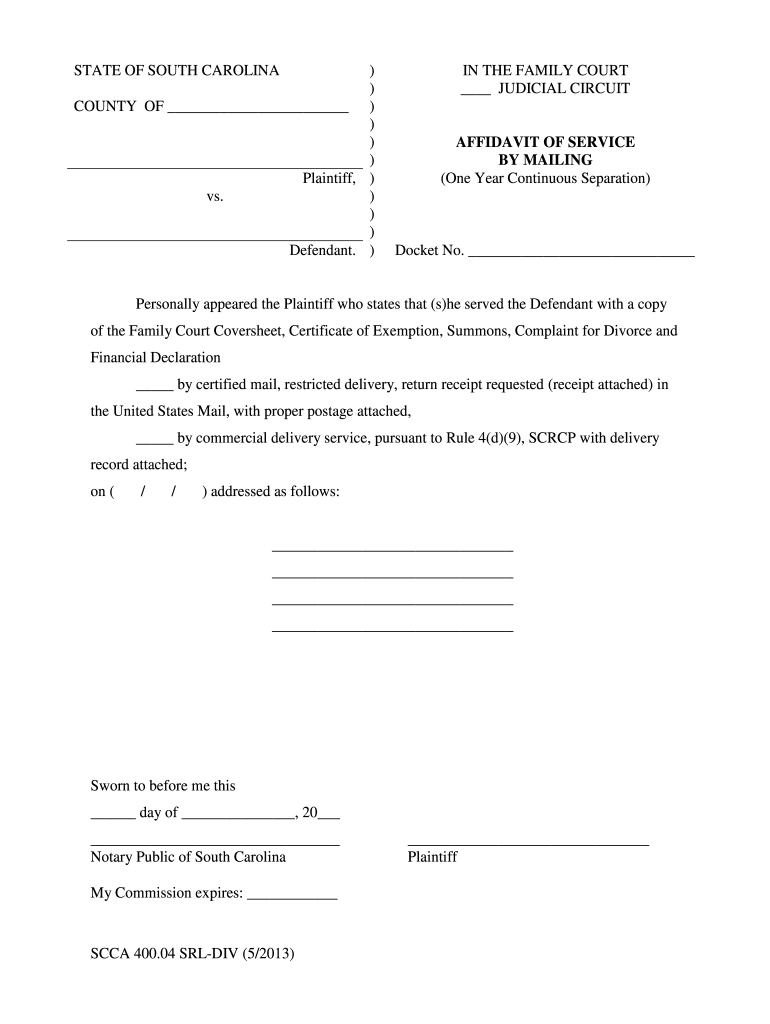
South carolina court proof of service 2026

Get Form
proof of service form Preview on Page 1

Here's how it works

01. Edit your proof of service form online
Type text, add images, blackout confidential details, add comments, highlights and more.
02. Sign it in a few clicks
Draw your signature, type it, upload its image, or use your mobile device as a signature pad.
03. Share your form with others
Send affidavit of service south carolina via email, link, or fax. You can also download it, export it or print it out.

How to use or fill out south carolina court proof of service with DocHub

Form edit decoration
9.5
Ease of Setup
DocHub User Ratings on G2
9.0
Ease of Use
DocHub User Ratings on G2
  1. Click ‘Get Form’ to open the South Carolina Court Proof of Service in our editor.
  2. Begin by entering the county name at the top of the form, followed by the docket number. This information is crucial for identifying your case.
  3. In the section where you indicate how you served the Defendant, select either 'by certified mail' or 'by commercial delivery service'. Make sure to check the appropriate box and attach any required receipts.
  4. Fill in the date of service in the designated area. Ensure that this date reflects when you actually mailed or delivered the documents.
  5. Provide the Defendant's address clearly in the space provided. Accuracy here is essential for proper service.
  6. Finally, sign and date where indicated, and ensure a notary public witnesses your signature if required. This step validates your affidavit.

Start using our platform today to easily complete your South Carolina Court Proof of Service for free!

See more south carolina court proof of service versions

We've got more versions of the south carolina court proof of service form. Select the right south carolina court proof of service version from the list and start editing it straight away!
Versions Form popularity Fillable & printable
2013 4.2 Satisfied (26 Votes)
be ready to get more

Complete this form in 5 minutes or less

Get form

Got questions?

We have answers to the most popular questions from our customers. If you can't find an answer to your question, please contact us.
Contact us
This Rule 37 is the language of the Federal Rule with minor changes. The Federal Rule provides that a motion to compel discovery or for sanctions may be brought either in the court where the action is pending or in the place where the discovery or deposition is taken.
This document serves as verification that legal documents have been delivered to an intended recipient within the regulated deadline and that the recipient has time to respond. Proof of service prevents a served party from claiming they never received legal documents or werent given enough time to respond.
Details needed for a complete Proof of Service Name of the person being served. Address of the person being served. Name of the person who served the papers. Method of service (hand delivered, mailed, etc.) Date of service. Signature of the person who served the papers. Acknowledgement of the person who was served.
At a minimum, your ToS agreement should include: Tell Users Who You Are: Clearly identify your business. Explain Your Service: Describe what your website or app offers. Promise and Assurance: If relevant, let users know about any warranties or guarantees.

Security and compliance

At DocHub, your data security is our priority. We follow HIPAA, SOC2, GDPR, and other standards, so you can work on your documents with confidence.

Learn more
ccpa2
pci-dss
gdpr-compliance
hipaa
soc-compliance