Crcst mobile application 2013 form-2026

Get Form
crcst mobile application 2013 form Preview on Page 1

Here's how it works

01. Edit your form online
Type text, add images, blackout confidential details, add comments, highlights and more.

02. Sign it in a few clicks
Draw your signature, type it, upload its image, or use your mobile device as a signature pad.

03. Share your form with others
Send it via email, link, or fax. You can also download it, export it or print it out.

How to use or fill out crcst mobile application 2013 form with our platform

Form edit decoration
9.5
Ease of Setup
DocHub User Ratings on G2
9.0
Ease of Use
DocHub User Ratings on G2
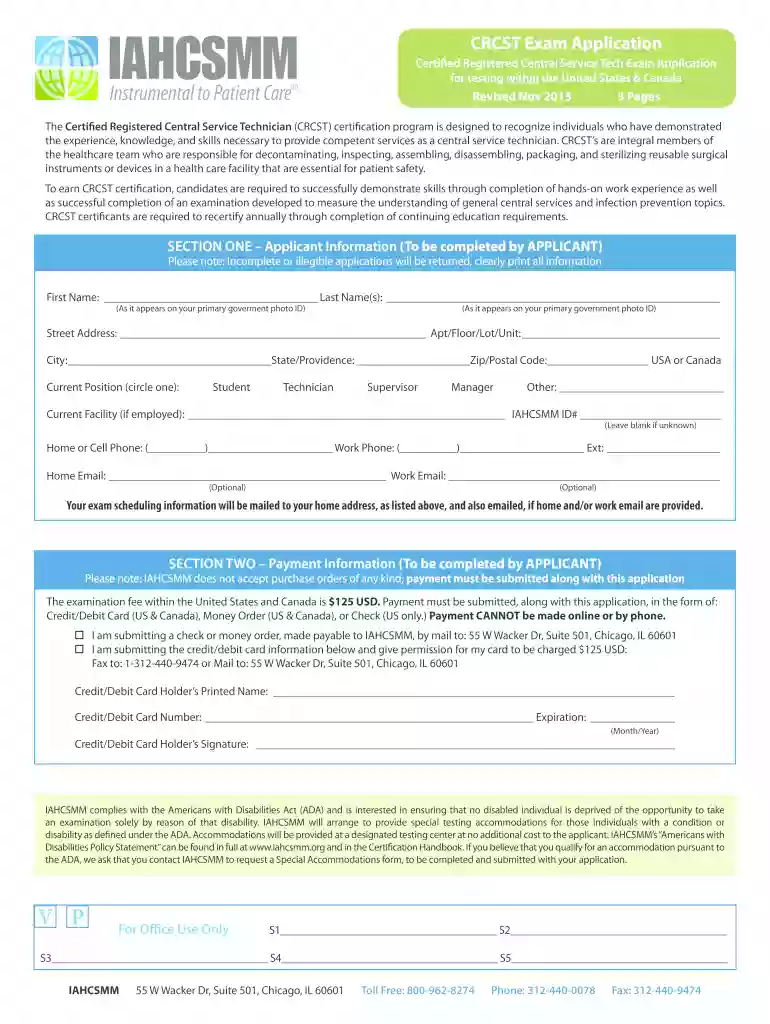
  1. Click ‘Get Form’ to open the crcst mobile application 2013 form in the editor.
  2. Begin with SECTION ONE – Applicant Information. Clearly print your first and last name as it appears on your government photo ID, followed by your address, contact numbers, and email addresses. Ensure all fields are filled accurately to avoid delays.
  3. Move to SECTION TWO – Payment Information. Select your payment method and provide the necessary details. Remember that payments must accompany the application; ensure you follow the instructions for checks or credit card submissions.
  4. In SECTION THREE – Statement of Understanding, read through the terms carefully. Your signature is mandatory here, confirming your understanding of the certification policies.
  5. Complete SECTION FOUR – Type of CRCST by selecting either Full Certification or Provisional Certification based on your experience hours.
  6. Finally, if applicable, have your manager/supervisor complete SECTION FIVE – Hands-On Experience. This section must be filled out by someone in a supervisory role.

Start using our platform today to fill out your crcst mobile application 2013 form easily and for free!

See more crcst mobile application 2013 form versions

We've got more versions of the crcst mobile application 2013 form form. Select the right crcst mobile application 2013 form version from the list and start editing it straight away!
Versions Form popularity Fillable & printable
2018 4.8 Satisfied (251 Votes)
2013 4.3 Satisfied (140 Votes)
be ready to get more

Complete this form in 5 minutes or less

Get form

Got questions?

We have answers to the most popular questions from our customers. If you can't find an answer to your question, please contact us.
Contact us
CRC Exam Structure The exam is divided in two (2) sections: Rehabilitation and Disability (R) and Counseling (C). It consists of a total of 175 multiple-choice questions without a break in between. Each exam includes 150 scored items and 25 field test questions that will not be used in the scoring of the exam.
How hard is the certification exam? ing to HSPA, out of 11,128 CRCST exams taken in 2023, 72% passed the test. The exam is not a walk in the park! Youll need to be well-prepared both academically and professionally to pass the exam and become certified.
The only thing you need to be eligible to take the CRCST exam is 400 hours of documented hands-on experience. You can take the exam before you have the 400 hours, but you must submit documentation of your hands-on experience, completed on a paid or volunteer basis, within six months of passing the exam.
Did you know? The CRCST exam has 150 multiple-choice questions. It covers 7 key areas of sterile processing, including cleaning, decontamination, disinfection, preparation, documentation, and sterilization. A score of 70% or higher is required to pass and take you a step further to an IAHCSMM CRCST certification.

Security and compliance

At DocHub, your data security is our priority. We follow HIPAA, SOC2, GDPR, and other standards, so you can work on your documents with confidence.

Learn more
ccpa2
pci-dss
gdpr-compliance
hipaa
soc-compliance
be ready to get more

Complete this form in 5 minutes or less

Get form