Type text, add images, blackout confidential details, add comments, highlights and more.

02. Sign it in a few clicks
Draw your signature, type it, upload its image, or use your mobile device as a signature pad.

03. Share your form with others
Send it via email, link, or fax. You can also download it, export it or print it out.

How to use or fill out cg 718a with our platform
Ease of Setup
DocHub User Ratings on G2
Ease of Use
DocHub User Ratings on G2
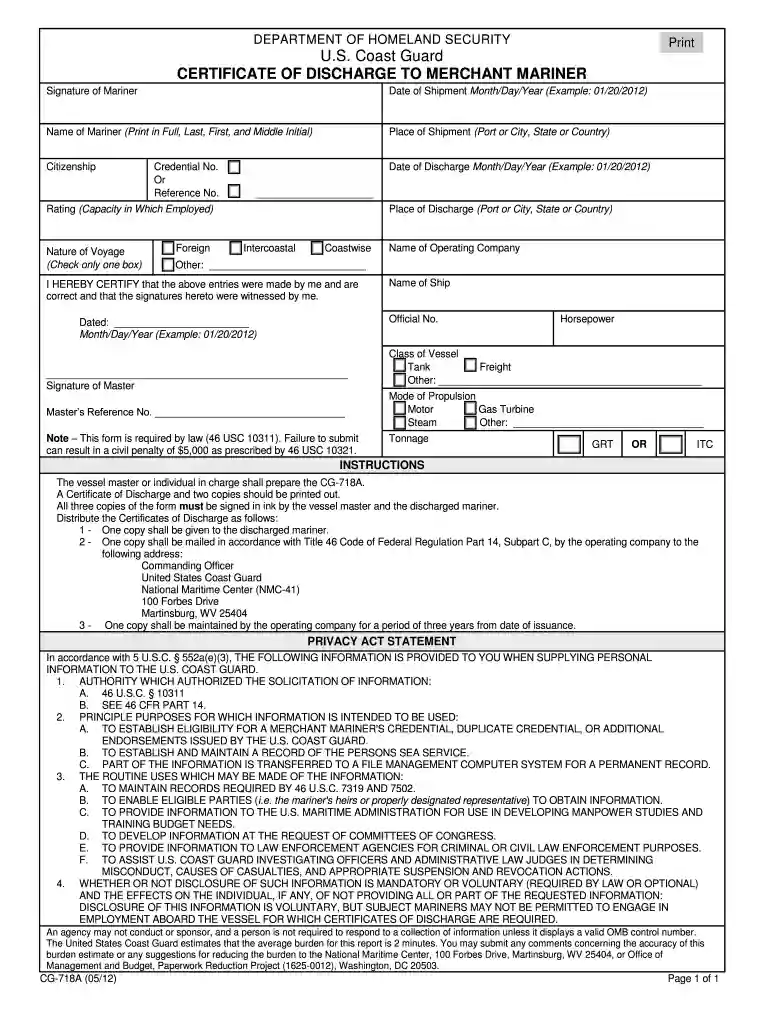
Click ‘Get Form’ to open the CG-718A in the editor.
Begin by entering the 'Name of Mariner' in full, including last name, first name, and middle initial. This is crucial for identification.
Fill in the 'Date of Shipment' and 'Date of Discharge' using the format Month/Day/Year (e.g., 01/20/2012). Ensure accuracy as these dates are essential for record-keeping.
Indicate the 'Place of Shipment' and 'Place of Discharge', specifying either port, city, state, or country as applicable.
Select the appropriate 'Nature of Voyage' by checking one box: Foreign, Intercoastal, Coastwise, or Other. This helps categorize the voyage type.
Complete fields for 'Rating', 'Credential No.', and 'Name of Operating Company'. These details are important for maritime records.
Finally, ensure that both the mariner and vessel master sign the document. You can easily add signatures using our platform's signature feature.
Start filling out your CG-718A today for free on our platform!
46 CFR 14.307 - Entries on certificate of discharge.
The prescribed format may include the current form CG-718A or other means provided by the Coast Guard. If not using the Coast Guard prescribed format, theRead more
Cookie consent notice
This site uses cookies to enhance site navigation and personalize your experience.
By using this site you agree to our use of cookies as described in our Privacy Notice.
You can modify your selections by visiting our Cookie and Advertising Notice.