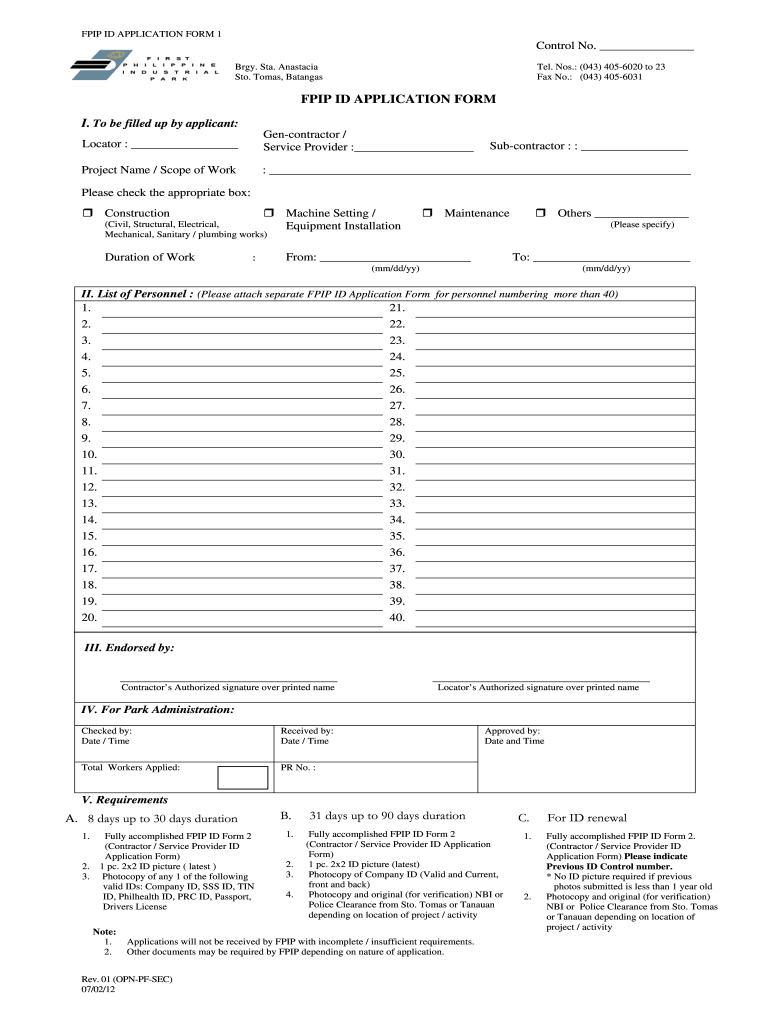
Fpip vehicles sticker application form rev 18 2026

Get Form
bffhai sticker online application 2024 Preview on Page 1

Here's how it works

01. Edit your bffhai sticker online application 2024 online
Type text, add images, blackout confidential details, add comments, highlights and more.
02. Sign it in a few clicks
Draw your signature, type it, upload its image, or use your mobile device as a signature pad.
03. Share your form with others
Send bffhai sticker 2024 via email, link, or fax. You can also download it, export it or print it out.

How to use or fill out fpip vehicles sticker application form rev 18 with our platform

Form edit decoration
9.5
Ease of Setup
DocHub User Ratings on G2
9.0
Ease of Use
DocHub User Ratings on G2
  1. Click ‘Get Form’ to open it in the editor.
  2. Begin by filling in your locator information and the name of your general contractor or service provider. Ensure that all details are accurate.
  3. In the 'Project Name / Scope of Work' section, provide a clear description of the project. Specify the type of work by checking the appropriate box for construction, machine setting, maintenance, or others.
  4. Indicate the duration of work by entering start and end dates in mm/dd/yy format.
  5. List personnel involved in the project. If there are more than 40 personnel, attach additional FPIP ID Application Forms as needed.
  6. Ensure that both contractor’s and locator’s authorized signatures are provided at the end of the form.
  7. Review all sections for completeness before submitting to avoid delays due to insufficient requirements.

Start using our platform today to easily complete your fpip vehicles sticker application form for free!

See more fpip vehicles sticker application form rev 18 versions

We've got more versions of the fpip vehicles sticker application form rev 18 form. Select the right fpip vehicles sticker application form rev 18 version from the list and start editing it straight away!
Versions Form popularity Fillable & printable
2012 4.9 Satisfied (230 Votes)
2011 4 Satisfied (52 Votes)
be ready to get more

Complete this form in 5 minutes or less

Get form

Got questions?

We have answers to the most popular questions from our customers. If you can't find an answer to your question, please contact us.
Contact us

Microsoft Word doesn’t have signing tools to create valid electronic signatures and enforceable paperwork. Luckily, DocHub is an online eSignature-compliant editor that works with various file formats, such as .doc files. Log in to your account and upload the Word version of your bffhai sticker application form 2024 from your device and cloud, or URL - our editor will automatically convert it into an editable PDF. Make all required modifications in your document and click Sign to create your own legally-binding electronic signature. There are four signing options from which to choose.

When you edit your bffhai sticker with DocHub, you merely require a stable web connection and virtually any browser installed on your device. No need to set up any third-party applications or research tutorials. Simply open a tab with DocHub, drag and drop your file, and modify it immediately.

Vehicle Sticker Online Application Click New Application , then select Application on the right frame. Key-in your phone number email address, then click button Apply. Key-in your vehicles detail, then click button Add. Click New Application , then select Upload Document on the right frame.
Other Options For Purchasing an Illinois Plate Sticker Visit the Illinois Secretary of States website and enter your vehicle registration number and PIN, both of which are found on your renewal notice. After entering your payment, your sticker will be mailed to you, usually within a week.
5:12 8:08 And Im not satisfied with it I can easily peel it off and readjust it. Now I can put it closer toMoreAnd Im not satisfied with it I can easily peel it off and readjust it. Now I can put it closer to the bottom. And when Im satisfied. I can just press on it and it should stick to the windshield.

Security and compliance

At DocHub, your data security is our priority. We follow HIPAA, SOC2, GDPR, and other standards, so you can work on your documents with confidence.

Learn more
ccpa2
pci-dss
gdpr-compliance
hipaa
soc-compliance

People also ask

1:26 2:26 Then I lined the letter up where it should be. And carefully pressed it into. Place. You cant evenMoreThen I lined the letter up where it should be. And carefully pressed it into. Place. You cant even tell it was missing. And thats all there is to applying your own decal.

bffhai sticker online application 2024 requirements