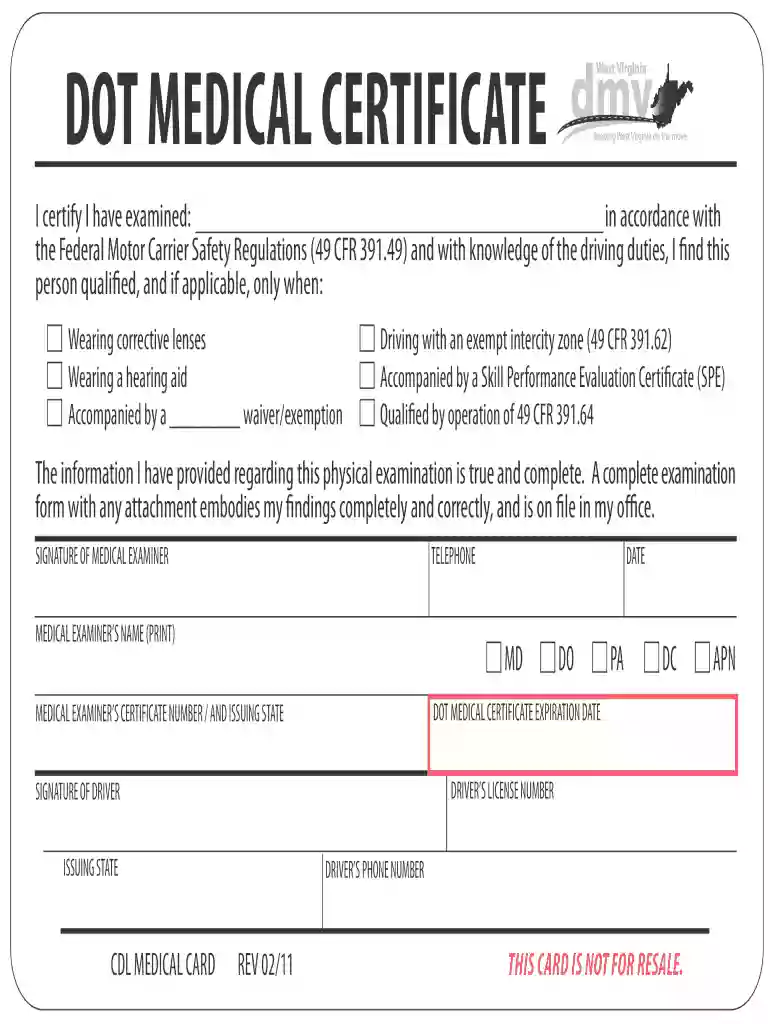
Medical fitness report 2026

Get Form
medical fitness report Preview on Page 1

Here's how it works

01. Edit your medical fitness report online
Type text, add images, blackout confidential details, add comments, highlights and more.

02. Sign it in a few clicks
Draw your signature, type it, upload its image, or use your mobile device as a signature pad.

03. Share your form with others
Send medical fitness report sample via email, link, or fax. You can also download it, export it or print it out.

How to use or fill out medical fitness report with our platform

Form edit decoration
9.5
Ease of Setup
DocHub User Ratings on G2
9.0
Ease of Use
DocHub User Ratings on G2
  1. Click ‘Get Form’ to open the medical fitness report in the editor.
  2. Begin by entering the name of the individual being examined in the designated field. Ensure accuracy as this is crucial for identification.
  3. In the section regarding qualifications, check any applicable boxes such as 'Wearing corrective lenses' or 'Accompanied by a waiver/exemption'. This helps clarify any special conditions.
  4. Fill in the details about the medical examiner, including their name, signature, and certification number. This validates the examination process.
  5. Complete the expiration date of the DOT Medical Certificate and ensure that all information is accurate before finalizing.
  6. Finally, have the driver sign and provide their driver's license number and issuing state to complete the form.

Start using our platform today to easily fill out your medical fitness report for free!

See more medical fitness report versions

We've got more versions of the medical fitness report form. Select the right medical fitness report version from the list and start editing it straight away!
Versions Form popularity Fillable & printable
2011 4 Satisfied (29 Votes)
be ready to get more

Complete this form in 5 minutes or less

Get form

Got questions?

We have answers to the most popular questions from our customers. If you can't find an answer to your question, please contact us.
Contact us
3 Easy Steps! Step 1 : Submit your request. Complete our quick medical questionnaire and submit your request for the medical certificate. Step 2: Consultation by a certified doctor. Share necessary details and our doctor will review your request and docHub out to you. Step 3 : Receive your fitness certificate online.
2. How long do UAE medical results take? It takes between 24 to 48 hours, according to the type of application (standard or quick).
How to Check Your Medical Report Online in Dubai: A Step-by-Step Guide Step 1: Visit the DHA Website. Step 2: Navigate to the Medical Fitness Section. Step 3: Access the Medical Fitness Reports Portal. Step 4: Enter Your Details. Step 5: Submit Your Information. Step 6: View and Download Your Medical Report.
A structured format incorporating elements of background information, medical history, physical examination, specimens obtained, treatment provided and opinion is suggested.
The standard visa medical screening involves screening for communicable diseases such as hepatitis, , leprosy, syphilis and tuberculosis to safeguard the health of the community. It includes: A physical assessment by a nurse or physician if required. Simple blood draw procedure for a blood test as per visa category.

Security and compliance

At DocHub, your data security is our priority. We follow HIPAA, SOC2, GDPR, and other standards, so you can work on your documents with confidence.

Learn more
ccpa2
pci-dss
gdpr-compliance
hipaa
soc-compliance
be ready to get more

Complete this form in 5 minutes or less

Get form

People also ask

Medical fitness can be defined as medical readiness to perform duties under all conditions without excessive loss of quality of life, excessive loss of duty time or separation from duty, aggravation of existing medical conditions, or endangering the health of others.
To check your medical status online, follow these steps: Visit the GAMCA medical test booking website or the medical centers website. Click Medical Status. Provide details such as your passport number and nationality. Click the submit button to view your medical status.

ehs medical fitness report