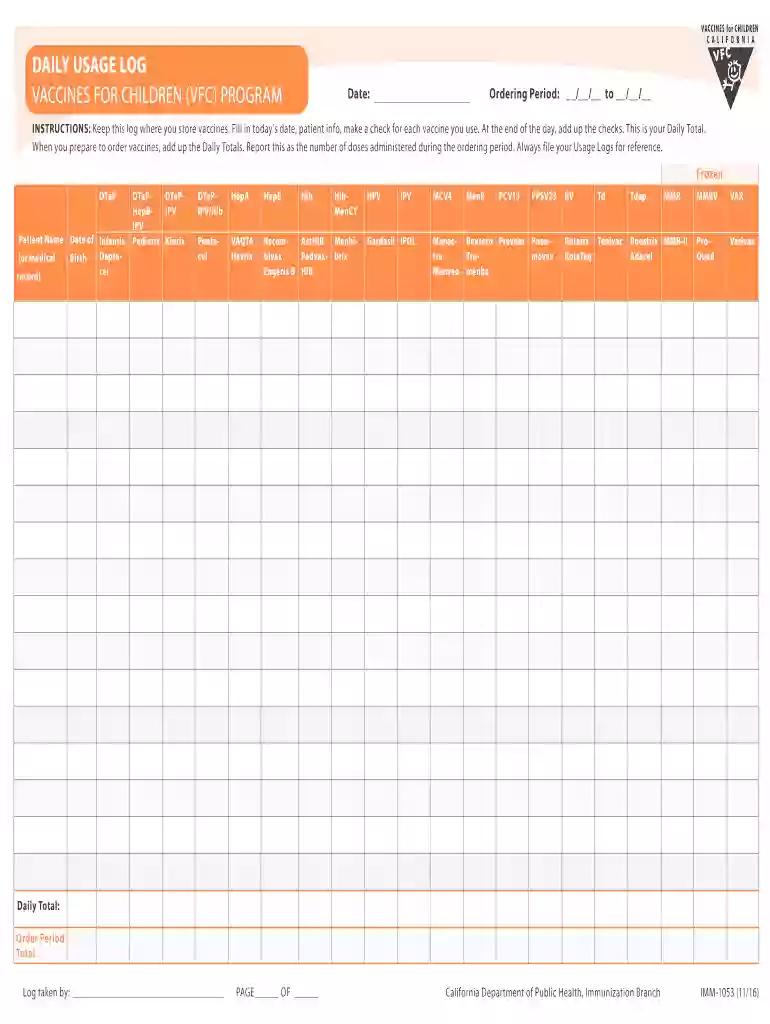
Vaccine inventory log sheet 2026

Get Form
vfc daily usage log Preview on Page 1

Here's how it works

01. Edit your vfc daily usage log online
Type text, add images, blackout confidential details, add comments, highlights and more.

02. Sign it in a few clicks
Draw your signature, type it, upload its image, or use your mobile device as a signature pad.

03. Share your form with others
Send private vaccine daily usage log via email, link, or fax. You can also download it, export it or print it out.

How to use or fill out vaccine inventory log sheet with our platform

Form edit decoration
9.5
Ease of Setup
DocHub User Ratings on G2
9.0
Ease of Use
DocHub User Ratings on G2
  1. Click ‘Get Form’ to open the vaccine inventory log sheet in the editor.
  2. Begin by entering today’s date in the designated field at the top of the form. This is crucial for tracking usage accurately.
  3. In the 'Patient Name' section, input the name of each patient receiving a vaccine. This helps maintain clear records for future reference.
  4. For each vaccine administered, place a checkmark in the corresponding box under the appropriate vaccine type. Ensure you check all vaccines used throughout the day.
  5. At the end of your logging period, sum up all checks to calculate your Daily Total. Enter this total in the specified field.
  6. When preparing to order more vaccines, add up your Daily Totals from this log and report them as doses administered during your ordering period.
  7. Finally, ensure that you save and file your Usage Logs for future reference and compliance.

Start using our platform today to streamline your vaccine inventory management for free!

See more vaccine inventory log sheet versions

We've got more versions of the vaccine inventory log sheet form. Select the right vaccine inventory log sheet version from the list and start editing it straight away!
Versions Form popularity Fillable & printable
2019 4.9 Satisfied (37 Votes)
2014 4 Satisfied (35 Votes)
be ready to get more

Complete this form in 5 minutes or less

Get form

Got questions?

We have answers to the most popular questions from our customers. If you can't find an answer to your question, please contact us.
Contact us
Providers usually count only those vaccine doses that are documented in a written record or a state or local online immuni zation information system (known as an IIS, or registry). No national registry maintains this information.
Maintain a vaccine inventory log, which should include vaccine name, number of doses, arrival condition of the vaccine, manufacturer and lot numbers, and expiration date. If the shipment includes lyophilized (freeze-dried) vaccines, ensure they came with the correct type and quantity of diluents.
Photocopies of immunization records from a licensed healthcare provider or clinic, or from a California K-12 school uploaded to My Health Portal. All records must show the vaccine type, dose, and date of each shot.
Immunization providers are required by law to record what vaccine was given, the date the vaccine was given (month, day, year), the name of the manufacturer of the vaccine, the lot number, the signature and title of the person who gave the vaccine, and the address where the vaccine was given.

Security and compliance

At DocHub, your data security is our priority. We follow HIPAA, SOC2, GDPR, and other standards, so you can work on your documents with confidence.

Learn more
ccpa2
pci-dss
gdpr-compliance
hipaa
soc-compliance
be ready to get more

Complete this form in 5 minutes or less

Get form