Connecticut insurance card 2026

Get Form
connecticut insurance identification card Preview on Page 1

Here's how it works

01. Edit your connecticut insurance identification card online
Type text, add images, blackout confidential details, add comments, highlights and more.

02. Sign it in a few clicks
Draw your signature, type it, upload its image, or use your mobile device as a signature pad.

03. Share your form with others
Send car insurance card via email, link, or fax. You can also download it, export it or print it out.

How to use or fill out Connecticut Insurance Card with our platform

Form edit decoration
9.5
Ease of Setup
DocHub User Ratings on G2
9.0
Ease of Use
DocHub User Ratings on G2
  1. Click ‘Get Form’ to open the Connecticut Insurance Card in the editor.
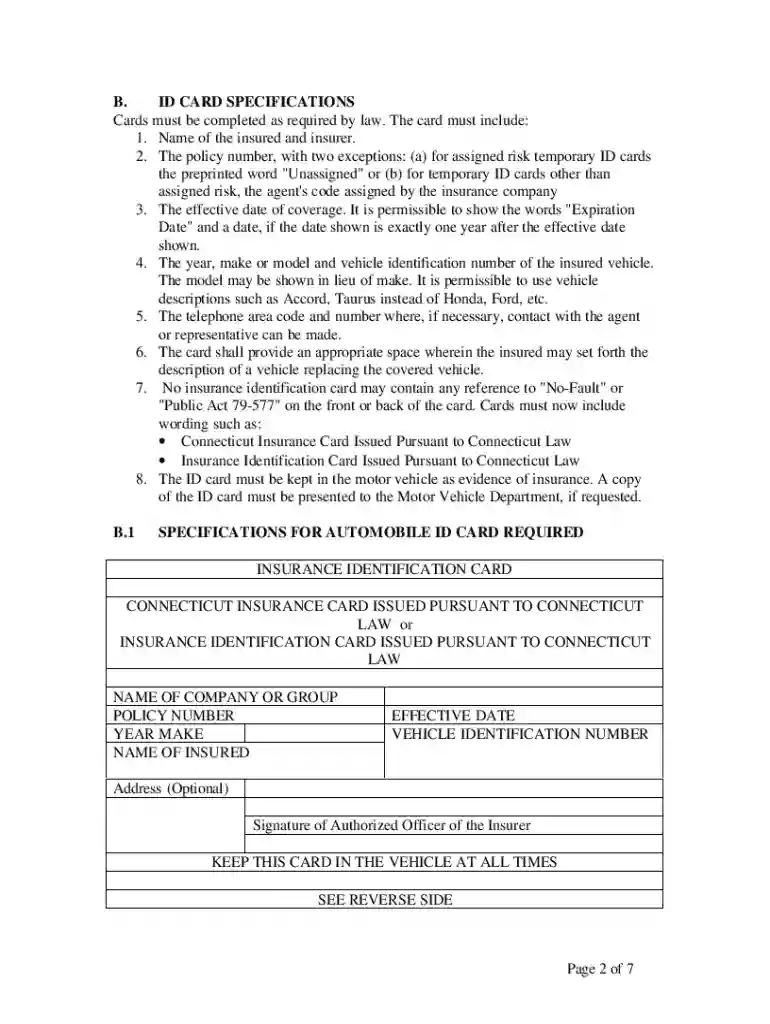
  2. Begin by entering the 'Name of Insured' and 'Name of Company or Group' in the designated fields. Ensure that these names match your registration documents.
  3. Input the 'Policy Number'. If you are using a temporary ID card, include the agent's code if applicable.
  4. Fill in the 'Effective Date' of coverage. You may also add an 'Expiration Date' if it is exactly one year after the effective date.
  5. Provide details about your vehicle, including its 'Year', 'Make', and 'Vehicle Identification Number (VIN)'. You can abbreviate the make if necessary.
  6. Include a contact number for your insurance agent in the specified area. This should be a valid area code and phone number.
  7. If applicable, use the space provided to describe any vehicle replacing the covered vehicle.

Start editing your Connecticut Insurance Card for free today on our platform!

See more connecticut insurance card versions

We've got more versions of the connecticut insurance card form. Select the right connecticut insurance card version from the list and start editing it straight away!
Versions Form popularity Fillable & printable
2000 4.8 Satisfied (124 Votes)
be ready to get more

Complete this form in 5 minutes or less

Get form

Got questions?

We have answers to the most popular questions from our customers. If you can't find an answer to your question, please contact us.
Contact us
HUSKY Health Member ID Card Your name, ID number, and the name of your HUSKY Health member program (A, B, C, D, or LB) are on your ID card. If your HUSKY Health Member ID card has been lost, stolen, or damaged please call Member Engagement Services at 1.800. 859.9889 to ask for a new one.
Which states allow an electronic car insurance card? Alabama. Alaska. Arizona. Arkansas. California. Colorado. Connecticut. Delaware.
Nearly every state and the District of Columbia allow electronic proof of insurance. Massachusetts is the only state that doesnt require drivers to carry proof of insurance since state laws require insurance information to be printed directly on the cars registration.
In most states, you can print your auto insurance ID cards at home. The exception is Hawaii, which does not allow you to print ID cards at home.
(b) For the purposes of this title, the requirement that a person present an automobile insurance identification card to the commissioner or a law enforcement officer may be satisfied by electronic means, including by display of an electronic image on a cellular mobile telephone or other electronic device, except that

People also ask

Can you present digital proof of insurance? Yes, you can provide a picture of your vehicles insurance information. California Vehicle Code 16028 states, The evidence of financial responsibility may be provided using a mobile electronic device.
The owner of a private passenger motor vehicle required to be registered in Connecticut who operates it or permits it to be operated without maintaining the insurance required by law is guilty of a class C misdemeanor (a fine of up to $500, imprisonment up to three months, or both) (CGS 38a-371).

vehicle insurance card