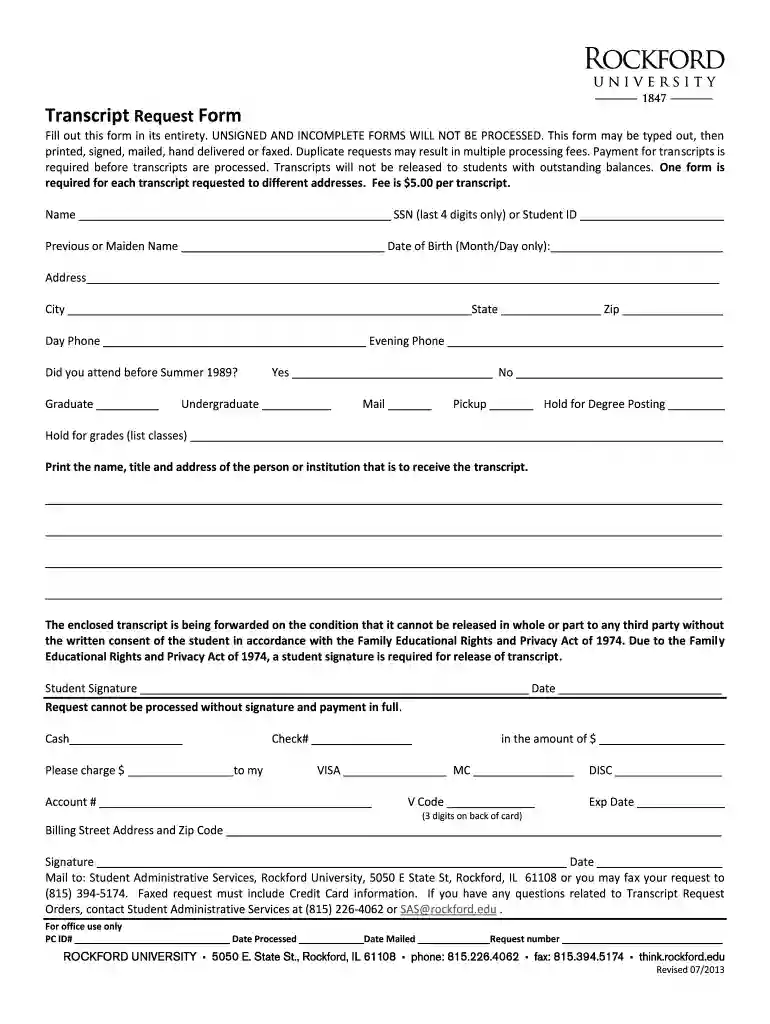
rockford university transcripts Preview on Page 1

Rockford college transcripts 2008 form-2026

Here's how it works

  • 01. Edit your rockford university transcripts online

    Type text, add images, blackout confidential details, add comments, highlights and more.

  • 02. Sign it in a few clicks

    Draw your signature, type it, upload its image, or use your mobile device as a signature pad.

  • 03. Share your form with others

    Send it via email, link, or fax. You can also download it, export it or print it out.

How to use or fill out rockford college transcripts 2008 form with our platform

Form edit decoration
9.5
Ease of Setup
DocHub User Ratings on G2
9.0
Ease of Use
DocHub User Ratings on G2
  1. Click ‘Get Form’ to open the rockford college transcripts 2008 form in the editor.
  2. Begin by entering your full name in the designated field. Ensure accuracy as this will be used for identification.
  3. Input your last four digits of your Social Security Number or Student ID. This is crucial for processing your request.
  4. If applicable, provide your previous or maiden name and date of birth (month/day) to assist in locating your records.
  5. Fill in your current address, including city, state, and zip code, ensuring it is complete for mailing purposes.
  6. Indicate whether you attended before Summer 1989 and select if you are requesting a graduate or undergraduate transcript.
  7. Choose how you would like to receive the transcript: by mail, pickup, or hold for degree posting/grades.
  8. Provide the name and address of the recipient institution or person who will receive the transcript.
  9. Sign and date the form at the bottom to authorize release under FERPA regulations. Ensure payment details are filled out accurately.

Start using our platform today to easily fill out and submit your rockford college transcripts 2008 form for free!

See more rockford university transcripts versions

We've got more versions of the rockford university transcripts form. Select the right rockford university transcripts version from the list and start editing it straight away!

VersionsForm popularityFillable & printable
20134.8 Satisfied (160 Votes)
20084 Satisfied (44 Votes)

be ready to get more

Complete this form in 5 minutes or less

Got questions?

We have answers to the most popular questions from our customers. If you can't find an answer to your question, please contact us.

Sure, you’ll find numerous apps for this on the web. Nevertheless, if you need to eSign your rockford college transcripts 2008 form without installing extra software, DocHub is the best choice you can make. This powerful editor works on mobile devices just as on desktops. Open our editor in your preferred internet browser, register or sign in to your account, and start managing your documents.

You can find and modify your rockford college transcripts 2008 form online by using DocHub. Its straightforward yet feature-rich design enables you to begin effective work immediately after you register your account. Create your profile and add your file, then our user interface will guide you via our stress-free form completion experience.

Security and compliance

At DocHub, your data security is our priority. We follow HIPAA, SOC2, GDPR, and other standards, so you can work on your documents with confidence.

Related links

University Policies Regulations

Students must complete an application form and obtain signatures from the director of Lang Center and the student administrative services (SAS) office. ThisRead more

Learn more
List of Closed Schools and Colleges.pdf

Transcripts can be requested for $10.00 per record. Milwaukee College of Business Rockford College. Rockford, IL. Yes. 2006. 2008. National Teachers Read more

Learn more
If you believe that this page should be taken down, please follow our DMCA take down process here