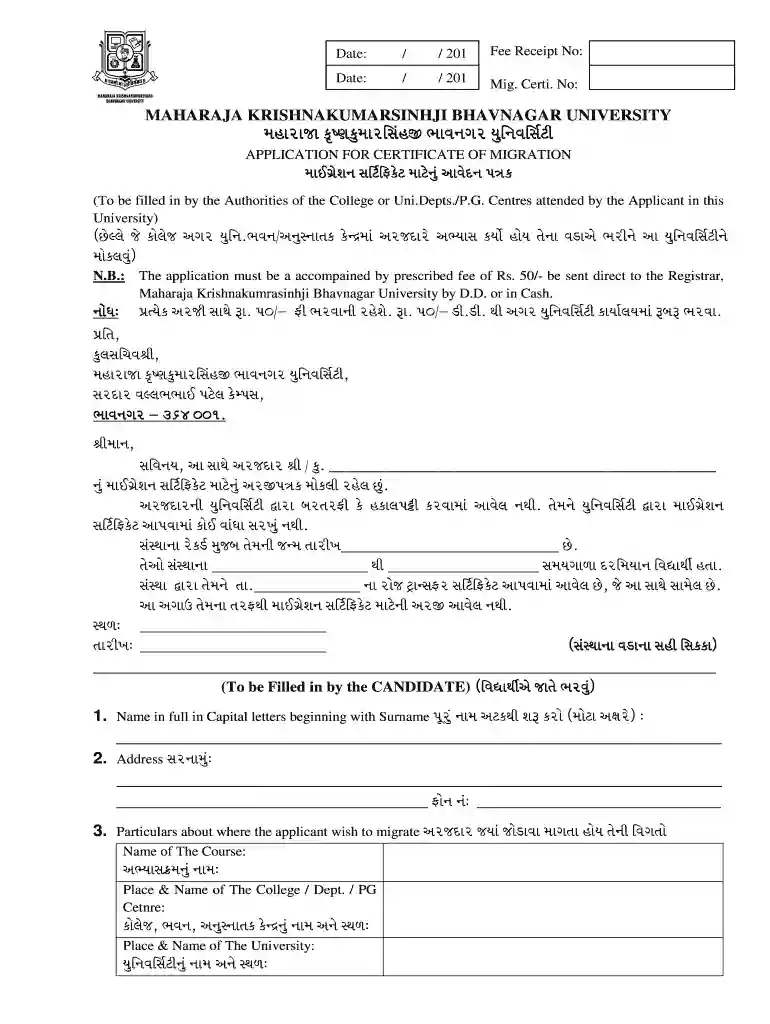
Mkbu exam form 2026

Get Form
mkbu exam form Preview on Page 1

Here's how it works

01. Edit your mkbu exam form online
Type text, add images, blackout confidential details, add comments, highlights and more.

02. Sign it in a few clicks
Draw your signature, type it, upload its image, or use your mobile device as a signature pad.

03. Share your form with others
Send certificate migration form via email, link, or fax. You can also download it, export it or print it out.

Definition & Meaning of the MKBU Exam Form

The MKBU exam form is an application specifically designed for students attending Maharaja Krishnakumarsinhji Bhavnagar University. This form is essential for registering to take various examinations throughout an academic year, including semester and external exams. The MKBU exam form not only captures personal information but also includes details related to the specific semester and courses for which students are registering. Understanding this form is crucial for ensuring compliance with university regulations and for maintaining students’ academic progress.

How to Obtain the MKBU Exam Form

Obtaining the MKBU exam form can be done easily through several channels to ensure that all students have access. The following are the primary methods for obtaining this form:

  • University Website: Visit the official Bhavnagar University website where the MKBU exam form is available for download. This typically includes the latest versions of the form in PDF format.
  • Online Student Portal: Students can log in to their university-provided online accounts to access and fill out the exam forms directly.
  • Physical University Office: The exam forms can also be collected in person from the campus administrative offices responsible for student affairs.

Ensuring that the correct version of the MKBU exam form is obtained is vital, as outdated versions may not be accepted.

Steps to Complete the MKBU Exam Form

Filling out the MKBU exam form requires careful attention to detail to ensure all necessary information is accurately provided. Follow these steps:

  1. Download or Access the Form: Obtain the latest MKBU exam form from the university website or online portal.
  2. Enter Personal Information: Fill in your full name, roll number, department, and contact details carefully. Ensure that the name matches official records.
  3. Specify Course Information: Clearly indicate the courses or subjects for which you are registering, as well as the corresponding semester (e.g., semester one, two, etc.).
  4. Attach Required Documents: Gather and attach necessary documents as instructed, which may include previous mark sheets, identity proof, and fee payment receipts.
  5. Review for Accuracy: Double-check all entries for accuracy and completeness before submission to avoid processing delays.
  6. Submit the Form: Submit your completed MKBU exam form as directed—either online or in person—by the established deadline.

Being thorough in each of these steps ensures that there will be no issues when registering for examinations.

Important Terms Related to the MKBU Exam Form

Understanding key terms associated with the MKBU exam form can aid students in navigating their responsibilities effectively. Some of the essential terms include:

  • Migration Certificate: A document required by students transferring universities, often requested alongside the exam form.
  • Eligibility for Examination: Criteria set by the university that students must meet to sit for their exams, including attendance and previous academic performance.
  • Fee Payment: The process and amount required for registering for exams, which can vary by semester or course.
  • Submission Deadline: Key dates by which the MKBU exam form must be submitted to ensure enrollment in the upcoming examination session.

Familiarity with these terms will help students understand their obligations related to the MKBU exam form.

Form Submission Methods (Online / Mail / In-Person)

Submission methods for the MKBU exam form differ and can impact the processing time and adherence to deadlines:

  • Online Submission: Students can complete and submit the MKBU exam form directly through the university’s online portal. This method often allows for faster processing.
  • Mail Submission: Students choosing to send the completed MKBU exam form via postal service should ensure it is sent well before the deadline to account for potential delays in transit.
  • In-Person Submission: Delivering the form directly to designated university offices guarantees immediate confirmation of submission, offering peace of mind regarding the registration process.

Choosing the appropriate submission method is critical for meeting deadlines and ensuring valid registration for exams.

Key Elements of the MKBU Exam Form

Understanding the critical components of the MKBU exam form can help students adequately prepare for completing it. Key elements include:

  • Personal Identification Details: This includes the student's name, roll number, and contact information.
  • Academic Information: Details concerning the course or subject matter, semester, and any relevant previous qualifications.
  • Fee Structure: A clear breakdown of the fees associated with registering for examinations, including payment methods and deadlines.
  • Certification Agreement: A declaration section where students affirm the accuracy of the information provided and acknowledge the policies of the university related to examinations.

Each of these elements plays a vital role in the processing and validation of the exam form submitted.

Eligibility Criteria for the MKBU Exam Form

Eligibility criteria must be carefully reviewed by students prior to the submission of the MKBU exam form. The following factors are typically assessed:

  • Course Enrollment: Students must officially be enrolled in the courses for which they are registering for examinations.
  • Attendance Requirements: Schools may require students to have met specific attendance thresholds to qualify for exam participation.
  • Submission Timeliness: Forms submitted past the established deadlines may not be processed, leading to potential disqualification from exams.

Awareness of these criteria can guide students in their preparation and ensure that they fulfill all requirements for exam registration.


decoration image ratings of Dochub

Examples of Using the MKBU Exam Form

Practical application of the MKBU exam form can be observed in various scenarios, including:

  • Semester Exam Registration: A student completing the MKBU exam form for their semester exams must provide details about the courses taken and ensure all fees paid.
  • Reassessment Applications: If a student seeks to reassess a previous result, they can use the MKBU exam form to register for the additional evaluations, fulfilling all criteria related to the reassessment process.
  • Special Exam Arrangements: In cases of medical or other valid reasons, the form can be utilized to apply for special accommodations during exams, requiring additional documentation to be attached.

Understanding these use cases helps clarify the versatility of the MKBU exam form across different academic situations.

See more mkbu exam form versions

We've got more versions of the mkbu exam form form. Select the right mkbu exam form version from the list and start editing it straight away!
Versions Form popularity Fillable & printable
2015 4 Satisfied (48 Votes)
be ready to get more

Complete this form in 5 minutes or less

Get form

Got questions?

We have answers to the most popular questions from our customers. If you can't find an answer to your question, please contact us.
Contact us

Of course, it is possible with DocHub. This reliable and compliant online service features a phone-based signing option. After you log in to your DocHub account and add your mk bhavnagar university online form to our editor, fill out all empty fields and utilize the Sign tool on the upper barf. Click on Create your signature and select Phone from the available options. Here, you scan a QR code using your smartphone and draw your signature on your phone display, as you normally do when signing hard copies. If you access DocHub right from your mobile device, you can electronically sign your template by drawing your electronic signature, uploading its image, or simply with a typed name.

If you edit your exam form mkbu with DocHub, you merely need a steady web connection and virtually any browser installed on your device. No need to set up any third-party software or study guides. Simply open a tab with DocHub, drag and drop your file, and modify it on the spot.

Security and compliance

At DocHub, your data security is our priority. We follow HIPAA, SOC2, GDPR, and other standards, so you can work on your documents with confidence.

Learn more
ccpa2
pci-dss
gdpr-compliance
hipaa
soc-compliance
be ready to get more

Complete this form in 5 minutes or less

Get form