




Here's how it works



How to use or fill out ksou marks card download with our platform

- Click ‘Get Form’ to open the ksou marks card download in the editor.
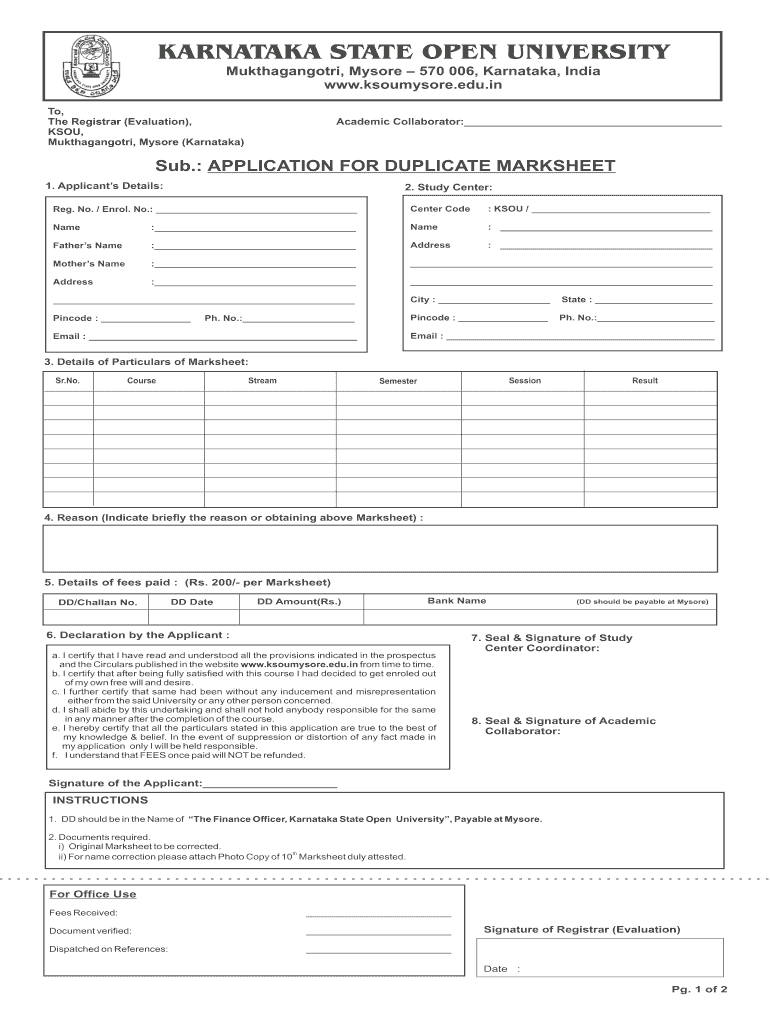
- Begin by filling in your personal details in the 'Applicant’s Details' section. Include your Registration Number, Name, Father’s Name, and contact information.
- In the 'Study Center' field, enter your center code and name. Ensure accuracy as this information is crucial for processing your application.
- Complete the 'Details of Particulars of Marksheet' section by listing your course, stream, session, semester, and result.
- Provide a brief reason for obtaining the duplicate marksheet in the designated area.
- Fill out the 'Details of fees paid' section with your payment information including DD/Challan number and bank details.
- Review and sign the declaration by confirming that all provided information is accurate and complete.
- Finally, save your completed form and export it for submission using our platform's features.
Start editing your ksou marks card download today for free on our platform!
It's free
See more ksou marks card download versions
| Versions | Form popularity | Fillable & printable |
|---|---|---|
| 2013 | 4 Satisfied (55 Votes) |
Got questions?
Can I draw my eSignature to sign my ksou duplicate marksheet?
Sure, electronically drawing your signature is appropriate, but only if you utilize a tool that complies with industry regulations and policies. Consider DocHub, which ensures eSignature validity under ESIGN and UETA requirements. All you need to approve your ksou duplicate marksheet electronically is an account with DocHub and an internet connection. After you open your file in our editor, click Sign and select the Draw option.
Can I sign my ksou marksheet download while I edit it?
If you edit your ksou marksheet download with DocHub, you simply will not need to look for other applications or services to sign it. An electronic signature is a component of DocHub’s comprehensive editing toolset, which allows you to implement changes in your form without switching between platforms. Simply complete your form, double-check the correctness of the information and place your electronic signature at the end to make it submission-ready within minutes.
Security and compliance
At DocHub, your data security is our priority. We follow HIPAA, SOC2, GDPR, and other standards, so you can work on your documents with confidence.
Learn more




