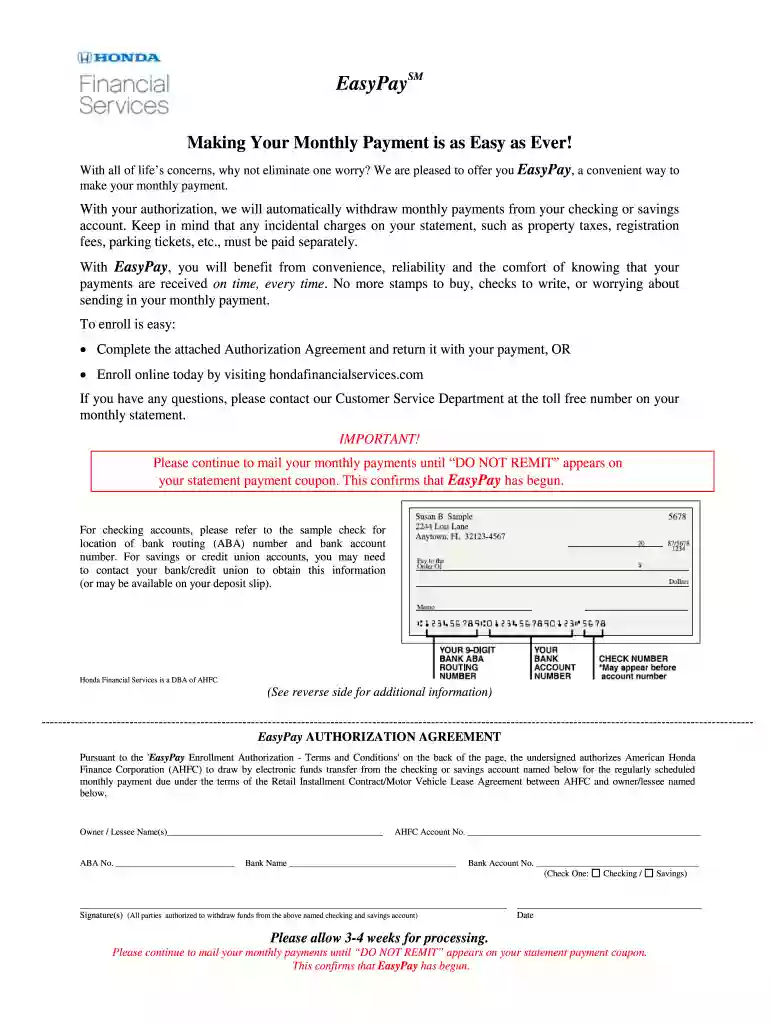
EasyPay Enrollment form - Honda Financial Services 2026

Get Form
honda financial services login Preview on Page 1

Here's how it works

01. Edit your honda financial services login online
Type text, add images, blackout confidential details, add comments, highlights and more.

02. Sign it in a few clicks
Draw your signature, type it, upload its image, or use your mobile device as a signature pad.

03. Share your form with others
Send honda financial bill pay login via email, link, or fax. You can also download it, export it or print it out.

How to use or fill out EasyPay Enrollment form - Honda Financial Services with our platform

Form edit decoration
9.5
Ease of Setup
DocHub User Ratings on G2
9.0
Ease of Use
DocHub User Ratings on G2
  1. Click ‘Get Form’ to open the EasyPay Enrollment form in the editor.
  2. Begin by entering your name(s) in the 'Owner / Lessee Name(s)' field. Ensure that all parties authorized to withdraw funds are included.
  3. Locate your bank routing (ABA) number and account number from your check or deposit slip, and fill them in the respective fields.
  4. Select whether you are using a checking or savings account by checking the appropriate box.
  5. Provide your signature(s) in the designated area, confirming authorization for electronic funds transfer.
  6. Finally, review all entered information for accuracy before submitting the form. Remember to continue mailing payments until you see 'DO NOT REMIT' on your statement.

Start filling out your EasyPay Enrollment form today for free and enjoy hassle-free payments!

See more EasyPay Enrollment form - Honda Financial Services versions

We've got more versions of the EasyPay Enrollment form - Honda Financial Services form. Select the right EasyPay Enrollment form - Honda Financial Services version from the list and start editing it straight away!
Versions Form popularity Fillable & printable
2020 4.9 Satisfied (22 Votes)
2019 4.3 Satisfied (135 Votes)
2016 4.3 Satisfied (224 Votes)
2015 4 Satisfied (33 Votes)
be ready to get more

Complete this form in 5 minutes or less

Get form

Got questions?

We have answers to the most popular questions from our customers. If you can't find an answer to your question, please contact us.
Contact us
EasyPay is our NO-FEE option for automatic payments. With EasyPay, policyholders never have to worry about missing a payment. When enrolling, policyholders can choose what bank account they want to make payments from and their preferred date (the 1st or 15th of the month).
Now your automatic payments will draft on the same day each month - thats EasyPay! See our video on Payoff or Purchase if you want to pay off or own your product outright.
easy! Select the product you want to enroll in EasyPay (monthly automatic payments) using the carousel at the top of the dashboard. Then, simply click Enroll in EasyPay, which takes you to the Make a Payment page. Enroll in EasyPay is pre-selected as the Payment Type.
EasyPay automatically transfers funds from your checking or savings account each month to make your monthly payment.
Set up a bill pay payment through your online banking institution. Make a payment by using ACI Pay at 1-800-366-8500 (ACI Pay assesses a processing fee) or visit a Western Union Quick Collect location. Make a same-day payment at a MoneyGram location (MoneyGram charges a fee).

Security and compliance

At DocHub, your data security is our priority. We follow HIPAA, SOC2, GDPR, and other standards, so you can work on your documents with confidence.

Learn more
ccpa2
pci-dss
gdpr-compliance
hipaa
soc-compliance
be ready to get more

Complete this form in 5 minutes or less

Get form