telus dome whitby Preview on Page 1

Whitby iroquois soccer 2026

Here's how it works

  • 01. Edit your telus dome whitby online

    Type text, add images, blackout confidential details, add comments, highlights and more.

  • 02. Sign it in a few clicks

    Draw your signature, type it, upload its image, or use your mobile device as a signature pad.

  • 03. Share your form with others

    Send whitby dome collapse via email, link, or fax. You can also download it, export it or print it out.

How to use or fill out whitby iroquois soccer with our platform

Form edit decoration
9.5
Ease of Setup
DocHub User Ratings on G2
9.0
Ease of Use
DocHub User Ratings on G2
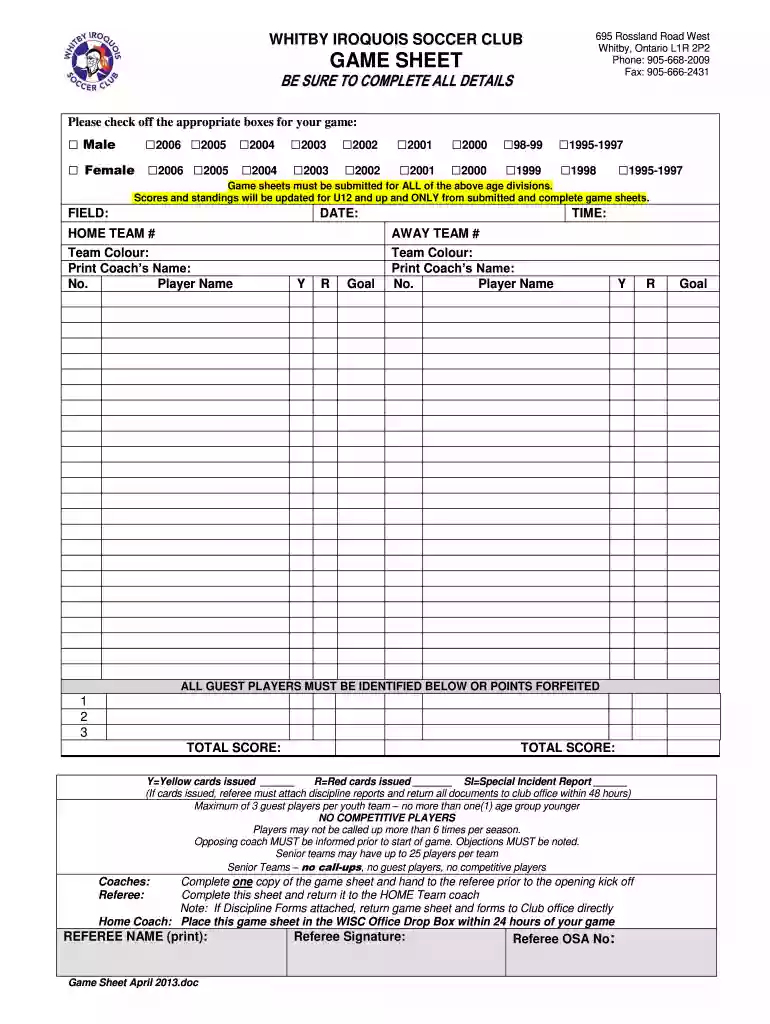
  1. Click ‘Get Form’ to open the whitby iroquois soccer game sheet in the editor.
  2. Begin by filling in the 'FIELD' and 'DATE' sections at the top of the form. This information is crucial for identifying when and where the game took place.
  3. Select the appropriate gender and age division by checking off the corresponding boxes. Ensure that you complete this for both male and female categories as required.
  4. Fill in details for both home and away teams, including team colors, coach's names, and player names. Make sure to indicate any yellow or red cards issued during the game.
  5. Identify any guest players by listing their names below the main player list. Remember, a maximum of three guest players is allowed per youth team.
  6. Complete the total score section at the bottom of the form, ensuring all scores are accurately recorded before submission.
  7. Once completed, hand one copy of the game sheet to the referee before kickoff and return another copy to your home team coach within 24 hours.

Start using our platform today to streamline your document editing experience for free!

See more telus dome whitby versions

We've got more versions of the telus dome whitby form. Select the right telus dome whitby version from the list and start editing it straight away!

VersionsForm popularityFillable & printable
20134.8 Satisfied (150 Votes)
20104 Satisfied (48 Votes)

be ready to get more

Complete this form in 5 minutes or less

Got questions?

We have answers to the most popular questions from our customers. If you can't find an answer to your question, please contact us.

Yes, and it’s really easy! DocHub is a web-based PDF editor with advanced document processing features that allow you promptly modify your documents, fill out empty fields and drop new ones for other people to fill out, and create eSignatures in several ways. Import your whitby soccer, give information as requested, and choose how you want to eSign your template - by typing your name, drawing your signature, uploading its picture, or utilizing a QR code.

If you use Chrome, there are two easy ways to modify your whitby soccer dome online. First, go to the DocHub website, add your document, and modify it using our toolbar. You can also set up our Chrome extension and modify any document by dragging and dropping it in your web browser tab.

Security and compliance

At DocHub, your data security is our priority. We follow HIPAA, SOC2, GDPR, and other standards, so you can work on your documents with confidence.

whitby telus dome

University Archives: Index to Photographs of Groups

This page is an alphabet of group names (eg, athletic teams, classes (Sophmore, Junior, Senior), fraternities and sororities, and other groups andRead more

Learn more
If you believe that this page should be taken down, please follow our DMCA take down process here