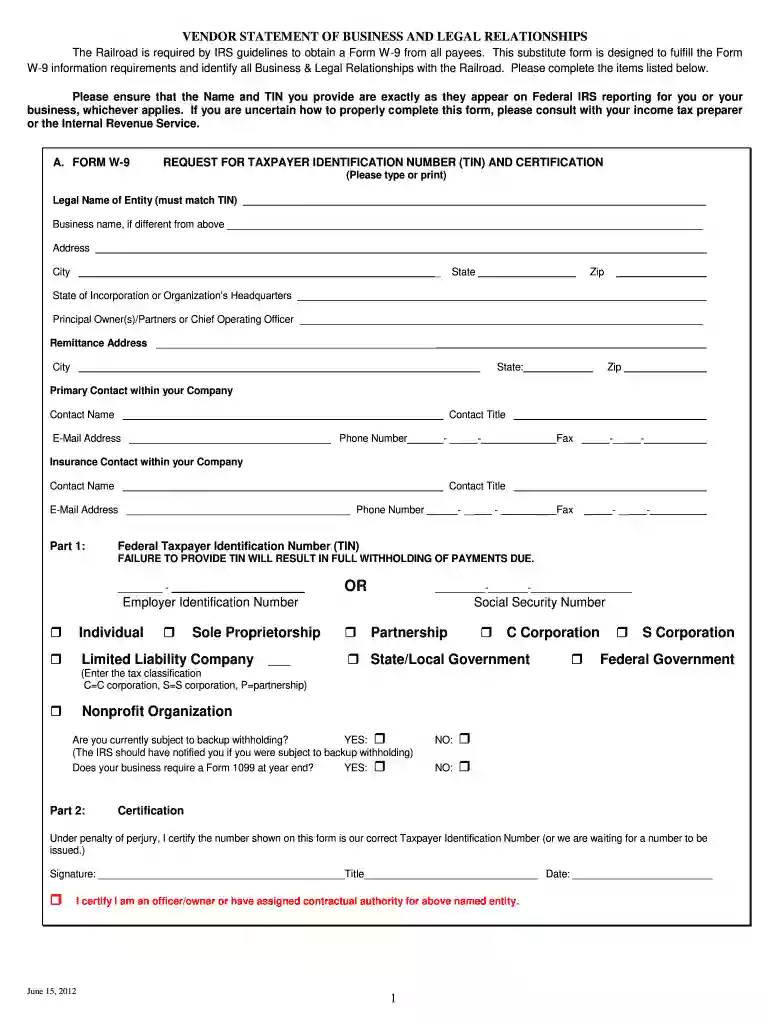
vendor statement business Preview on Page 1

Statement business legal 2026

Here's how it works

  • 01. Edit your vendor statement business online

    Type text, add images, blackout confidential details, add comments, highlights and more.

  • 02. Sign it in a few clicks

    Draw your signature, type it, upload its image, or use your mobile device as a signature pad.

  • 03. Share your form with others

    Send it via email, link, or fax. You can also download it, export it or print it out.

How to use or fill out statement business legal with our platform

Form edit decoration
9.5
Ease of Setup
DocHub User Ratings on G2
9.0
Ease of Use
DocHub User Ratings on G2
  1. Click ‘Get Form’ to open the statement business legal in the editor.
  2. Begin by entering your Legal Name of Entity and Business Name, ensuring they match IRS records. Fill in your address details accurately.
  3. Provide the Principal Owner(s)/Partners information along with the Remittance Address. Ensure all contact details are current for effective communication.
  4. In Part 1, enter your Federal Taxpayer Identification Number (TIN) and select your business type. Be mindful that failure to provide a TIN may result in withholding payments.
  5. Complete the Certification section by signing and dating the form, confirming that you have authority over the entity listed.
  6. Fill out Company Financial Information, including estimated annual sales and Dun & Bradstreet credit rating, if applicable.
  7. Answer questions regarding Business and Legal Relationships honestly to ensure compliance with IRS guidelines.

Start using our platform today for free to streamline your document editing and completion process!

See more vendor statement business versions

We've got more versions of the vendor statement business form. Select the right vendor statement business version from the list and start editing it straight away!

VersionsForm popularityFillable & printable
20124.8 Satisfied (143 Votes)

be ready to get more

Complete this form in 5 minutes or less

Security and compliance

At DocHub, your data security is our priority. We follow HIPAA, SOC2, GDPR, and other standards, so you can work on your documents with confidence.

Related links

Legal Grinding (Guide)

Nov 7, 2025 If you are parked in this location, subsequent visits to Arbor and failing to labour will yield 7 Statements per a 3-action visit, or 2.33 perRead more

Learn more
45 CFR 2554.4 - What is a statement? - Cornell Law School

A statement means any written representation, certification, affirmation, document, record, or accounting or bookkeeping entry made with respect to a claim.Read more

Learn more
Set Up Your Business in California

A fictitious business name statement (known as Doing Business As or DBA) must be registered with the city and/or county clerk in the county of the registrantsRead more

Learn more
If you believe that this page should be taken down, please follow our DMCA take down process here