Absentee Bid Form - GreenBid Auctions 2026

Get Form
bid form sample Preview on Page 1

Here's how it works

01. Edit your bid form sample online
Type text, add images, blackout confidential details, add comments, highlights and more.

02. Sign it in a few clicks
Draw your signature, type it, upload its image, or use your mobile device as a signature pad.

03. Share your form with others
Send greenbid via email, link, or fax. You can also download it, export it or print it out.

How to use or fill out Absentee Bid Form - GreenBid Auctions with our platform

Form edit decoration
9.5
Ease of Setup
DocHub User Ratings on G2
9.0
Ease of Use
DocHub User Ratings on G2
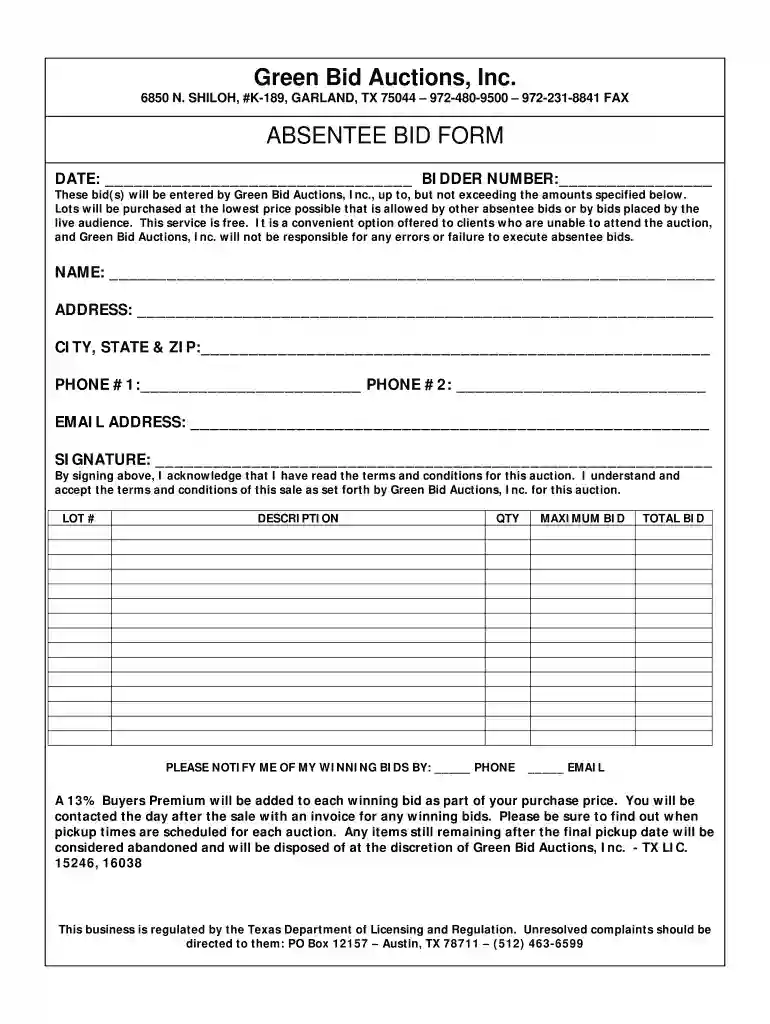
  1. Click ‘Get Form’ to open the Absentee Bid Form in the editor.
  2. Begin by entering the date at the top of the form. This helps track your bid submission.
  3. Fill in your bidder number, which is essential for identifying your bids during the auction.
  4. Provide your personal information: name, address, city, state, zip code, and contact numbers. Accurate details ensure smooth communication.
  5. Enter your email address for notifications regarding winning bids. Choose how you prefer to be notified—by phone or email.
  6. List each lot number you wish to bid on along with a description and quantity. Specify your maximum bid for each item.
  7. Sign the form to acknowledge that you have read and accepted the terms and conditions of the auction.

Start filling out your Absentee Bid Form today for free using our platform!

See more Absentee Bid Form - GreenBid Auctions versions

We've got more versions of the Absentee Bid Form - GreenBid Auctions form. Select the right Absentee Bid Form - GreenBid Auctions version from the list and start editing it straight away!
Versions Form popularity Fillable & printable
2007 4 Satisfied (45 Votes)
be ready to get more

Complete this form in 5 minutes or less

Get form

Got questions?

We have answers to the most popular questions from our customers. If you can't find an answer to your question, please contact us.
Contact us
There are two types of bidding in procurement: open or competitive bidding, and closed (sealed) or noncompetitive bidding. Competitive bidding takes place usually through the RFx process, which is detailed below. In contrast, some companies will also use noncompetitive bidding.
An Autobid is an absentee bid/commission bid that is executed in real time by our system. Autobids allows our system to bid on your behalf up to the maximum bid you have left. All live auctions allow you to leave Autobids on lots. Each lot page will have a box for you to input your maximum bid and save it.
What is Absentee Bidding? Absentee bidding means you can still take part in the auction even if you cant be there. You let us know the highest amount youre willing to pay, and one of our staff members will place bids for you at the live auctionjust like you were standing in the crowd.
The 3 Minute Rule is an important auction mechanism designed to maintain fairness in auction bidding. When a bid is placed within the final three minutes of an auction, the closing time automatically extends by an additional three minutes.
An absentee bid is sometimes called a proxy bid. It is a convenient option for someone who is not available to bid in person or online on auction day. When you place a proxy bid, the auctioneer will bid on your behalf, up to and including the amount you specify as if you were present at the auction.

Security and compliance

At DocHub, your data security is our priority. We follow HIPAA, SOC2, GDPR, and other standards, so you can work on your documents with confidence.

Learn more
ccpa2
pci-dss
gdpr-compliance
hipaa
soc-compliance

People also ask

An absentee bid, also known as a commission bid, is the maximum bid amount you want entered into the auctioneers book. The auctioneer will then bid on your behalf when the lot comes up during an auction.

Related links